Limited-Time Offer: Enjoy 50% Savings! Ends in 00h 00m 00s Coupon code: 50OFF
Skip to content

Free Microsoft Administering Microsoft Azure SQL Solutions DP-300 Exam Questions

Page: 1 / 29 Total 422 questions

Want more questions? Get Premium Access.

Question 1

You have an Azure subscription.

You need to deploy an Azure SQL database. The solution must meet the following requirements:

* Dynamically scale CPU resources.

* Ensure that the database can be paused to reduce costs.

What should you use?

Correct Answer: B. the serverless compute tier

Question 2

You are building a database backup solution for a SQL Server database hosted on an Azure virtual machine.

In the event of an Azure regional outage, you need to be able to restore the database backups. The solution must minimize costs.

Which type of storage accounts should you use for the backups?

Correct Answer: B. read-access geo-redundant storage (RA-GRS)
Explanation:

Geo-redundant storage (with GRS or GZRS) replicates your data to another physical location in the secondary region to protect against regional outages. However, that data is available to be read only if the customer or Microsoft initiates a failover from the primary to secondary region. When you enable read access to the secondary region, your data is available to be read if the primary region becomes unavailable. For read access to the secondary region, enable read-access geo-redundant storage (RA-GRS) or read-access geo-zone-redundant storage (RA-GZRS).

Incorrect Answers:

A: Locally redundant storage (LRS) copies your data synchronously three times within a single physical location in the primary region. LRS is the least expensive replication option, but is not recommended for applications requiring high availability.

C: Zone-redundant storage (ZRS) copies your data synchronously across three Azure availability zones in the primary region.

D: Geo-redundant storage (with GRS or GZRS) replicates your data to another physical location in the secondary region to protect against regional outages. However, that data is available to be read only if the customer or Microsoft initiates a failover from the primary to secondary region.


https://docs.microsoft.com/en-us/azure/storage/common/storage-redundancy

Question 3

You have an Azure subscription that contains a SQL Server on Azure Virtual Machines instance named SQLVMI. SQLVMI hosts a database named OBI.

You need to retrieve query plans from the Query Store on DBI.

What should you do first?

Correct Answer: B. From Microsoft SQL Server Management Studio, modify the properties of the SQL Server instance.
Explanation:

To retrieve query plans from the Query Store on a database in SQL Server on Azure Virtual Machines, you should connect to the instance using SQL Server Management Studio as the first action.

This is necessary because:

  • Query Store data can be accessed through SQL Server Management Studio's Object Explorer
  • You need to establish a connection to the SQLVM1 instance before you can view Query Store reports
  • SSMS provides the most direct interface to view query plans, performance metrics, and Query Store data

After connecting, you can navigate to Databases > DBI > Query Store to view and analyze query plans and performance data.

Question 4

SIMULATION

Task 5

You need to configure a disaster recovery solution for db1. When a failover occurs, the connection strings to the database must remain the same. The secondary server must be in the West US 3 Azure region.

Correct Answer: A. See the explanation part for the complete Solution
Explanation:

To configure a disaster recovery solution for db1, you can use the failover groups feature of Azure SQL Database.Failover groups allow you to manage the replication and failover of a group of databases across different regions with the same connection strings1.You can also use active geo-replication as an alternative, but you will need to update the connection strings manually after a failover2.

Here are the steps to create a failover group for db1 with the secondary server in the West US 3 region:

Using the Azure portal:

Go to the Azure portal and select your Azure SQL Database server that hosts db1.

SelectFailover groupsin the left menu and click onAdd group.

Enter a name for the failover group and selectWest US 3as the secondary region.

Click onCreate a new serverand enter the details for the secondary server, such as server name, admin login, password, and subscription.

Click onSelect existing database(s)and choose db1 from the list of databases on the primary server.

Click onConfigure failover policyand select the failover mode, grace period, and read-write failover endpoint mode according to your preferences.

Click onCreateto create the failover group and start the replication of db1 to the secondary server.

Using PowerShell commands:

Install the Azure PowerShell module and log in with your Azure account.

Run the following command to create a new server in the West US 3 region:New-AzSqlServer -ResourceGroupName <your-resource-group-name> -ServerName <your-secondary-server-name> -Location 'West US 3' -SqlAdministratorCredentials $(New-Object -TypeName System.Management.Automation.PSCredential -ArgumentList '<your-admin-login>', $(ConvertTo-SecureString -String '<your-password>' -AsPlainText -Force))

Run the following command to create a new failover group with db1:New-AzSqlDatabaseFailoverGroup -ResourceGroupName <your-resource-group-name> -ServerName <your-primary-server-name> -PartnerResourceGroupName <your-resource-group-name> -PartnerServerName <your-secondary-server-name> -FailoverGroupName <your-failover-group-name> -Database db1 -FailoverPolicy Manual -GracePeriodWithDataLossHours 1 -ReadWriteFailoverEndpoint 'Enabled'

You can modify the parameters of the command according to your preferences, such as the failover policy, grace period, and read-write failover endpoint mode.

These are the steps to create a failover group for db1 with the secondary server in the West US 3 region.


Question 5

You have An Azure SQL managed instance.

You need to configure the SQL Server Agent service to email job notifications.

Which statement should you execute?

A)

B)

C)

Correct Answer: B. Option B

Question 6

SIMULATION

Task 9

You need to generate an email alert to admin@contoso.com when CPU percentage utilization for db1 is higher than average.

Correct Answer: A. See the explanation part for the complete Solution
Explanation:

To generate an email alert to admin@contoso.com when CPU percentage utilization for db1 is higher than average, you can use the Azure portal to create an alert rule based on the CPU percentage metric. Here are the steps to do that:

Go to the Azure portal and select your Azure SQL Database server that hosts db1.

SelectAlertsin the Monitoring section and click onNew alert rule.

In the Condition section, clickAddand select theCPU percentagemetric.

In the Configure signal logic page, set the threshold type toDynamic.This will compare the current metric value to the historical average and trigger the alert when it deviates significantly1.

Set the operator toGreater than, the aggregation type toAverage, the aggregation granularity to1 minute, and the frequency of evaluation to5 minutes.

ClickDoneto save the condition.

In the Action group section, clickCreateand enter a name and a short name for the action group.

In the Notifications section, clickAddand selectEmail/SMS message/Push/Voice.

Enteradmin@contoso.comin the Email field and clickOK.

ClickOKto save the action group.

In the Alert rule details section, enter a name and a description for the alert rule, choose a severity level, and make sure the rule is enabled.

ClickCreate alert ruleto create the alert rule.

This alert rule will send an email to admin@contoso.com when the CPU percentage utilization for db1 is higher than average.You can also add other actions to the alert rule, such as calling a webhook or running an automation script


Question 7

Note: This question is part of a series of questions that present the same scenario. Each question in the series contains a unique solution that might meet the stated goals. Some question sets might have more than one correct solution, while others might not have a correct solution.

After you answer a question in this section, you will NOT be able to return to it. As a result, these questions will not appear in the review screen.

You have SQL Server 2019 on an Azure virtual machine.

You are troubleshooting performance issues for a query in a SQL Server instance.

To gather more information, you query sys.dm_exec_requests and discover that the wait type is PAGELATCH_UP and the wait_resource is 2:3:905856.

You need to improve system performance.

Solution: You reduce the use of table variables and temporary tables.

Does this meet the goal?

Correct Answer: A. Yes
Explanation:

https://docs.microsoft.com/en-US/troubleshoot/sql/performance/recommendations-reduce-allocation-contention

Question 8

You have an Azure subscription.

You need to deploy an Azure SQL database by using a BACPAC file. Which command should you run?

Correct Answer: A. az sql db import
Explanation:

To deploy an Azure SQL database using a BACPAC file, you should run the sqlpackage.exe import command. The sqlpackage utility is Microsoft's command-line tool for importing and exporting BACPAC files. The import operation reads the BACPAC file and creates or updates the target Azure SQL database with the schema and data contained in the BACPAC file.

Question 9

You have an Azure virtual machine based on a custom image named VM1.

VM1 hosts an instance of Microsoft SQL Server 2019 Standard.

You need to automate the maintenance of VM1 to meet the following requirements:

Automate the patching of SQL Server and Windows Server.

Automate full database backups and transaction log backups of the databases on VM1.

Minimize administrative effort.

What should you do first?

Correct Answer: D. Register VM1 to the Microsoft.SqlVirtualMachine resource provider
Explanation:

Automated Patching depends on the SQL Server infrastructure as a service (IaaS) Agent Extension. The SQL

Server IaaS Agent Extension (SqlIaasExtension) runs on Azure virtual machines to automate administration tasks. The SQL Server IaaS extension is installed when you register your SQL Server VM with the SQL Server VM resource provider.


https://docs.microsoft.com/en-us/azure/azure-sql/virtual-machines/windows/sql-server-iaas-agent-extensionautomate-management

Question 10

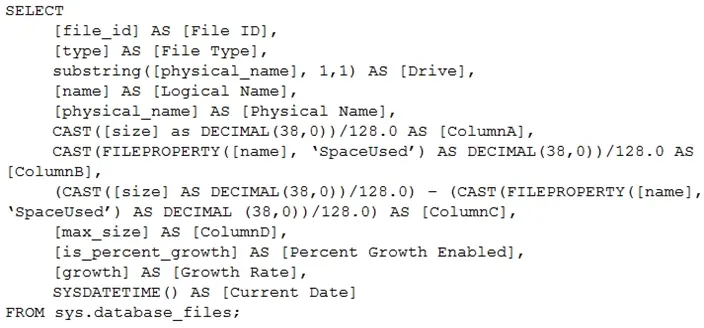
You have the following Transact-SQL query.

Which column returned by the query represents the free space in each file?

Correct Answer: C. ColumnC
Explanation:

Example:

Free space for the file in the below query result set will be returned by the FreeSpaceMB column.

SELECT DB_NAME() AS DbName,

name AS FileName,

type_desc,

size/128.0 AS CurrentSizeMB,

size/128.0 - CAST(FILEPROPERTY(name, 'SpaceUsed') AS INT)/128.0 AS FreeSpaceMB

FROM sys.database_files

WHERE type IN (0,1);


https://www.sqlshack.com/how-to-determine-free-space-and-file-size-for-sql-server-databases/

Question 11

Note: This question is part of a series of questions that present the same scenario. Each question in the series contains a unique solution that might meet the stated goals. Some question sets might have more than one correct solution, while others might not have a correct solution.

After you answer a question in this section, you will NOT be able to return to it. As a result, these questions will not appear in the review screen.

You have an Azure Synapse Analytics dedicated SQL pool that contains a table named Table1.

You have files that are ingested and loaded into an Azure Data Lake Storage Gen2 container named container1.

You plan to insert data from the files into Table1 and transform the data. Each row of data in the files will produce one row in the serving layer of Table1.

You need to ensure that when the source data files are loaded to container1, the DateTime is stored as an additional column in Table1.

Solution: You use an Azure Synapse Analytics serverless SQL pool to create an external table that has an additional DateTime column.

Does this meet the goal?

Correct Answer: A. Yes
Explanation:

In dedicated SQL pools you can only use Parquet native external tables. Native external tables are generally available in serverless SQL pools.


https://docs.microsoft.com/en-us/azure/synapse-analytics/sql/create-use-external-tables

Question 12

SIMULATION

Task 9

You need to ensure that when non-administrative users query the SalesLT.Customer table in db1, email addresses are obscured. For example, an email address of alice@contoso.com must appear as aXXX@XXXX.com.

You may need to use SQL Server Management Studio and the Azure portal.

Correct Answer: A. See the explanation part for the complete Solution
Explanation:

Configure Dynamic Data Masking on the email column in:

SalesLT.Customer

The column is normally:

EmailAddress

Use the built-in masking function:

email()

Microsoft documents that Dynamic Data Masking hides sensitive data in query results for nonprivileged users without changing the stored data. The built-in email() masking function exposes the first letter and returns the masked format aXXX@XXXX.com, which exactly matches the requirement.

Method 1 --- SSMS / T-SQL Method

This is the fastest and most reliable method.

Step 1: Connect to db1

Open SQL Server Management Studio.

Connect to the Azure SQL logical server that hosts db1.

Open a query window against database:

db1

Step 2: Apply the email mask

Run:

ALTER TABLE [SalesLT].[Customer]

ALTER COLUMN [EmailAddress]

ADD MASKED WITH (FUNCTION = 'email()');

This adds a Dynamic Data Masking rule to the EmailAddress column. The actual email address remains stored in the table, but users without permission to view unmasked data will see the masked value. Microsoft's documented syntax for adding an email mask is ALTER COLUMN Email ADD MASKED WITH (FUNCTION = 'email()').

Step 3: Verify that the column is masked

Run:

SELECT

OBJECT_SCHEMA_NAME(mc.object_id) AS schema_name,

OBJECT_NAME(mc.object_id) AS table_name,

c.name AS column_name,

mc.masking_function

FROM sys.masked_columns AS mc

JOIN sys.columns AS c

ON mc.object_id = c.object_id

AND mc.column_id = c.column_id

WHERE OBJECT_SCHEMA_NAME(mc.object_id) = 'SalesLT'

AND OBJECT_NAME(mc.object_id) = 'Customer'

AND c.name = 'EmailAddress';

Expected result:

schema_name SalesLT

table_name Customer

column_name EmailAddress

masking_function email()

Step 4: Test as a non-administrative user

If you have a test user, run:

EXECUTE AS USER = 'TestUser';

SELECT TOP (10)

EmailAddress

FROM SalesLT.Customer;

REVERT;

Expected output should look like:

aXXX@XXXX.com

bXXX@XXXX.com

cXXX@XXXX.com

A user with administrative privileges, db_owner, or UNMASK permission can still see the original email value. Microsoft states that users with administrative rights such as server admin, Microsoft Entra admin, and db_owner can view the original unmasked data.

Method 2 --- Azure Portal Method

Use this if the simulation expects portal configuration.

Step 1: Open db1

Sign in to the Azure portal.

Search for SQL databases.

Open database:

db1

Step 2: Open Dynamic Data Masking

From the db1 page:

Security > Dynamic Data Masking

Microsoft states that for Azure SQL Database, Dynamic Data Masking can be configured in the Azure portal from the SQL database configuration pane under Security > Dynamic Data Masking.

Step 3: Add a masking rule

Add a mask for the email column:

Setting

Value

Schema

SalesLT

Table

Customer

Column

EmailAddress

Masking field format

Email

Masking function

email()

Then select:

Save

The portal may show the mask type simply as:

Email

That is the correct option because it maps to the email() masking function.

Important Permission Check

Dynamic Data Masking only affects users who do not have permission to view unmasked data.

If a non-administrative user was previously granted UNMASK, remove it:

REVOKE UNMASK TO [UserName];

Or, if a role was granted UNMASK, revoke it from the role:

REVOKE UNMASK TO [RoleName];

Do not grant UNMASK to normal users. UNMASK allows users to bypass masking and see the original values. Microsoft documents that UNMASK permission controls whether users can view masked or original data.

Final Exam-Lab Action

Run this against db1:

ALTER TABLE [SalesLT].[Customer]

ALTER COLUMN [EmailAddress]

ADD MASKED WITH (FUNCTION = 'email()');

Then verify:

SELECT

OBJECT_SCHEMA_NAME(object_id) AS schema_name,

OBJECT_NAME(object_id) AS table_name,

name AS column_name,

masking_function

FROM sys.masked_columns

WHERE OBJECT_SCHEMA_NAME(object_id) = 'SalesLT'

AND OBJECT_NAME(object_id) = 'Customer'

AND name = 'EmailAddress';

The task is complete when non-administrative users querying SalesLT.Customer.EmailAddress see masked email values such as:

aXXX@XXXX.com


Question 13

You have SQL Server on Azure virtual machines in an availability group.

You have a database named DB1 that is NOT in the availability group.

You create a full database backup of DB1.

You need to add DB1 to the availability group.

Which restore option should you use on the secondary replica?

Correct Answer: B. Restore with Norecovery
Explanation:

Prepare a secondary database for an Always On availability group requires two steps:

1. Restore a recent database backup of the primary database and subsequent log backups onto each server

instance that hosts the secondary replica, using RESTORE WITH NORECOVERY

2. Join the restored database to the availability group.


https://docs.microsoft.com/en-us/sql/database-engine/availability-groups/windows/manually-prepare-asecondary-

database-for-an-availability-group-sql-server

Question 14

You are designing a security model for an Azure Synapse Analytics dedicated SQL pool that will support multiple companies.

You need to ensure that users from each company can view only the data of their respective company.

Which two objects should you include in the solution? Each correct answer presents part of the solution.

NOTE: Each correct selection is worth one point.

Correct Answer: D. a custom role-based access control (RBAC) role; E. a security policy
Explanation:

Azure RBAC is used to manage who can create, update, or delete the Synapse workspace and its SQL pools, Apache Spark pools, and Integration runtimes.

Define and implement network security configurations for resources related to your dedicated SQL pool with Azure Policy.


https://docs.microsoft.com/en-us/azure/synapse-analytics/security/synapse-workspace-synapse-rbac

https://docs.microsoft.com/en-us/security/benchmark/azure/baselines/synapse-analytics-security-baseline

Question 15

You have an Azure SQL Database elastic pool that contains 10 databases.

You receive the following alert.

Msg 1132, Level 16, State 1, Line 1

The elastic pool has reached its storage limit. The storage used for the elastic pool cannot exceed (76800) MBs.

You need to resolve the alert. The solution must minimize administrative effort.

Which three actions can you perform? Each correct answer presents a complete solution.

NOTE: Each correct selection is worth one point.

Correct Answer: B. Remove a database from the pool.; C. Increase the maximum storage of the elastic pool.; D. Shrink individual databases.