Limited-Time Offer: Enjoy 50% Savings! Ends in 00h 00m 00s Coupon code: 50OFF
Skip to content

Free Microsoft Dynamics 365 Business Central Developer MB-820 Exam Questions

Page: 1 / 13 Total 122 questions

Want more questions? Get Premium Access.

Question 1

You need to determine why the debugger does not start correctly.

What is the cause of the problem?

Correct Answer: A. The 'userld' parameter must have the GUID of the user specified, not the username.
Explanation:

In Microsoft Dynamics 365 Business Central, when configuring snapshot debugging, it is crucial that the parameters in the configuration file are correctly set. From the options provided, the issue with the debugger not starting correctly is most likely due to an incorrect 'userId' parameter.

Option A is the cause of the problem. The 'userId' parameter must be the GUID of the user, not the username. The snapshot debugger needs the exact GUID to attach to the right session for debugging.

Option B is incorrect because 'breakOnNext' set to 'WebClient' is a valid setting. This tells the debugger to break on the next client action in the web client, which is a typical scenario.

Option C is not the cause of the problem. The 'userId' parameter is meant to specify which user session to debug, and this works in conjunction with the 'breakOnNext' parameter.

Option D is incorrect as the 'executionContext' parameter does not need to be set to 'Debug' for snapshot debugging to work. 'DebugAndProfile' is a valid value for the 'executionContext' parameter, as it allows for debugging and collecting performance information.

Therefore, the reason why the debugger does not start correctly is due to Option A: The 'userId' parameter must have the GUID of the user specified, not the username.
Question 2

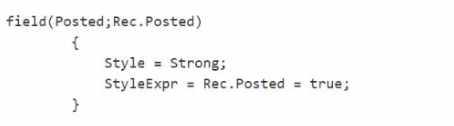
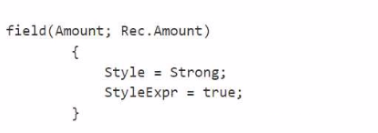
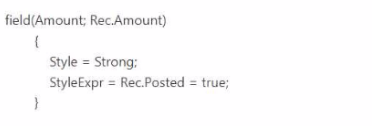
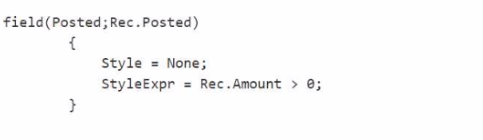
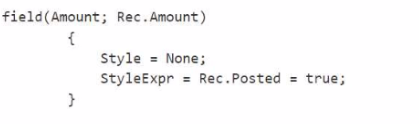
You need to edit the code to meet the formatting requirements on the Subcontract Document List for the control department.

Which formatting should you use?

A.

B.

C.

D.

E.

Correct Answer: C. Option C

Question 3

You need to access the RoomsAPI API from the canvas app.

What should you do?

Correct Answer: C. Open the Web Services page and publish the RoomsAPI page as a web service.

Question 4

You are developing an app that will be published to Microsoft AppSource.

The app requires code analyzers to enforce some rules. You plan to add the analyzers to the settings.json file.

You need to activate the analyzers for the project.

Which three code analyzers should you activate to develop the app for AppSource? Each correct answer presents part of the solution

NOTE: Each correct selection is worth one point.

Correct Answer: A. CodeCop; B. UlCop; E. AppSourceCop

Question 5

You are developing an app.

You plan to publish the app to Microsoft AppSource.

You need to assign an object range for the app.

Which object range should you use?

Correct Answer: D. an object range within the range of 7000000 to 74999999 that is requested from Microsoft
Explanation:

When developing an app for Microsoft AppSource, it is essential to use an object range that is specifically designated by Microsoft to avoid conflicts with other apps and the base application. The correct object range to use is:

An object range within the range of 70000000 to 74999999 that is requested from Microsoft (D): This range is reserved for AppSource apps. Developers need to request this range from Microsoft to ensure that the objects used in their extension do not conflict with those used by other extensions or by the base application. Using this reserved range helps maintain the integrity and compatibility of extensions published on AppSource.

It's important to note that the other ranges mentioned (A, B, C, and E) are not suitable for apps intended for AppSource. Ranges 50000 to 59999 and 50000 to 99999 are typically reserved for per-tenant customizations or partner solutions, not for distribution on AppSource. The standard range 1 to 49999 is reserved for the base application objects, and using an object range divided by countries (C) is not a standard practice for AppSource apps.


Question 6

You are exporting data from Business Central.

You must export the data in a non-fixed length and width in CSV format.

You need to generate an XMLport to export the data in the required format

Which Format property value should you use?

Correct Answer: B. VariableText
Explanation:

When exporting data from Business Central and the requirement is for the data to be in a non-fixed length and width CSV format, the Format property of the XMLport should be set to VariableText (B). The VariableText format is designed for handling data exports where the fields are separated by a delimiter, such as a comma or tab, which is typical of CSV (Comma-Separated Values) files. This format allows for the flexibility needed when dealing with varying field lengths, as it does not enforce a fixed width for each field, making it ideal for CSV data exports. Setting the Format property to FixedText (C) would enforce a fixed width for each field, which is not suitable for CSV files, while the XML format (A) is used for exporting data in an XML structure, which is different from the CSV format requirements.


Question 7

You are creating an entitlement object in Business Central to enable transactability for AppSource apps.

You must map the entitlement object to a plan in Partner Center.

You need to select the value of the Type property to use in the entitlement object.

Which value should you use?

Correct Answer: A. PerUserServicePlan
Explanation:

In Business Central, when creating an entitlement object to enable transactability for AppSource apps and mapping it to a plan in Partner Center, the Type property of the entitlement object should be set to PerUserServicePlan (A). The PerUserServicePlan type is used to define an entitlement that is based on a service plan, which is typically how transactability features are managed for apps distributed through AppSource. This type of entitlement allows for the mapping of specific features or capabilities of the app to a service plan in Partner Center, enabling granular control over what users are entitled to use based on their subscription. The other values, such as Implicit (B), Unlicensed (C), and Role (D), are used in different contexts and do not apply to the scenario of mapping an entitlement object to a plan for AppSource apps.


Question 8

You have a custom app.

A warning for the rule code named AA0XYZ appears in multiple app objects.

You need to change the severity of the rule from Warning to Info for only the current app.

Which three actions should you perform? Each correct answer presents part of the solution. (Choose three.)

NOTE: Each correct selection is worth one point.

Correct Answer: C. Add the ''al.ruleSetPath'' property with a path to the ruleset.json file.; D. Open the Visual Studio Code project settings,json file.; E. Add the following ruleset object to the ruleset,json file: { ''id'': ''AA0XYZ'', ''action'': ''Info'' } To the ''rules'' array.

Question 9

A company plans to optimize its permission sets.

The company has the following permission sets:

You need to provide the following implementation for a third permission set:

* Create a new Permission Set C that is a composite of Permission Set A and Permission Set B.

* Assign Permission Set C to a user.

You need to ensure that the user has only read access to the Job table.

Solution: Set the IncludedPermissionSets property to Permission Set B and the ExcludedPermissionSets property to Permission Set A.

Does the solution meet the goal?

Correct Answer: B. No

Question 10

You need to allow debugging in an extension to view the source code. In which file should you specify the value of the allowDebugging property?

Correct Answer: C. app.json
Explanation:

To enable debugging in an extension and allow the source code to be viewed, the allowDebugging property should be specified in the app.json file (C). The app.json file serves as the manifest for an AL project in Microsoft Dynamics 365 Business Central, defining the project's properties, dependencies, and features. By setting the allowDebugging property to true in this file, developers enable the debugging of the extension's source code, facilitating troubleshooting and development. This is essential for analyzing the behavior of the extension and identifying issues during the development process.