
Limited-Time Offer: Enjoy 50% Savings! Ends in 00h 00m 00s Coupon code: 50OFF
Skip to content

Free Microsoft Managing and Securing Microsoft 365 Endpoints by using Intune MD-102 Exam Questions

Page: 1 / 30 Total 440 questions

Want more questions? Get Premium Access.

Question 1

Note: This section contains one or more sets of questions with the same scenario and problem. Each question presents a unique solution to the problem. You must determine whether the solution meets the stated goals. More than one solution in the set might solve the problem. It is also possible that none of the solutions in the set solve the problem.

After you answer a question in this section, you will NOT be able to return. As a result, these questions do not appear on the Review Screen.

You have a Microsoft Entra tenant named contoso.com.

You purchase an Android device named Device1.

You need to register Device1 in contoso.com.

Solution; You use the Microsoft Authenticator app.

Does this meet the goal?

Correct Answer: B. No
Explanation:

Yes, this solution meets the goal. The Microsoft Authenticator app can be used to register an Android device in a Microsoft Entra tenant. Users can open the app, enter their work or school account credentials, and the app will guide them through the device registration process, which enrolls the device into the tenant.
Question 2

You have a Microsoft 365 E5 subscription that contains 100 iOS devices enrolled in Microsoft Intune.

You need to ensure that notifications of iOS updates are deferred for 30 days after the updates are released.

What should you create?

Correct Answer: C. an update policy for iOS/iPadOS
Explanation:

Manage iOS/iPadOS software update policies in Intune, delay visibility of software updates.

When you use update policies for iOS, you might have need to delay visibility of an iOS software update. Reasons to delay visibility include:

Prevent users from updating the OS manually

To deploy an older update while preventing users from installing a more recent one

To delay visibility, deploy a device restriction template that configures the following settings:

Defer software updates = Yes

This doesn't affect any scheduled updates. It represents days before software updates are visible to end users after release.

Delay default visibility of software updates = 1 to 90

90 days is the maximum delay that Apple supports.


Question 3

You have a Microsoft 365 tenant that uses Microsoft Intune.

You use the Company Portal app to access and install published apps to enrolled devices.

From the Microsoft Intune admin center, you add a Microsoft Store app.

Which two App information types are visible in the Company Portal?

NOTE: Each correct selection is worth one point.

Correct Answer: A. Privacy URL; B. Information URL
Explanation:

A . Privacy URL

B . Information URL

https://learn.microsoft.com/en-us/mem/intune/apps/store-apps-microsoft


Question 4

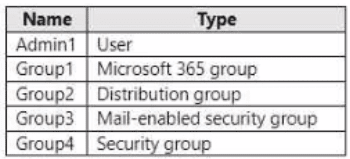
You have a Microsoft 365 tenant that contains the objects shown in the following table.

In the Microsoft Intune admin center, you are creating a Microsoft 365 Apps app named App1. To which objects can you assign App1?

Correct Answer: C. Group1, Group3, and Group4 only
Explanation:

In the Microsoft Intune admin center, you can assign apps to users or devices. Users can be assigned to apps by using user groups or individual user accounts. Devices can be assigned to apps by using device groups. In this scenario, the objects shown in the table are as follows:

Admin1 is an individual user account that belongs to theGlobal administratorsrole group.

Group1 is a user group that contains 100 users.

Group2 is a device group that contains 50 devices.

Group3 is a user group that contains 200 users.

Group4 is a device group that contains 150 devices.

Since App1 is a Microsoft 365 Apps app, it can only be assigned to users, not devices. Therefore, Group2 and Group4 are not valid objects for app assignment. Admin1 is also not a valid object for app assignment, because individual user accounts can only be used for testing purposes, not for production deployment. Therefore, the only valid objects for app assignment are Group1 and Group3, which are user groups.


Question 5

You have a Microsoft 365 E5 subscription that contains 100 iOS devices enrolled in Microsoft Intune.

You need to deploy a custom line-of-business (LOB) app to the devices by using Intune.

Which extension should you select for the app package file?

Correct Answer: C. jpa
Explanation:

iOS/iPadOS LOB apps: Select Line-of-business app as the app type, select the App package file, and then enter an iOS/iPadOS installation file with the extension .ipa.


https://docs.microsoft.com/en-us/mem/intune/apps/apps-add

Question 6

You have an Azure AD tenant and 100 Windows 10 devices that are Azure AD joined and managed by using Microsoft Intune.

You need to configure Microsoft Defender Firewall and Microsoft Defender Antivirus on the devices. The solution must minimize administrative effort.

Which two actions should you perform? Each correct answer presents part of the solution.

NOTE: Each correct selection is worth one point.

Correct Answer: C. To configure Microsoft Defender Antivirus, create a device configuration profile and configure the Endpoint protection settings.; E. To configure Microsoft Defender Firewall, create a device configuration profile and configure the Endpoint protection settings.
Explanation:

To configure Microsoft Defender Firewall and Microsoft Defender Antivirus on Azure AD joined devices that are managed by Intune, you need to create a device configuration profile and configure the Endpoint protection settings. You can use this profile to configure various settings for firewall and antivirus protection on the devices. Reference: https://docs.microsoft.com/en-us/mem/intune/protect/endpoint-protection-windows-10


Question 7

You have a Microsoft 365 subscription that uses Microsoft Intune to manage Windows devices and iOS devices.

Users report that Intune app deployments and remote device actions are delayed on both platforms.

You need to identify whether the issue relates to an active Intune service incident. The solution must minimize administrative effort.

What should you review in the Microsoft Intune admin center?

Correct Answer: C. Tenant status

Question 8

You need to meet the device management requirements for the developers.

What should you implement?

Correct Answer: B. Enterprise State Roaming
Explanation:

Litware identifies the following device management requirements:

Ensure that Microsoft Edge Favorites are accessible from all computers to which the developers sign in.

Enterprise State Roaming allows for the synchronization of Microsoft Edge browser setting, including favorites and reading list, across devices.


https://docs.microsoft.com/en-us/azure/active-directory/devices/enterprise-state-roaming-windows-settings-reference

Question 9

You have a Microsoft 365 subscription. All devices run Windows 10.

You need to prevent users from enrolling the devices in the Windows Insider Program.

What two configurations should you perform from the Microsoft Intune admin center? Each correct answer is a complete solution.

NOTE: Each correct selection is worth one point.

Correct Answer: A. a device restrictions device configuration profile; E. a Windows 10 and later update ring
Explanation:

To prevent users from enrolling Windows 10 devices in the Windows Insider Program, you can perform either of these two complete solutions: (1) Configure Device update settings in Intune specifically to disable or prevent Windows Insider Program enrollment, or (2) Deploy Group Policy settings via Intune (using Device Configuration profiles or Administrative Templates) to set the policy that prevents users from joining the Insider Program. Both approaches work independently and either configuration alone will prevent the enrollment. The Group Policy setting 'Manage preview builds' or similar Insider-related policies can be deployed through Intune to achieve this objective.

Question 10

You use Microsoft Intune and Intune Data Warehouse.

You need to create a device inventory report that includes the data stored in the data warehouse.

What should you use to create the report?

Correct Answer: D. Microsoft Power Bl
Explanation:

You can use the Power BI Compliance app to load interactive, dynamically generated reports for your Intune tenant. Additionally, you can load your tenant data in Power BI using the OData link. Intune provides connection settings to your tenant so that you can view the following sample reports and charts related to:

Devices

Enrollment

App protection policy

Compliance policy

Device configuration profiles

Software updates

Device inventory logs

Note: Load the data in Power BI using the OData link

With a client authenticated to Azure AD, the OData URL connects to the RESTful endpoint in the Data Warehouse API that exposes the data model to your reporting client. Follow these instructions to use Power BI Desktop to connect and create your own reports.

Sign in to the Microsoft Endpoint Manager admin center.

Select Reports > Intune Data warehouse > Data warehouse.

Retrieve the custom feed URL from the reporting blade, for example:

https://fef.{yourtenant}.manage.microsoft.com/ReportingService/DataWarehouseFEService/dates?api-version=v1.0

Open Power BI Desktop.

Choose File > Get Data. Select OData feed.

Choose Basic.

Type or paste the OData URL into the URL box.

Select OK.

If you have not authenticated to Azure AD for your tenant from the Power BI desktop client, type your credentials. To gain access to your data, you must authorize with Azure Active Directory (Azure AD) using OAuth 2.0.

Select Organizational account.

Type your username and password.

Select Sign In.

Select Connect.

Select Load.


Question 11

You have 100 computers that run Windows 10 and connect to an Azure Log Analytics workspace.

Which three types of data can you collect from the computers by using Log Analytics? Each correct answer a complete solution.

NOTE: Each correct selection is worth one point.

Correct Answer: A. error events from the System log; C. third-party application logs stored as text files; E. the average processor utilization
Explanation:

You can collect error events from the System log, third-party application logs stored as text files, and the average processor utilization from the computers by using Log Analytics. These are some of the types of data that you can collect by using data sources such as Windows event logs, custom logs, and performance counters. You cannot collect failure events from the Security log or the list of processes and their execution times by using Log Analytics. Reference: https://docs.microsoft.com/en-us/azure/azure-monitor/agents/data-sources-overview


Question 12

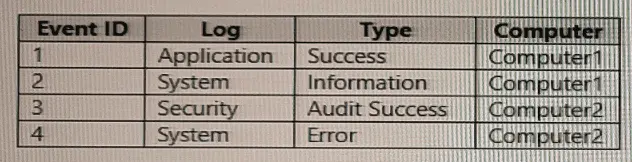
You have computer that run Windows 10 and connect to an Azure Log Analytics workspace. The workspace is configured to collect all available events from Windows event logs.

The computers have the logged events shown in the following table.

Which events are collected in the Log Analytics workspace?

Correct Answer: E. 1, 2, 3, and 4
Explanation:

All events from Windows event logs are collected in the Log Analytics workspace, regardless of the event level or source. Therefore, events 1, 2, 3, and 4 are all collected in the workspace. Reference: https://docs.microsoft.com/en-us/azure/azure-monitor/agents/data-sources-windows-events


Question 13

Your company has an Azure AD tenant named contoso.com that contains several Windows 10 devices.

When you join new Windows 10 devices to contoso.com, users are prompted to set up a four-digit pin.

You need to ensure that the users are prompted to set up a six-digit pin when they join the Windows 10 devices to contoso.com.

Solution: From the Microsoft Entra admin center, you configure automatic mobile device management (MDM) enrollment. From the Microsoft Intune admin center, you configure the Windows Hello for Business enrollment options.

Does this meet the goal?

Correct Answer: A. Yes

Question 14

You have a Microsoft 365 subscription that contains Windows 11 devices enrolled in Microsoft Intune.

You need to use Device query to identify whether a critical security patch was installed on a device.

Which table should you target?

Correct Answer: C. WindowsQfe
Explanation:

To use Device query to identify whether a critical security patch was installed on a device, you should target the DeviceTvmSecurityPatch table. This table contains detailed information about security patches on devices, including installation status. TVM stands for Threat and Vulnerability Management, and this table provides the patch-related data necessary to query patch deployment status.

Question 15

Your network contains an Active Directory domain. The domain contains 2,000 computers that run Windows 10. You implement hybrid Azure AD and Microsoft Intune.

You need to automatically register all the existing computers to Azure AD and enroll the computers in Intune. The solution must minimize administrative effort.

What should you use?

Correct Answer: D. a Windows Autopilot deployment profile
Explanation:

To automatically register 2,000 existing Windows 10 computers to Azure AD and enroll them in Intune with minimal administrative effort, you should use Group Policy to trigger automatic Azure AD registration and Intune enrollment. Configure Group Policy in your Active Directory domain with settings that enable automatic Azure AD join (Intune enrollment client) for domain-joined computers. Specifically, use Group Policy settings like 'Allow users to join devices to Azure AD' and 'Configure automatic MDM enrollment' in the domain GPO. This scales to all computers with minimal manual intervention, as they will automatically register and enroll when the policy applies during logon.