Free Microsoft 365 Administrator MS-102 Exam Questions
Page: 1 / 38Total 570 questions
Want more questions? Get Premium Access.
Question 1
You have a Microsoft 365 E5 subscription. You plan to use Microsoft Entra ID Protection.
You need to ensure that account passwords must be changed if account credential. What should you configure?
Correct Answer:D. a user risk policy
Question 2
You have a Microsoft 365 ES subscription.
You integrate Microsoft Defender for Endpoint with Microsoft Intune.
You need to ensure that devices automatically onboard to Defender for Endpoint when they are enrolled In Intune.
Solution: You create an endpoint detection and response (EDR) policy.
Does this meet the goal?
Correct Answer:B. No
Question 3
Your network contains an Active Directory domain and a Microsoft Entra tenant.
The network uses a firewall that contains a list of allowed outbound domains.
You begin to implement directory synchronization, but it fails.
The firewall currently allows only:
microsoft.com
office.com
You need to ensure that directory synchronization completes successfully.
What is the best approach to achieve the goal?
Correct Answer:B. From the firewall, modify the list of allowed outbound domains.
Question 4
You have a Microsoft 365 E5 subscription that contains a user named User1.
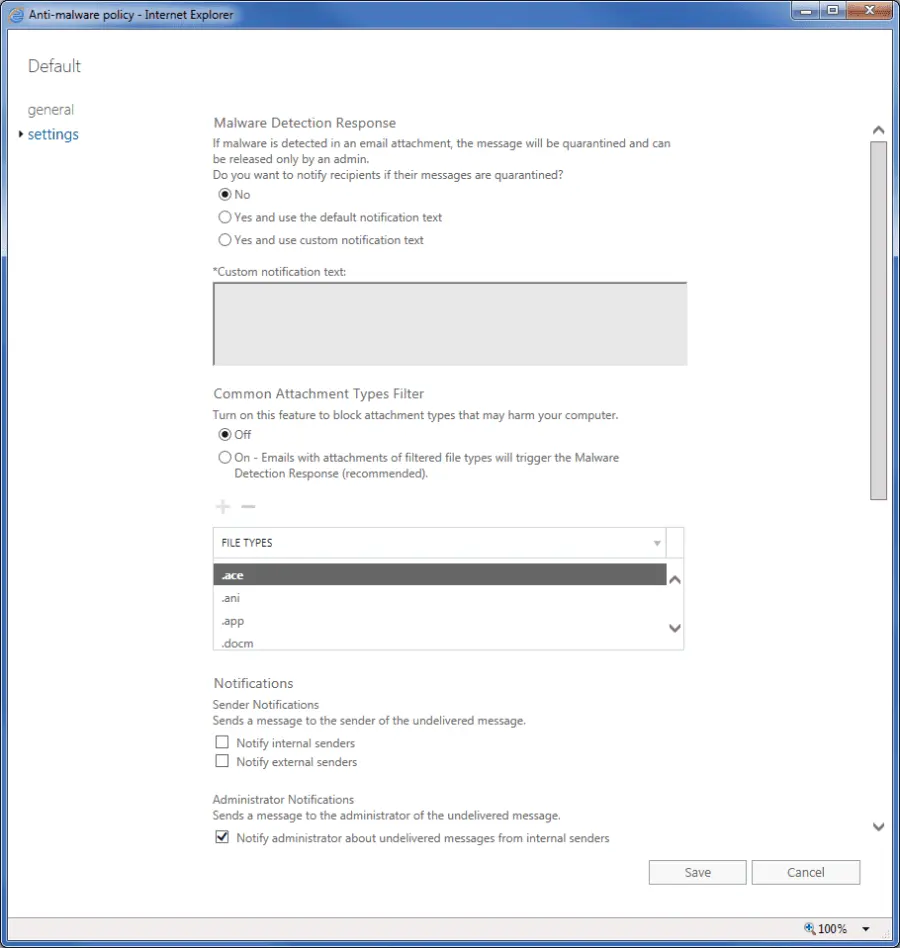
The subscription has a single anti-malware policy as shown in the following exhibit.
An email message that contains text and two attachments is sent to User1. One attachment is infected with malware.
How will the email message and the attachments be processed?
Correct Answer:C. Both attachments will be removed. The email message will be quarantined, and User1 will receive a copy of the message containing the original text and a new attachment that includes the following text: 'Malware was removed.'
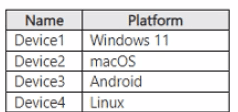
You have a Microsoft 365 E5 subscription and use Microsoft Purview. The subscription contains the devices shown in the following table.
All the devices are onboarded to Microsoft Defender for Endpoint. You plan to deploy Endpoint data loss prevention (Endpoint DLP) policies. Which devices can be protected by using the DLP policies?
Correct Answer:B. Device1 and Device2 only
Question 7
: 250
You have Windows 10 devices that are managed by using Microsoft Endpoint Manager.
You need to configure the security settings in Microsoft Edge.
What should you create in Microsoft Endpoint Manager?
You need to compare the current Safe Links configuration to the Microsoft recommended configurations.
What should you use?
Correct Answer:C. Microsoft Secure Score
Question 9
You have a Microsoft 365 subscription that contains 500 Windows devices enrolled in Microsoft Intune.
You need to ensure that you can review vulnerability management recommendations for the devices. The solution must minimize administrative effort.
Which policy template should you select in the Microsoft Defender portal?
Correct Answer:A. Endpoint Detection and Response
Explanation:
The correct policy template is Endpoint Detection and Response because vulnerability management recommendations require the devices to be onboarded to Microsoft Defender for Endpoint, where Defender Vulnerability Management can assess the endpoint inventory, detected weaknesses, exposure, and security recommendations. Microsoft states that after Intune is integrated with Defender for Endpoint, Defender Vulnerability Management identifies vulnerabilities on managed devices and allows security admins to review endpoint vulnerabilities and create remediation tasks.
For Intune-managed Windows devices, the lowest-administration deployment path is to use an endpoint security policy rather than manually deploying onboarding scripts or packages. Microsoft's Defender portal endpoint security policy documentation states that when Defender for Endpoint is integrated with Intune, administrators use endpoint detection and response endpoint security policies to manage EDR settings and onboard devices to Microsoft Defender for Endpoint. Microsoft's onboarding guidance also identifies deploying an endpoint detection and response policy with Intune as an onboarding deployment method.
Device Control manages removable/device access controls, Microsoft Defender Antivirus configures antivirus behavior, and Windows Security Experience controls end-user Windows Security app experience. None of those templates is the direct onboarding mechanism needed for Defender Vulnerability Management recommendations. Reference/topics: Microsoft Defender for Endpoint onboarding, Intune endpoint security policies, Endpoint Detection and Response policy, Defender Vulnerability Management recommendations.
Question 10
You have a Microsoft 365 subscription.
You plan to use Adoption Score and need to ensure that it can obtain device and software metrics.
What should you do?
Correct Answer:A. Enable Endpoint analytics.
Question 11
Note: This question is part of a series of questions that present the same scenario. Each question in the series contains a unique solution that might meet the stated goals. Some question sets might have more than one correct solution, while others might not have a correct solution.
After you answer a question in this section, you will NOT be able to return to it. As a result, these questions will not appear in the review screen.
Your network contains an on-premises Active Directory domain. The domain contains domain controllers that run Windows Server 2019. The functional level of the forest and the domain is Windows Server 2012 R2.
The domain contains 100 computers that run Windows 10 and a member server named Server1 that runs Windows Server 2012 R2.
You plan to use Server1 to manage the domain and to configure Windows 10 Group Policy settings.
You install the Group Policy Management Console (GPMC) on Server1.
You need to configure the Windows Update for Business Group Policy settings on Server1.
Solution: You upgrade Server1 to Windows Server 2019.
Does this meet the goal?
Correct Answer:A. yes
Question 12
Note: This question is part of a series of questions that present the same scenario. Each question in the series contains a unique solution that might meet the stated goals. Some question sets might have more than one correct solution, while others might not have a correct solution.
After you answer a question in this section, you will NOT be able to return to it. As a result, these questions will not appear in the review screen.
Your network contains an on-premises Active Directory domain. The domain contains domain controllers that run Windows Server 2019. The functional level of the forest and the domain is Windows Server 2012 R2.
The domain contains 100 computers that run Windows 10 and a member server named Server1 that runs Windows Server 2012 R2.
You plan to use Server1 to manage the domain and to configure Windows 10 Group Policy settings.
You install the Group Policy Management Console (GPMC) on Server1.
You need to configure the Windows Update for Business Group Policy settings on Server1.
Solution: You copy the Group Policy Administrative Templates from a Windows 10 computer to Server1.
Does this meet the goal?
Correct Answer:A. yes
Question 13
You have a Microsoft 365 E5 subscription that uses Microsoft Defender for Office 365 and contains a user named User1.
User1 emails a product catalog in the PDF format to 300 vendors. Only 200 vendors receive the email message, and User1 is blocked from sending email until the next day.
You need to prevent this issue from reoccurring.
What should you configure?
Correct Answer:A. anti-spam policies
Question 14
You need to ensure that all the sales department users can authenticate successfully during Project1 and Project2.
Which authentication strategy should you implement for the pilot projects?
Correct Answer:C. password hash synchronization and seamless SSO
Explanation:
Project1: During Project1, the mailboxes of 100 users in the sales department will be moved to Microsoft 365.
Project2: After the successful completion of Project1, Microsoft Teams & Skype for Business will be enabled in Microsoft 365 for the sales department users.
After the planned migration to Microsoft 365, all users must be signed in to on-premises and cloud-based applications automatically.
Fabrikam does NOT plan to implement identity federation.
After the planned migration to Microsoft 365, all users must continue to authenticate to their mailbox and to SharePoint sites by using their UPN.
You need to enable password hash synchronization to enable the users to continue to authenticate to their mailbox and to SharePoint sites by using their UPN.
You need to enable SSO to enable all users to be signed in to on-premises and cloud-based applications automatically.