Question 1
You have a Teams deployment.
You change the display name and profile photo of a user named User1.
You need to ensure that the changes are displayed as soon as possible in the new Teams client for User1.
What should you do?
You have a Teams deployment.
You change the display name and profile photo of a user named User1.
You need to ensure that the changes are displayed as soon as possible in the new Teams client for User1.
What should you do?
You are a Microsoft Teams administrator for your company.
All the teams used by the company's legal department must meet the following compliance requirements:
Each team must expire 365 days after it is created.
All team content must be deleted when the team expires.
An administrator must be able to restore deleted team content for 30 days.
What should you do?
https://docs.microsoft.com/en-us/microsoftteams/team-expiration-renewal
You have a Teams deployment.
You need to apply bandwidth restrictions for Teams users in the Buffalo office. The solution must meet the following requirements:
* The media bit rate must be a maximum of 1 Mbps.
* Users that travel between the offices must have access to high-quality video while in the New York office.
Which two features should you configure? Each correct answer presents part of the solution.
NOTE: Each correct selection is worth one point.
You have a Teams Phone deployment that contains a resource account named Resource1 and an auto attendant named Attendant1
You plan to use Resource1 to provide call answering functionality for Attendant1.
You need to ensure that Resource1 has a designated phone number.
What should you do?
You have a Microsoft Office 365 subscription.
You need to prevent guest users from deleting channels from a Microsoft Teams team.
What should you use?
Your company has a Microsoft 365 subscription.
You have a Microsoft Teams team named Sales that is set to Private.
Users report that they can view the Sales team from a list of suggested teams.
You need to hide the team from the list of suggested teams.
What should you do from the Microsoft Teams client?
You have a Microsoft 365 subscription that uses Microsoft Teams.
You plan to implement Microsoft Teams Rooms. The solution must meet the following requirements:
Support Microsoft Teams Rooms, Microsoft Surface Hub, and collaboration bars for Microsoft Teams.
Ensure that Microsoft manages firmware and application updates for room systems and peripherals.
Ensure that Microsoft monitors and troubleshoots room system and peripherals
.
Which license should you purchase?
https://docs.microsoft.com/en-us/microsoftteams/rooms/rooms-licensing
https://docs.microsoft.com/en-us/microsoftteams/rooms/microsoft-teams-rooms-premium
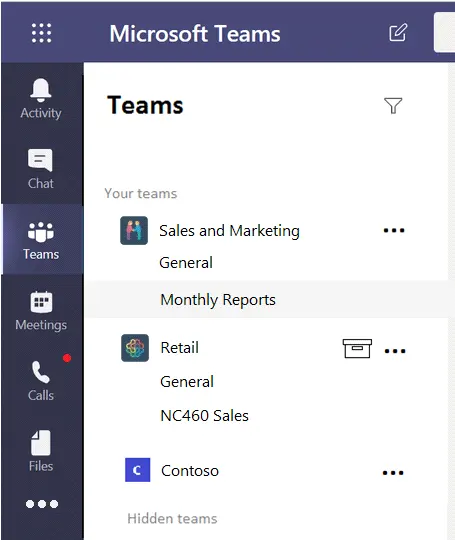
You company has a Microsoft 365 subscription that contains the teams shown in the following exhibit.

Guest users report that they cannot create posts in Monthly Reports.
You need to ensure that the guest users can post to Monthly Reports.
What should you do?
Note: This question is part of a series of questions that present the same scenario. Each question in the series contains a unique solution that might meet the stated goals. Some question sets might have more than one correct solution, while others might not have a correct solution.
After you answer a question in this section, you will NOT be able to return to it. As a result, these questions will not appear in the review screen.
Your company has a Microsoft 365 subscription.
You plan to configure the environment to allow external users to collaborate in Microsoft Teams by using guest access.
The company implements a new security policy that has the following requirements:
Only guest users from specific domains must be allowed to connect to collaborate by using Microsoft Teams.
Guest users must be prevented from inviting other guests.
You need to recommend a solution to meet the security policy requirements.
Solution: From the Azure Active Directory, you modify the External collaboration settings.
Does this meet the goal?
Your company uses Phone System.
A group of users make outbound calls on behalf of the company's billing department.
You need to ensure that when the users make the outbound calls, their numbers are replaced by a phone number that is associated to an existing call queue.
What should you do first?
https://docs.microsoft.com/en-us/microsoftteams/caller-id-policies
https://docs.microsoft.com/en-us/microsoftteams/set-the-caller-id-for-a-user
Note: This question is part of a series of questions that present the same scenario. Each question in the series contains a unique solution that might meet the stated goals. Some question sets might have more than one correct solution, while others might not have a correct solution.
After you answer a question in this section, you will NOT be able to return to it. As a result, these questions will not appear in the review screen.
Your company has a Microsoft 365 subscription.
You need to prevent temporary employees from using the private chat feature in Microsoft Teams.
Solution: You create an app permission policy and assign the policy to the users.
Does this meet the goal?
You have a Microsoft 365 subscription that uses Microsoft Teams.
You feed 10 identify which teams were inactive during the past 90 days.
What should you use?
According to the Microsoft documentation1, you can use the Teams usage report in the Microsoft Teams admin center to get an overview of the usage activity in Teams. This includes the number of active users, channels, guests, and post messages via chat and conversations to know how many users in each team are actively using Teams to communicate and collaborate. However, this report only shows the last 7 or 28 days of activity of teams, which may not be enough to identify inactive teams over a longer period.
Alternatively, you can use PowerShell scripts to generate activity reports that check the audit records of inactive teams and provide an HTML report file based on SharePoint site activity in the group's document library in the past 90 days and conversations that occurred in the mailbox in the past year2. However, this method requires writing complex and time-consuming PowerShell commands, which may not be feasible for administrators who need to produce multiple reports on a daily basis.
Another method to detect inactive teams in your Teams environment is by setting an expiration policy for the associated group in Azure AD.This notifies the owner of the team or group by sending an email to renew or delete the team after specified days if no activity is detected3. However, this method also has some drawbacks, such as:
The owner may fail to notice the email or renew the team within the timeline of the configured policy, resulting in the team being deleted automatically and not being restorable after 30 days.
The expiration policy applies to all Microsoft 365 groups in an Azure AD organization, not just Teams. This may affect other groups that are not related to Teams.
The expiration policy requires Azure AD Premium licenses for the members of all groups to which the policy is applied.
Therefore, based on this information, the correct answer isD. the Teams usage report. This report is the most straightforward and accessible way to find inactive teams in Microsoft Teams, even though it has some limitations. The other options are either not related to finding inactive teams (Teams advisor) or require additional licenses or permissions (the Office 365 Groups activity report and the Teams user activity report).

Your company has a Microsoft Office 365 subscription.
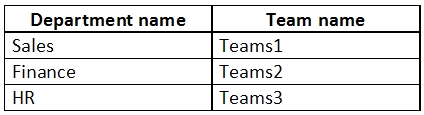
The company has the departments and teams shown in the following table.

You need to recommend which policies must be created to meet the following requirements:
Users in the HR department must be prevented from sending messages marked as Urgent.
Users in the finance department must be able to send messages marked as Urgent.
Users in the finance department must be able to delete sent messages.
The solution must only affect the HR department users and the finance department users.
What is the minimum number of policies you should recommend?
Your company has a Microsoft 365 subscription that contains three groups named HR, Marketing, and Sales.
You need to configure the Microsoft Teams desktop client. The solution must meet the following requirements:
Members of the HR group must be prevented from pinning apps to their app bar.
Members of the Marketing group must have the Microsoft Planner app pinned to their app bar.
Members of the Sales group must not be affected by policies applied to the Marketing and HR groups.
Which two actions should you perform? Each correct answer presents part of the solution.
NOTE: Each correct selection is worth one point.
You have a Microsoft 365 E5 subscription that includes Teams. The subscription contains a user named User1 that is an owner of a team named Team1. Team1 contains members that include guest user accounts.
You need to ensure that User1 provides a quarterly confirmation for all the guest users that have a legitimate business need for membership to Team1.
What should you do?