
Limited-Time Offer: Enjoy 50% Savings! Ends in 00h 00m 00s Coupon code: 50OFF
Skip to content

Free Microsoft Identity and Access Administrator SC-300 Exam Questions

Page: 1 / 25 Total 370 questions

Want more questions? Get Premium Access.

Question 1

You have an Azure subscription that contains a user named User1. The subscription is onboarded to Microsoft Entra Permissions Management. You need to provide User! with access to Permissions Management. The solution must meet the following requirements:

* Follow the principle of least privilege.

* Minimize administrative effort.

What should you do first?

Correct Answer: C. From the Microsoft Entra admin center, assign a role to User1.
Explanation:

When onboarding to Microsoft Entra Permissions Management (a CIEM solution), before a user can perform any functions inside Permissions Management, that user must be granted an appropriate Permissions Management role in the Entra tenant. The principle of least privilege dictates that you grant only the minimal role necessary (for example, a Permissions Management Approver, Viewer, or Controller). The SC-300 study materials and Microsoft's documentation emphasize that administrative access must begin by assigning roles within Entra ID.

Creating a security group (option A) is a useful organizational practice but doesn't itself grant the user permissions inside Permissions Management. Creating a role/policy template (option B) is about defining permission scopes and is not a first step to allow a user access. Creating a request in My Requests (option D) presupposes that User1 already has some entitlement to make requests (i.e. some role), which they don't yet.

Therefore, the first action is to assign a Permissions Management role to User1 from the Entra admin center, thus giving them appropriate access while adhering to least privilege.
Question 2

You have a Microsoft Entra tenant.

You need to query risky user activity for the tenant.

How long will the logs of risky user activity be retained?

Correct Answer: C. 90 days
Explanation:

According to the Microsoft Entra ID Protection section of the SC-300 Study Guide and the official Microsoft documentation on risk detections and retention, Microsoft Entra ID stores risky user activity and detections for 90 days. This includes logs of risky users, risky sign-ins, and risk detections identified by machine learning models and heuristic signals.

The retention period of 90 days ensures administrators can analyze user risk patterns, investigate compromised accounts, and implement mitigations such as Conditional Access or user risk policies. After 90 days, these logs are automatically purged unless exported to a SIEM such as Microsoft Sentinel for extended retention.

Microsoft Learn states:

''Identity Protection retains data for 90 days. Administrators can view risk detections, risky users, and risky sign-ins in the portal or query them using Microsoft Graph.''


Question 3

You have a Microsoft 365 tenant.

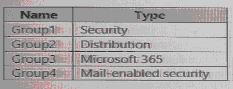
The Azure Active Directory (Azure AD) tenant contains the groups shown in the following table.

In Azure AD. you add a new enterprise application named Appl. Which groups can you assign to App1?

Correct Answer: E. Group1 and Group4
Explanation:

According to the Microsoft SC-300: Microsoft Identity and Access Administrator Study Guide and Microsoft Learn documentation on Azure AD group assignments for enterprise applications, only specific group types in Azure AD can be assigned to enterprise applications (service principals).

Azure AD allows group-based assignment for enterprise applications only when the group is a Security group or a Mail-enabled security group. This is because Azure AD uses security groups for authorization purposes.

Let's analyze the groups from the table:

Group

Type

Assignable to App1?

Reason

Group1

Security

Yes

Security groups are used for managing access permissions and can be assigned to apps.

Group2

Distribution

No

Distribution groups are used for email distribution lists and cannot be used for access management.

Group3

Microsoft 365

No

Microsoft 365 (formerly Office 365) groups manage collaboration resources like Teams and SharePoint but are not supported for enterprise app assignments.

Group4

Mail-enabled security

Yes

Mail-enabled security groups combine mailing capabilities with security functionality and can be used to assign permissions to applications.

The Microsoft documentation states:

''You can assign access to enterprise applications in Azure AD to users, security groups, and mail-enabled security groups. Distribution lists and Microsoft 365 groups are not supported for app assignments.''

Thus, for App1, which is an enterprise application, you can assign only Group1 (Security) and Group4 (Mail-enabled Security).


Question 4

Your network contains an on-premises Active Directory domain that syncs to an Azure AD tenant.

Users sign in to computers that run Windows 10 and are joined to the domain.

You plan to implement Azure AD Seamless Single Sign-On (Azure AD Seamless SSO).

You need to configure the Windows 10 computers to support Azure AD Seamless SSO.

What should you do?

Correct Answer: A. Modify the Local intranet zone settings
Explanation:

According to the Microsoft SC-300: Microsoft Identity and Access Administrator Study Guide and Exam Ref SC-300, Azure AD Seamless Single Sign-On (SSO) allows users on corporate Windows 10 devices connected to the corporate network to automatically sign in to Azure AD-connected services such as Microsoft 365 or Azure without needing to re-enter their credentials.

Seamless SSO works by automatically signing users in using their on-premises Active Directory credentials when they are on the corporate network. This feature is enabled through Azure AD Connect and uses a service account (AZUREADSSOACC) to securely communicate authentication tokens.

However, for Azure AD Seamless SSO to function correctly on domain-joined Windows 10 computers, specific browser configurations are required. In particular, users must be able to automatically authenticate to the Azure AD SSO endpoint (https://autologon.microsoftazuread-sso.com).

The Microsoft documentation specifies:

''To enable Seamless SSO on Windows devices, ensure that the Azure AD SSO URL (https://autologon.microsoftazuread-sso.com) is added to the Local intranet zone in Internet Explorer or Microsoft Edge (IE mode). This allows the browser to use the user's current Windows credentials for integrated authentication without prompting.''

Therefore:

Option A (Modify the Local intranet zone settings) is correct --- adding the Azure AD SSO URL to the Local intranet zone allows integrated Windows authentication to pass through automatically, enabling seamless sign-on.

Option B (Configure Sign-in options from the Settings app) applies to user-specific credential management but not domain-wide SSO configuration.

Option C (Enable Enterprise State Roaming) synchronizes settings and credentials across devices but does not enable seamless SSO.

Option D (Install the Azure AD Connect Authentication Agent) is used for Pass-through Authentication, not Seamless SSO.

From Microsoft Learn's ''Plan, deploy, and manage Azure AD Seamless SSO'' module:

''To enable users to sign in automatically, configure the browsers and add the Azure AD SSO service URL to the Local intranet security zone. This ensures credentials are passed transparently for single sign-on.''

\


Question 5

SIMULATION

Task 9

You need to ensure that when users in the Sg-Operations group go to the My Apps portal a tab named Operations appears that contains only the following applications:

* Unkedln

* Box

Correct Answer: A. See the Explanation for the complete step by step solution
Explanation:

To ensure that users in the Sg-Operations group see a tab named ''Operations'' containing only LinkedIn and Box applications in the My Apps portal, you can create a collection with these specific applications. Here's how to do it:

Sign in to the Microsoft Entra admin center:

Make sure you have one of the following roles: Global Administrator, Cloud Application Administrator, Application Administrator, or owner of the service principal.

Navigate to App launchers:

Go to Identity > Applications > Enterprise applications.

Under Manage, select App launchers.

Create a new collection:

Click on New collection.

Enter ''Operations'' as the Name for the collection.

Provide a Description if necessary.

Add applications to the collection:

Select the Applications tab within the new collection.

Click on + Add application.

Search for and select LinkedIn and Box applications.

Click Add to include them in the collection.

Assign the collection to the Sg-Operations group:

Select the Users and groups tab.

Click on + Add users and groups.

Search for and select the Sg-Operations group.

Click Select to assign the collection to the group.

Review and create the collection:

Select Review + Create to check the configuration.

If everything is correct, click Create to finalize the collection.

By following these steps, when users in the Sg-Operations group visit the My Apps portal, they will see a new tab named ''Operations'' that contains only the LinkedIn and Box applications1.

Please note that to create collections on the My Apps portal, you need a Microsoft Entra ID P1 or P2 license1.


Question 6

Note: This question is part of a series of questions that present the same scenario. Each question in the series contains a unique solution that might meet the stated goals. Some question sets might have more than one correct solution, while others might not have a correct solution.

After you answer a question in this section, you will NOT be able to return to it as a result these questions will not appear in the review screen.

You have a Microsoft 365 E5 subscription.

You create a user named User1.

You need to ensure that User1 can update the status of identity Secure Score improvement actions.

Solution: You assign the User Administrator role to User1.

Does this meet the goal?

Correct Answer: B. No
Explanation:

The User Administrator role allows management of user accounts, licenses, and group memberships within Azure AD but does not grant access to security configurations, Secure Score dashboards, or improvement actions.

According to Microsoft's Secure Score documentation:

''Only users with Global Administrator, Security Administrator, or Security Reader roles can access Microsoft Secure Score. To modify improvement action statuses, the user must be a Security Administrator or Global Administrator.''

Therefore, a User Administrator cannot update Secure Score improvement actions.


Question 7

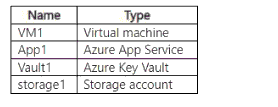
You have an Azure subscription that contains the resources shown in the following table.

You need to grant permissions to the resources by using attribute-based access control (ABAC).

To which resource can you grant permissions?

Correct Answer: D. storage 1
Explanation:

According to Microsoft Learn: ''Configure Attribute-Based Access Control (ABAC) for Azure resources'', ABAC allows you to assign access permissions based on resource attributes and user attributes (claims).

Currently, ABAC is available for Azure Storage (Blob and Queue) and Azure Key Vault (limited preview for specific scenarios). However, the generally available and supported ABAC implementation as per SC-300 and Azure documentation is for Azure Storage accounts.

This means that you can use ABAC in storage1 to grant fine-grained access (for example, based on object tags or user department claims) while resources like VM1, App1, and Vault1 still rely on traditional RBAC (role-based access control).


Question 8

You have an Azure subscription.

You are evaluating enterprise software as a service (SaaS) apps.

You need to ensure that the apps support automatic provisioning of Microsoft Entra users.

Which specification should the apps support?

Correct Answer: B. SCIM 2.0
Explanation:

The SC-300 Exam Ref and official Microsoft Learn module ''Plan and implement user provisioning'' confirm that automatic user provisioning between Microsoft Entra ID (formerly Azure AD) and external SaaS applications uses the System for Cross-domain Identity Management (SCIM) 2.0 protocol.

SCIM 2.0 is an open standard that simplifies identity lifecycle management --- enabling automatic creation, update, and removal of user accounts within connected SaaS applications. When a SaaS app supports SCIM 2.0, Entra ID can automatically synchronize user identities and attributes based on defined mappings.

Other protocols listed, such as WS-Fed, LDAP, or OAuth 2.0, serve different purposes --- authentication and directory access rather than provisioning. WS-Fed is used for federated authentication; LDAP provides directory querying; OAuth 2.0 handles delegated authorization for resource access.

Thus, any enterprise SaaS app that supports automatic provisioning from Entra ID must implement SCIM 2.0 as per Microsoft's integration requirements.


Question 9

You need to implement the planned changes for Package1. Which users can create and manage the access review?

Correct Answer: E. User3 and User5
Explanation:

For Identity Governance (Entitlement Management), the materials clarify who can create and manage access reviews of access packages: ''To create or manage access reviews for access packages, you must be a Global administrator, an Identity Governance administrator, a catalog owner for the catalog that contains the access package, or an access package manager.'' The exam text also states: ''User administrator does not grant the ability to manage entitlement management access reviews unless the user is delegated as a catalog owner or access package manager.'' Given the scenario's user roles, User3 (Identity Governance administrator) and User5 (Global administrator) satisfy these permissions and therefore can create and manage the access review for Package1. By contrast, User4 (User administrator) cannot perform this task by role alone. This selection follows the least-privilege guidance emphasized in SC-300: use specialized governance roles (Identity Governance admin or delegated catalog roles) rather than broad directory roles when possible.


Question 10

You have a Microsoft 365 tenant.

The Sign-ins activity report shows that an external contractor signed in to the Exchange admin center.

You need to review access to the Exchange admin center at the end of each month and block sign-ins if

required.

What should you create?

Correct Answer: D. an application-based access review that targets guest users
Explanation:

The SC-300 Study Guide section on ''Implement Access Reviews'' states that administrators can create access reviews for groups, roles, or applications. When the scenario involves verifying external users' access to specific applications --- such as the Exchange admin center --- the proper configuration is an application-based access review targeting guest users.

Microsoft Learn specifies:

''Application access reviews allow you to periodically verify external users' access to enterprise applications integrated with Azure AD.''

Since the contractor is an external (guest) user and the access is to a specific application (Exchange admin center), you must configure an application-based review, not a group-based or directory-based one.

Correct Answe r: D. an application-based access review that targets guest users


Question 11

You have an Azure Active Directory (Azure AD) tenant named contoso.com.

You plan to bulk invite Azure AD business-to-business (B2B) collaboration users.

Which two parameters must you include when you create the bulk invite? Each correct answer presents part of

the solution

NOTE: Each correct selection is worth one point.

Correct Answer: A. email address; B. redirection URL
Explanation:

In Azure AD B2B bulk invitations, the portal and CSV workflow require two core fields: the external user's email address and the Invite Redirect URL that determines where the guest is sent to redeem the invitation. The study guide notes that the bulk invite template ''must include the guest's email address'' and that ''InviteRedirectUrl is required to define the post-invite redemption target (such as MyApps or a specific app).'' Usernames and passwords are not supplied for B2B guests because ''guest accounts authenticate with their home identity provider,'' and there is no shared key involved in the invitation. Therefore, the only mandatory parameters to successfully process a bulk B2B invite are the email address of each guest and the redirection URL used during invitation redemption.


Question 12

You have an Azure AD tenant

You open the risk detections report.

Which risk detection type is classified as a user risk?

Correct Answer: D. Azure AD threat intelligence
Explanation:

In Azure AD Identity Protection, risk detections are classified into sign-in risks and user risks. According to Microsoft's SC-300 Study Guide and Identity Protection documentation, a user risk represents the probability that an account has been compromised. Microsoft aggregates multiple sign-in signals and applies its threat intelligence algorithms to determine whether a user's identity may be at risk. Among the listed options, Password spray, Anonymous IP address, and Unfamiliar sign-in properties are sign-in risk detections, while Azure AD threat intelligence is the only type classified as a user risk detection.

Microsoft Docs states: ''User risk detections are generated by Azure AD threat intelligence when Microsoft detects that user credentials appear to be compromised.''


Question 13

You have a Microsoft 365 tenant.

All users have mobile phones and laptops.

The users frequently work from remote locations that do not have Wi-Fi access or mobile phone connectivity.

While working from the remote locations, the users connect their laptop to a wired network that has internet

access.

You plan to implement multi-factor authentication (MFA).

Which MFA authentication method can the users use from the remote location?

Correct Answer: D. an app password
Explanation:

The scenario states users may be at locations without Wi-Fi or mobile connectivity for their phones, but their laptops have wired Internet. Azure AD MFA methods that rely on the phone's connectivity---Authenticator push notifications or voice calls/SMS---won't work. While the most resilient MFA option in such situations is a time-based verification code from Microsoft Authenticator (works offline), that option isn't among the choices provided. The SC-300 coverage on MFA and legacy clients notes that app passwords can be used for applications that do not support modern authentication/MFA prompts, allowing users to sign in when MFA interaction is impractical. Given the listed options, the only workable method from the remote location is the app password; notification and voice require phone connectivity, and security questions are not an Azure AD MFA method.


Question 14

You have a Microsoft 365 E5 subscription that contains a Microsoft SharePoint Online site named Site1.

You need to ensure that users can request access to Site. the solution must meet the following requirements.

* Automatically approve requests from users based on their group membership.

* Automatically remove the access after 30 days

What should you do?

Correct Answer: B. Create an access package.
Explanation:

This scenario describes the need for users to request access, have access automatically approved based on group membership, and automatically expire after 30 days.

These are exactly the features provided by Azure AD Entitlement Management access packages under Identity Governance.

Access packages allow users to request access to resources (such as SharePoint sites, apps, or groups).

Policies within an access package can automatically approve requests based on group membership or manager approval.

You can also configure access expiration, automatically removing access after a set duration (e.g., 30 days).

Conditional Access, PIM, and Defender for Cloud Apps do not provide automatic access expiration tied to request workflows.


Question 15

Your company recently implemented Azure Active Directory (Azure AD) Privileged Identity Management (PIM).

While you review the roles in PIM, you discover that all 15 users in the IT department at the company have

permanent security administrator rights.

You need to ensure that the IT department users only have access to the Security administrator role when

required.

What should you configure for the Security administrator role assignment?

Correct Answer: D. Assignment type to Eligible
Explanation:

According to the Microsoft Identity and Access Administrator (SC-300) Study Guide and the Microsoft Learn module ''Configure Azure AD Privileged Identity Management (PIM)'', Azure AD PIM provides two types of role assignments: Active and Eligible.

An Active assignment means the user permanently holds the role with immediate access. An Eligible assignment means the user can activate the role only when needed, after providing justification or approval. This follows the least privilege principle by reducing exposure to high-privilege roles.

The official documentation states:

''Users assigned as eligible must activate their role when they need to perform privileged tasks. This ensures that administrative privileges are granted only for a limited time and when necessary.''

Because all IT users currently have permanent Security Administrator roles, the correct remediation is to change their assignment type from Active to Eligible so they can activate it only when required. Options A and B relate to expiration settings but do not convert the assignment type.