Free Microsoft Administering Information Security in Microsoft 365 SC-401 Exam Questions
Page: 1 / 15Total 223 questions
Want more questions? Get Premium Access.
Question 1
Your company has Microsoft 365 E5 subscription and plans to use Microsoft Purview Advanced Message Encryption.
Each product group at your company must show a distinct product logo in encrypted emails instead of the standard Microsoft 365 logo.
What should you do to create the branding templates?
Correct Answer:C. Run the New-OMEConfiguration cmdlet.
Question 2
Your company has offices in multiple countries.
The company has a Microsoft 365 E5 subscription that uses Microsoft Purview insider risk management.
You plan to perform the following actions:
In a new country, open an office named Office1.
Create a new user named User1.
Deploy insider risk management to Office1.
Add User1 to the Insider Risk Management Admins role group.
You need to ensure that User1 can perform insider risk management tasks for only the users and the devices in Office1.
What should you create first?
Correct Answer:C. an administrative unit
Explanation:
To ensure User1 can perform insider risk management tasks only for the users and devices in Office1, the first step is to create an administrative unit in Microsoft Entra ID (formerly Azure AD).
Administrative units allow you to scope permissions to specific users, devices, and locations. By creating an administrative unit for Office1 and assigning User1 to the Insider Risk Management Admins role group within that unit, User1 will only have access to users and devices in Office1.
Question 3
You have a Microsoft 365 E5 subscription that contains a user named User1. You deploy Microsoft Purview Data Security Posture Management for AD (DSPM for AD). You need to ensure that User1 can verify the auditing status of the subscription. The solution must follow the principle of least privilege. To which role group should you add User1?
Correct Answer:B. Security Reader
Question 4
Note: This question is part of a series of questions that present the same scenario. Each question in the series contains a unique solution that might meet the stated goals. Some question sets might have more than one correct solution, while others might not have a correct solution.
After you answer a question in this section, you will NOT be able to return to it. As a result, these questions will not appear in the review screen.
You have a Microsoft 365 tenant and 500 computers that run Windows 11. The computers are onboarded to Microsoft Purview.
You discover that a third-party application named Tailspin_scanner.exe accessed protected sensitive information on multiple computers. Tailspin_scanner.exe is installed locally on the computers.
You need to block Tailspin_scanner.exe from accessing sensitive documents without preventing the application from accessing other documents.
Solution: From the Microsoft Defender for Cloud Apps, you mark the application as Unsanctioned.
Does this meet the goal?
Correct Answer:B. No
Explanation:
Marking Tailspin_scanner.exe as 'Unsanctioned' in Microsoft Defender for Cloud Apps only blocks its usage in cloud-based activities (such as accessing SharePoint, OneDrive, or Exchange Online). However, it does not prevent a locally installed application on Windows 11 devices from accessing sensitive files.
To block Tailspin_scanner.exe from accessing sensitive documents while allowing it to access other files, the correct solution is to use Microsoft Purview Endpoint Data Loss Prevention (Endpoint DLP) and add Tailspin_scanner.exe to the Restricted Apps list.
Endpoint DLP allows you to block specific applications from accessing sensitive files while keeping general access available. Restricted Apps List in Endpoint DLP ensures that Tailspin_scanner.exe cannot open, copy, or process protected documents, but it can still function normally for non-sensitive content.
Question 5
You have a Microsoft 365 subscription.
Users have devices that run Windows 11.
You plan to create a Microsoft Purview insider risk management policy that will detect when a user performs the following actions:
Deletes files that contain a sensitive information type (SIT) from their device
Copies files that contain a SIT to a USB drive
Prints files that contain a SIT
You need to prepare the environment to support the policy.
What should you do?
Correct Answer:D. Onboard the devices to Microsoft Purview.
Explanation:
To ensure that Microsoft Purview Insider Risk Management can detect file deletions, USB copies, and print actions on sensitive information, you must onboard the Windows 11 devices to Microsoft Purview.
Device onboarding enables endpoint activity monitoring, allowing Purview to track and log user activities such as file deletions, USB transfers, and printing of sensitive files. Once onboarded, the Insider Risk Management policy can analyze these activities and generate risk alerts when sensitive information types (SITs) are involved.
Question 6
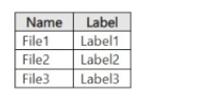
You have a Microsoft 365 E5 subscription. The subscription contains a user named User1 and the sensitivity labels shown in the following table.
You publish the labels to User1.
The subscription contains the files shown in the following table.
Which files can Microsoft 365 Copilot summarize for User1?
Correct Answer:A. File2only
Question 7
You have a Microsoft 365 E5 subscription.
You need to create a sensitivity label named Label1. The solution must ensure that users can use Microsoft 365 Copilot to summarize files that have Label1 applied.
Which permission should you select for Label1?
Correct Answer:B. Copy and extract content(EXTRACT)
Explanation:
To allow Microsoft 365 Copilot to summarize files that have Label1 applied, the label must grant permission to extract content from the document. The correct permission for this is Copy and extract content (EXTRACT).
Microsoft 365 Copilot requires access to read and process content in documents to generate summaries. The EXTRACT permission allows users (and AI tools like Copilot) to copy and extract content for processing while still maintaining the protection applied by the sensitivity label.
Question 8
You have a Microsoft 365 subscription.
You need to ensure that users can apply retention labels to individual documents in their Microsoft SharePoint libraries.
Which two actions should you perform? Each correct answer presents part of the solution.
NOTE: Each correct selection is worth one point.
Correct Answer:D. From the Microsoft Purview portal, publish a label.; E. From the Microsoft Purview portal, create a label.
Explanation:
To allow users to apply retention labels to individual documents in Microsoft SharePoint libraries, you need to create a retention label and publish the label.
In Microsoft Purview, retention labels define how long content should be retained or deleted. You must first create a label that specifies the retention rules. After creating the label, you must publish it so that it becomes available for users in SharePoint document libraries. Once published, users can manually apply the retention label to individual documents.
Question 9
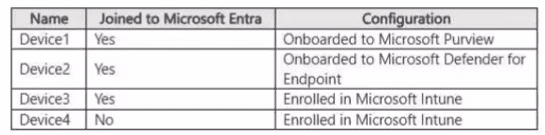
You have a Microsoft 365 E5 tenant and the Windows Client devices shown in the following table.
To which devices can you apply Microsoft 365 Endpoint data loss prevention (Endpoint DLP) settings?
Correct Answer:B. Device1 and Devce2 only
Question 10
You are configuring a data loss prevention (DLP) policy to report when credit card data is found on a Microsoft Entra joined Windows device.
You plan to use information from the policy to restrict the ability to copy the sensitive data to the clipboard.
What should you configure in the policy advanced DLP rule?
Correct Answer:A. an action
Question 11
You have a Microsoft 365 E5 subscription.
You create a sensitivity label named Label1 and publish Label1 to all users and groups.
You have the following files in a SharePoint site:
* File1.doc
* File2.docx
* File3.xlsx
* File4.txt
You need to identify which files can have Label1 applied.
Which files should you identify?
Correct Answer:B. File2.docx and File3.xlsx only
Question 12
Note: This question is part of a series of questions that present the same scenario. Each question in the series contains a unique solution that might meet the stated goals. Some question sets might have more than one correct solution, while others might not have a correct solution.
After you answer a question in this section, you will NOT be able to return to it. As a result, these questions will not appear in the review screen.
You have a Microsoft 365 subscription.
You have a user named User1. Several users have full access to the mailbox of User1.
Some email messages sent to User1 appear to have been read and deleted before the user viewed them.
When you search the audit log in the Microsoft Purview portal to identify who signed in to the mailbox of User1, the results are blank.
You need to ensure that you can view future sign-ins to the mailbox of User1.
Solution: You run the Set-MailboxFolderPermission -Identity "User1" -User User1@contoso.com -AccessRights Owner command.
Does that meet the goal?
Correct Answer:B. No
Explanation:
The Set-MailboxFolderPermission -Identity 'User1' -User User1@contoso.com -AccessRights Owner command is incorrect. This assigns folder permissions but does not enable auditing. It does not track who accessed the mailbox or deleted emails.
Question 13
Nate: This question is part of a series of questions that present the same scenario. Each question in the series contains a unique
solution that might meet the stated goals. Some question sets might have more than one correct solution, while others might
not have a correct solution.
After you answer a question in this section, you will NOT be able to return to it. As a result, these questions will not appear in the
review screen.
You implement Microsoft 365 Endpoint data loss prevention (Endpoint DLP).
You have computers that run Windows 11 and have Microsoft 365 Apps installed. The computers are joined to a Microsoft Entra tenant.
You need to ensure that Endpoint DLP policies can protect content on the computers.
Solution: You onboard the computers to Microsoft Defender for Endpoint.
Does this meet the goal?
Correct Answer:A. Yes
Question 14
You have a Microsoft $65 subscription.
You plan to retain the following audit log record types and activities for the next three years.
* Copilotlnteraction: All activities selected (1/1)
o Interacted with Copilot
* Compliance DLP endpoint: All activities selected {2/2)
o Matched DIP rule
o Removed Dl P rule from document
* AzureActiveDirectory 2 of 25 activities selected (2/25)
o Reset user password o Changed user password
What is the minimum number of audit retention policies you should create to retain only the selected record types and activities?
Correct Answer:C. 3
Question 15
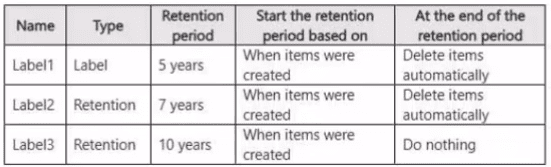
You have a Microsoft 365 E5 tenant that contains the policies shown in the following table.
A file named File! has all the policies applied. How long will File! be retained?
Correct Answer:B. File1 will be deleted automatically after 10 years.