Limited-Time Offer: Enjoy 50% Savings! Ends in 00h 00m 00s Coupon code: 50OFF
Skip to content

Free NetApp Certified Implementation Engineer - SAN Specialist, E-Series NS0-516 Exam Questions

Page: 1 / 7 Total 64 questions

Want more questions? Get Premium Access.

Question 1

A junior administrator recently made changes to an E-Series system. As a result of these changes, the management host lost the ability to manage the E-Series system through in-band management, but the host still has access to the E-Series data volumes.

In this scenario, what caused this issue?

Correct Answer: A. The access volume was un-mapped
Explanation:

If the management host loses the ability to manage the E-Series system through in-band management but still has access to data volumes, the most likely cause is that the access volume was un-mapped. The access volume is crucial for in-band management as it provides a path for management commands.

In-band management relies on this special volume to communicate management commands between the host and the storage system. If the access volume is un-mapped, the management interface on the host will no longer be able to send these commands, even though data volumes remain accessible.


NetApp E-Series SANtricity Storage Manager Documentation

NetApp Knowledge Base Articles
Question 2

Which command on a NetApp storage controller will display the average service time on a FC target port basis every five seconds?

Correct Answer: C. fcp stats -i 5
Explanation:

Purpose: To display the average service time on a FC target port basis.

Command: fcp stats -i 5

Usage: Monitors Fibre Channel Protocol (FCP) performance, including service times for FC target ports at specified intervals (every 5 seconds in this case).

Reference: NetApp Data ONTAP Command Reference Guide.


Question 3

Click the Exhibit button.

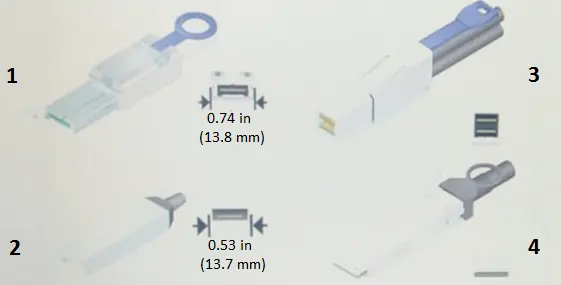
Referring to the exhibit, which cable is an InfiniBand 4X connector?

Correct Answer: B. 1
Explanation:

Identify Connector Types:

Step: Examine the connectors in the exhibit to identify the InfiniBand 4X connector.

Reason: InfiniBand 4X connectors have a distinct appearance and size.

Connector Characteristics:

Observation: Connector 1 in the exhibit is labeled as 0.74 in (13.8 mm), which matches the size and appearance of an InfiniBand 4X connector.

Verification:

Cross-Reference: Confirm with NetApp and industry standards for InfiniBand connectors.

Result: Connector 1 is the InfiniBand 4X connector based on size and design.


NetApp E-Series hardware documentation

Industry standards for InfiniBand connectors

Question 4

What does the CHAP secret accomplish for an E-Series system?

Correct Answer: A. iSCSI authentication
Explanation:

CHAP (Challenge Handshake Authentication Protocol): CHAP is a protocol used to authenticate the identity of an initiator or target in iSCSI communications. This ensures that only authorized devices can connect to the storage array over the iSCSI network.

Implementation in E-Series: In the context of E-Series systems, CHAP secrets are configured to provide an additional layer of security by requiring both the initiator and target to authenticate each other using a shared secret before establishing an iSCSI session.


NetApp E-Series SANtricity System Manager documentation on iSCSI setup

NetApp Implementation Engineer - SAN Specialist - E-Series manuals

Question 5

Which NetApp tool provides information on size, weight, acoustic noise, and power of NetApp E-Series systems?

Correct Answer: A. Hardware Universe
Explanation:

The Hardware Universe is a NetApp tool that provides comprehensive information on the size, weight, acoustic noise, and power requirements of NetApp systems, including the E-Series.

This tool is essential for planning and managing the physical aspects of deploying NetApp hardware in a data center environment.


NetApp Hardware Universe Documentation.

Question 6

You help a customer diagnose a performance issue on an E-Series storage system. You decide to measure the amount of data that is being handled over the span of an hour.

In this scenario, what are you measuring?

Correct Answer: C. throughput
Explanation:

Definition of Throughput: Throughput refers to the amount of data transferred from or to the storage system over a specific period. It is measured in units such as MB/s or GB/s.

Relevance to Performance Diagnosis: When diagnosing performance issues on an E-Series storage system, measuring throughput over an hour helps determine the data handling capacity of the system. This metric can reveal whether the system is processing data efficiently or if there are bottlenecks.

Methodology: Tools within the SANtricity System Manager can be used to monitor and log throughput, providing insights into the performance characteristics and potential areas needing optimization.


NetApp E-Series SANtricity System Manager documentation on performance monitoring

NetApp Implementation Engineer - SAN Specialist - E-Series manuals

Question 7

Click the Exhibit button.

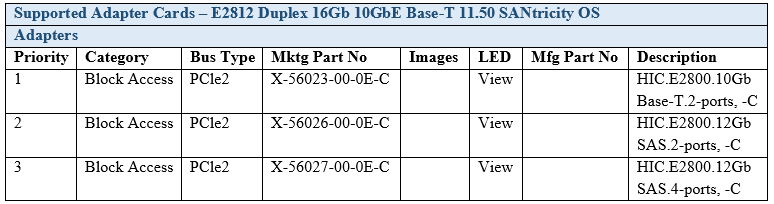
You ordered a NetApp E2812 Duplex 16GB 10 GbE Base-T system.

Referring to the exhibit, what is the maximum number of 10GbE Base-T ports available to be used?

Correct Answer: B. 4
Explanation:

The exhibit shows the supported adapter cards for the E2812 system with specific marketing part numbers.

The E2812 system ordered is a Duplex 16Gb 10GbE Base-T system with the adapter card part number X-56023-00-0E-C, which is described as 'HIC.E2800.10Gb Base-T.2-ports, -C'.

Each card provides 2 ports.

Given that the system is duplex, it means it has two controllers, each capable of supporting one card.

Therefore, each controller can have one 10GbE Base-T card with 2 ports, resulting in a maximum of 4 ports available in total for the system.


NetApp E-Series SANtricity System Manager and E2800 Series Hardware Installation Guide.

Question 8

Click the Exhibit button.

An administrator is asked to create a 5532 GiB volume from the volume group.

Referring to the exhibit, how would the administrator complete this request?

Correct Answer: B. Create the volume after consolidating the capacity
Explanation:

Review the Available Capacity: According to the exhibit, the volume group has a total of 17820.00 GiB capacity, out of which 5532.00 GiB is the current free capacity. However, it is split into two free capacity areas of 15120.00 GiB and 2412.00 GiB.

Identify the Challenge: The requested volume of 5532 GiB cannot be created directly from the current free capacity because it is not contiguous; it's split into two separate areas.

Consolidate the Capacity: To create the volume, the administrator needs to consolidate the free capacity. This involves merging the non-contiguous free spaces to form a contiguous space large enough for the 5532 GiB volume.

Procedure for Consolidation:

Access the volume group management settings.

Select the option to consolidate free capacity areas.

Follow the prompts to merge the two free capacity areas into a single contiguous space.

Create the Volume: Once the free capacity is consolidated, proceed to create the 5532 GiB volume from the newly formed contiguous free space.


Question 9

Click the Exhibit button.

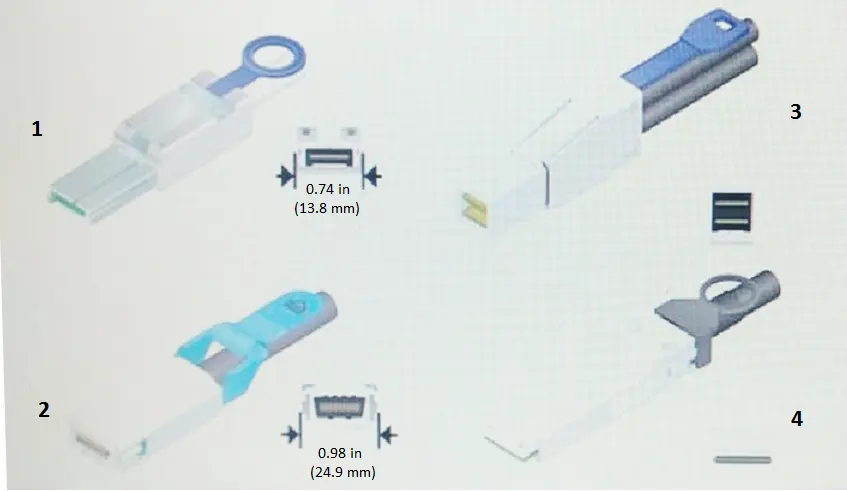
Referring to the exhibit, which SAS connector is supported on the NetApp E2800 E-Series family?

Correct Answer: A. 1
Explanation:

Identify SAS Connector Types: The exhibit shows different types of SAS connectors labeled 1 through 4.

Review E2800 Documentation: According to NetApp E2800 E-Series documentation, the supported SAS connector for expansion and host connectivity is type 1, which is the mini-SAS HD (High Density) connector.

Match the Connector: Verify the appearance and dimensions of the connector in the exhibit. Type 1 matches the mini-SAS HD connector used in the E2800 series.

Confirm Selection: Type 1 (0.74 in / 13.8 mm) is the correct choice for the E2800 family based on the physical characteristics and NetApp specifications.


Question 10

Your company has deployed an E2824 and has decided to change the host protocol from iSCSI to FC. You use the storage array profile to review the installed SFPs.

In this scenario, which set of supported data rates indicates that you are using dual-purpose SFPs?

Correct Answer: B. 32 Gbps, 16 Gbps, 8 Gbps, 4 Gbps
Explanation:

Dual-purpose SFPs: These are transceivers capable of supporting multiple data rates, allowing for flexible deployment in different networking environments.

Supported Data Rates: In the scenario where you are reviewing the storage array profile to determine if dual-purpose SFPs are installed, a set of supported data rates of 32 Gbps, 16 Gbps, 8 Gbps, and 4 Gbps indicates the presence of such SFPs. This enables the switch from iSCSI to FC without needing to replace the hardware.

Configuration: Once the correct SFPs are identified, the host protocol can be adjusted accordingly within the SANtricity System Manager to utilize the desired Fibre Channel speeds.


NetApp E-Series SANtricity System Manager documentation on hardware configuration

NetApp Implementation Engineer - SAN Specialist - E-Series manuals