Limited-Time Offer: Enjoy 50% Savings! Ends in 00h 00m 00s Coupon code: 50OFF
Skip to content

Free NetApp certified support engineer - ONTAP specialist NS0-593 Exam Questions

Page: 1 / 6 Total 60 questions

Want more questions? Get Premium Access.

Question 1

You notice poor performance on your FlexGroup and execute the system node run -node * flexgroup show command for more Information. You notice the "Urge" column has non-zero values.

In this scenario, which statement is true?

Correct Answer: C. The data placement is uneven.
Explanation:

= The ''Urge'' column in the flexgroup show command indicates the urgency of data rebalancing for each constituent volume. A non-zero value means that the data placement is uneven across the volumes, which can affect the performance of the FlexGroup. The target value is the desired percentage of data for each volume, and the difference value is the deviation from the target. The FlexGroup tries to balance the data placement by moving data between the volumes, but this process can be slow or interrupted by other factors. Therefore, it is recommended to monitor the ''Urge'' column and take corrective actions if the values are high or persistent.Reference=What do ''flexgroup show'' target and urgency and other columns mean?,NetApp ONTAP FlexGroup volumes --- Best practices and implementation guide


Question 2

Your customer calls you because one application is not able to access a NetApp ONTAP S3 bucket. While reviewing the EMS log on the cluster, you see the following message:

The same credentials work in another application.

In this scenario, what would cause this problem?

Correct Answer: B. The application is using v2 signatures.
Explanation:

The error message indicates that the access is denied for user 'anonymous user' (Vserver 50), from client IP 10.10.10.10 accessing resource '/offload-target'. This means that the application is not providing a valid user name or access key to authenticate with the ONTAP S3 server.According to the NetApp documentation1, ONTAP S3 server supports both v2 and v4 signatures, but v2 signatures are deprecated and not recommended. Therefore, the application should use v4 signatures to access the ONTAP S3 bucket.Additionally, the application should specify the bucket name in the host name, not in the resource path, as shown in the following example2:

https://bucket-name.s3-server-name.com/object-name

Reference=1ONTAP S3 Server Overview - NetApp Documentation2Accessing an ONTAP S3 bucket - NetApp Documentation


Question 3

You receive the panic message shown in the exhibit.

In this scenario, which component should you troubleshoot first?

Correct Answer: A. the PCI card in slot 3
Explanation:

= The panic message indicates that the node encountered a fatal error while accessing the PCI card in slot 31. This could be due to a hardware failure, a firmware issue, or a driver problem. The first component to troubleshoot is the PCI card in slot 3, as it is the most likely source of the error.You can use thesystem node hardware pci showcommand to check the status of the PCI card and thesystem node hardware firmware updatecommand to update the firmware if needed2.You can also use the Panic Message Analyzer tool from the NetApp Support Site to determine whether your panic was caused by a known software issue3.Reference=1:REBOOT (panic) ALERT - AutoSupport message2: [system node hardware pci show]3: [Panic Message Analyzer tool]


Question 4

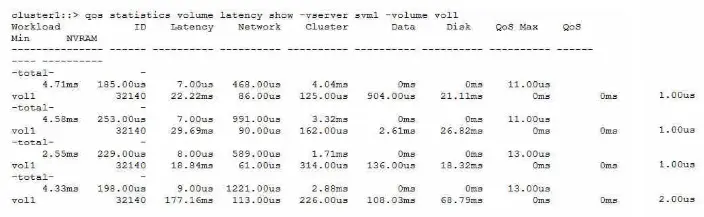
Refer to the exhibit.

Referring to the exhibit, from which delay center is most of the latency for voll?

Correct Answer: C. Data
Explanation:

. Data. However, I cannot guarantee the accuracy or completeness of this answer, and you should verify it with the NetApp Support Engineer ONTAP Specialist documents and learning resources.

Here are some references that might help you:

1:qos statistics volume latency show - NetApp2:How to use and understand qos statistics commands to monitor volume latency in real time - NetApp Knowledge Base


Question 5

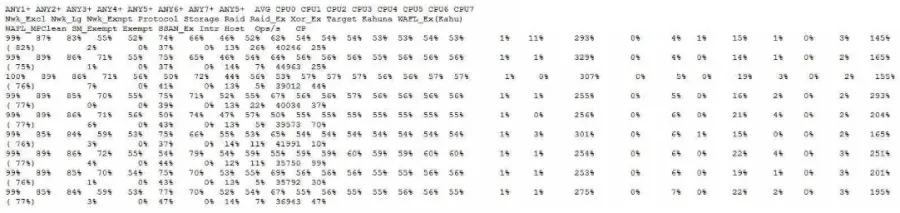
A storage administrator reports that a monitoring toot is reporting that the storage controller reads between 90% to 93% CPU use. You run the sysstat -m command against the node in question.

Referring to the exhibit, which statement is correct?

Correct Answer: D. The CPU Is not a first-order monitoring metric for ONTAP.
Explanation:

= CPU utilization in ONTAP is not a linear measure of the system load, nor can it be used alone as a measure of the overall system utilization. ONTAP uses a Coarse Symmetric Multiprocessing (CSMP) design which partitions system functions into logical processing domains, each with its own scheduling rules and resource availability. Therefore, a high CPU utilization does not necessarily indicate a performance problem, unless it is accompanied by other contributing factors such as high latency, low throughput, or high queue depth. ONTAP has several mechanisms to optimize CPU usage and balance the workload across the cores, such as WAFL parallelization, exempt processing, and CPU pinning. The CPU utilization reported by the sysstat command is an average across all cores and domains, and does not reflect the actual CPU activity or availability for each domain. Therefore, the CPU is not a first-order monitoring metric for ONTAP, and other metrics such as latency, throughput, and queue depth should be considered first.Reference=What is CPU utilization in Data ONTAP: Scheduling and Monitoring?,How to measure CPU utilization,What are CPU as a compute resource and the CPU domains in ONTAP 9?,Monitoring CPU utilization before ONTAP upgrade


Question 6

A customer reports that while Installing Windows updates on their external Vscan servers, clients could not access any files on their CIF-S SVM. The problem disappeared after the update process was completed. The customer wants to prevent this issue from happening during the next patch window.

In this scenario, what are two ways to accomplish this task? (Choose two.)

Correct Answer: B. Update the Vscan servers one at a time.; D. Disable the -scan-mandatory flag in the Vscan policy.
Explanation:

Updating the Vscan servers one at a time can prevent the clients from losing access to the files on the CIFS SVM, as there will always be at least one Vscan server available for scanning. Disabling the -scan-mandatory flag in the Vscan policy can also avoid the issue, as it allows the clients to access the files even if there are no Vscan servers online, but this may compromise the security of the data. Enabling the -scan-mandatory flag or modifying the CIFS shares to be CA shares will not help, as they do not affect the availability of the Vscan servers or the scanning process.Reference=Vscan server installation and configuration,Update the Vscan On-Access policy configuration for an SVM


Question 7

Which two automation methods does NetApp ONTAP Select support? (Choose two.)

Correct Answer: A. REST; B. Anslble
Explanation:

= ONTAP Select supports REST and Ansible as automation methods. REST is the primary foundation for the automation technologies, and Ansible is a popular tool for automating ONTAP Select deployments using roles and playbooks.Reference=ONTAP Automation documentation,Automate ONTAP Select deployments with Ansible


Question 8

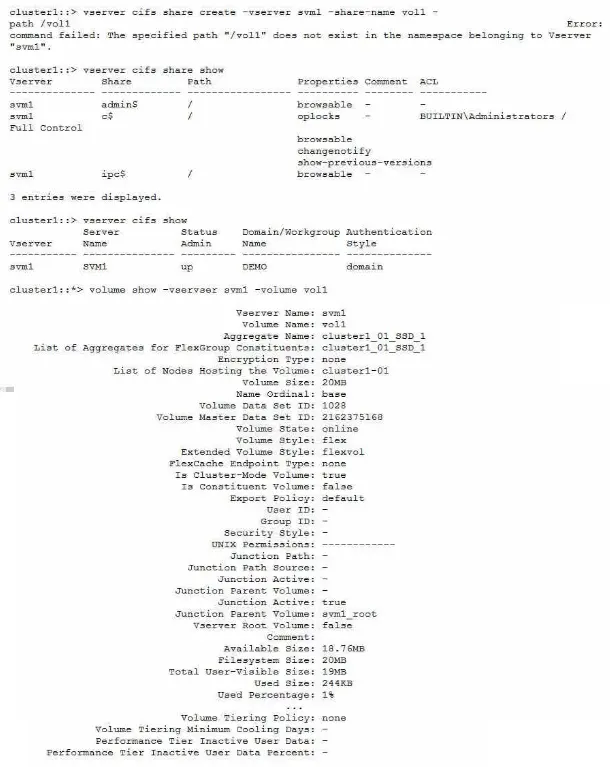
When an administrator tries to create a share for an existing volume named voll, the process fails with an error.

Referring to the exhibit, what Is the reason for the error?

Correct Answer: B. The volume has not been mounted.
Explanation:

The error message indicates that the specified path ''/vol1'' does not exist in the namespace belonging to Vserver ''svm1''. This means that the volume ''vol1'' has not been mounted to the Vserver's namespace, which is required for creating a share. The volume type, the CIFS service status, and the CIFS service mode are not relevant to the error.Reference=https://www.netapp.com/support-and-training/netapp-learning-services/certifications/support-engineer/

https://mysupport.netapp.com/site/docs-and-kb


Question 9

You have a NetApp ONTAP cluster consisting of four NetApp FAS8200 controllers with two NetApp CN1610 cluster switches running ONIAP 9.8 software. You are receiving several alert messages stating that the cluster network has degraded. After troubleshooting, you determine that the errors are being generated from Node 2, interface e0b.

In this scenario, what should you do first to solve this problem?

Correct Answer: A. Replace the Twinax cable between Node 2, Interface e0b. and the NetApp CN1610 switch.
Explanation:

A Twinax cable is a type of copper cable that is used to connect cluster ports to cluster switches1.

A cluster port is a network port that is configured for cluster communication and data access2.

A cluster switch is a network switch that is used to interconnect the nodes in a cluster and provide redundancy and load balancing3.

A cluster network is a network that enables cluster communication and data access between the nodes in a cluster and external clients4.

A cluster network can be degraded due to various reasons, such as misconfiguration, malfunction, or excessive link errors on the cluster ports or the cluster switches.

Link errors are errors that occur on the physical layer of the network, such as CRC errors, length errors, alignment errors, or dropped packets.

Link errors can indicate a problem with the cable, the switch port, the network interface card (NIC), or the cable connector.

In this scenario, the alert messages state that the cluster network has degraded and the errors are being generated from Node 2, interface e0b.

The first step to solve this problem is to replace the Twinax cable between Node 2, interface e0b and the NetApp CN1610 switch, as this could be the source of the link errors.

Replacing the cable could resolve the issue and restore the cluster network to a healthy state.

If replacing the cable does not solve the problem, then other steps may be required, such as checking the switch port, the NIC, or the cable connector, or replacing the switch or the motherboard.Reference:

1: Cluster network cabling, ONTAP 9 Documentation Center

2: Cluster ports, ONTAP 9 Documentation Center

3: Cluster switches, ONTAP 9 Documentation Center

4: Cluster network, ONTAP 9 Documentation Center

[5]: How to troubleshoot CLUSTER NETWORK DEGRADED error messages, NetApp Knowledge Base

[6]: Cluster network degraded due to high CRC errors on cluster ports, NetApp Knowledge Base


Question 10

A user reports that a colleague saved a file called Test.txt from a UNIX system to a multiprotocol volume. When opening the file later from a Windows system, it was not the file that they wanted. The file that they wanted was named TEST~1.TXT.

Which statement explains this behavior?

Correct Answer: D. Case Insensitivity of SMB clients caused the file to be displayed with a different name.
Explanation:

= The multiprotocol volume allows clients to access files using both NFS and SMB protocols. The NFS protocol is case-sensitive, meaning that Test.txt and TEST~1.TXT are two different files. The SMB protocol is case-insensitive, meaning that it treats uppercase and lowercase letters as the same when searching for a file. Therefore, when the user opened the file from a Windows system using SMB, the system could not distinguish between Test.txt and TEST~1.TXT and displayed one of them arbitrarily. This could lead to confusion and data loss if the user modified or deleted the wrong file.Reference=Client protocols;Multiprotocol NAS in NetApp ONTAP Overview and Best Practices, page 30-31.