Free Nutanix Certified Professional - End User Computing v7.6 NCP-EUC Exam Questions
Page: 1 / 11Total 108 questions
Want more questions? Get Premium Access.
Question 1
An administrator needs to configure Files for user profiles and data with active-active roaming between two Files deployments.
Which Files component is needed?
Correct Answer:D. VDI Sync
Explanation:
To enable active-active roaming of user profiles and data between two Files deployments, the administrator needs the Files replication or synchronization component. This could be File Replication Factor (FRF) or another replication mechanism that allows data to be synchronized and available across both Files instances, enabling users to seamlessly access their profiles and data from either deployment.
Question 2
Developer VDI users are complaining about performance issues and states that tasks are taking longer to complete than before. An administrator is analyzing the environment trying to determine the cause. The administrator has determined these metric values for the host:
CPU Usage = 18%
CPU Ready = 6.5%
IOPS = 250
Storage Usage = 20%
Which performance counter could explain the issue?
Correct Answer:D. CPU Ready
Explanation:
Among the metrics provided, CPU Ready of 6.5% is the most likely culprit for performance issues. CPU Ready measures the time a VM is waiting for CPU resources to become available. A CPU Ready value above 5% indicates that the host is oversubscribed with CPU resources and VMs are being delayed waiting for CPU access. This causes tasks to take longer to complete, even though overall CPU usage (18%) appears reasonable. The other metrics (CPU usage 18%, IOPS 250, Storage usage 20%) are all within acceptable ranges and would not typically cause the described performance degradation.
Question 3
An administrator is using EUC broker software to manage and direct connections to virtual desktops and applications. The administrator is being asked to make sure traffic is distributed across the broker VMs and wants to make sure the best solution is being implemented.
How can the administrator best accomplish this goal?
Correct Answer:D. Use round-robin DNS to distribute connections.
Explanation:
To ensure traffic is distributed across broker VMs in an EUC environment, the administrator should implement:
Load Balancing Solution: A load balancer (hardware or software) should be configured in front of the broker VMs to distribute incoming connections across multiple broker instances.
Best Practice Implementation:
Deploy a load balancer (such as F5, Citrix NetScaler, or cloud-based load balancer) that sits between users/clients and broker VMs
Configure the load balancer with all broker VM IP addresses as backend pool members
Use health checks to monitor broker VM availability
Implement session persistence if required for specific workloads
Benefits:
Distributes connection load across broker VMs
Provides high availability - if one broker fails, connections route to others
Improves overall broker performance and responsiveness
Enables horizontal scaling of broker infrastructure
Configuration Considerations: The load balancer should be configured with sticky sessions if broker sessions require affinity, or sessionless configuration if stateless broker design is used.
Question 4
An administrator attempts to create a Machine Catalog for Windows 11 desktops in Citrix utilizing Machine Creation Services (MCS), but the desktops fail to register on startup.
What could be preventing registration?
Correct Answer:C. No RDS Licenses are available.
Explanation:
Desktop registration failure during startup typically occurs due to network-level issues that prevent communication with required infrastructure. Common causes include: (1) the master image not having proper network configuration to reach domain controllers for domain join operations, (2) inability to communicate with Citrix brokers/controllers for registration, (3) DNS resolution issues, or (4) DHCP configuration problems. Network connectivity and proper configuration of the base image are critical for successful desktop registration.
Question 5
An administrator has a VDI environment of 1400 VMs running on a cluster of six hosts. On average there are about 800 powered-on VDIs at the same time.
During a maintenance window, all VMs are set to be powered on to ensure they boot on the updated configuration. Looking in Citrix Studio, the administrator notices that not all VDIs are powered on.
What can most likely explain this?
Correct Answer:C. Cluster memory capacity has been exceeded.
Explanation:
When not all VDIs power on during a maintenance window despite expecting them to, the most likely explanation is CPU or memory resource constraints on the cluster preventing all VMs from powering on simultaneously:
Resource calculation: With 1400 VMs and 800 typically powered on, there's already evidence that simultaneous power-on of all 1400 VMs exceeds cluster capacity
Peak demand: Powering on all 1400 VMs at once creates a peak load far exceeding the normal 800 concurrent VMs
Six-host cluster: Six hosts may not have sufficient aggregate CPU or memory resources to boot 1400 VMs simultaneously
Memory bottleneck: Each VDI requires RAM; 1400 VMs may exceed total cluster memory capacity when all are powered on at once
CPU overload: Boot processes for 1400 VMs create massive CPU demand that the cluster cannot handle concurrently
Cluster limits: Citrix and Nutanix both have limits on concurrent VM operations; the cluster may throttle or fail boot requests
Partial success: Some VMs power on successfully until resource limits are reached, then subsequent power-on attempts fail or are queued
The solution would be to stagger the power-on sequence or increase cluster resources to handle the peak load required for maintenance scenarios.
Question 6
A VM is having vGPU-related issues. An administrator wants to determine the display protocol in use and display real-time statistics such as CPU time, memory usage, frames per second, bandwidth, network latency, and GPU utilization.
What troubleshooting tool should the administrator use?
Correct Answer:D. NVIDIA GPUView
Explanation:
To determine the display protocol in use and view real-time vGPU statistics, the administrator should use Citrix Director or the native Performance Monitor:
Citrix Director: Provides session information including the protocol in use (HDX, ICA, etc.) and real-time performance metrics through dashboards and session details
Performance Monitor (Windows): Can display real-time statistics for CPU time, memory usage, bandwidth, and other system metrics through performance counters
GPU-specific monitoring: NVIDIA NVIDIA-SMI or GPU monitoring tools provide GPU utilization, memory usage, and frame rate statistics for vGPU workloads
HDX metrics: Citrix Director specifically shows bandwidth, latency, and frames per second for active sessions
Citrix Director is the primary tool for comprehensive troubleshooting as it displays protocol information and session-level statistics in a single interface, while Performance Monitor provides lower-level system metrics.
Question 7
An administrator has configured an EUC environment and wants to ensure a standard user configuration at the beginning of each session.
Which solution will best meet this requirement?
Correct Answer:C. Mandatory profile
Explanation:
To ensure a standard user configuration at the beginning of each session, the administrator should apply Group Policy Objects (GPOs) or implement user profile management solutions like Citrix Profile Management or Windows Folder Redirection:
Group Policy Objects: GPOs applied at logon enforce consistent desktop configurations, application settings, and security policies for all users
Citrix Profile Management: If using Citrix, Profile Management provides session-specific profile management that can reset or standardize user environments at session start
Windows Folder Redirection: Redirects user folders to network locations, ensuring consistent data access while allowing clean local profiles
Session logon scripts: Logon scripts can reset desktop settings, refresh configurations, and ensure standard startup state
Non-persistent desktops: For non-persistent VDI environments, resetting to a standard image automatically provides standard configuration at session start
Consistency: These solutions ensure every user session starts with identical configurations, desktop layouts, and application settings
Best practice: Combining GPOs with profile management provides both system-level standardization and user-level consistency
This approach is particularly important in shared or pooled desktop environments where multiple users access the same resources and standardization prevents configuration drift and support issues.
Question 8
An administrator is working to prepare a VDI image for benchmark testing.
Which action should the administrator take to accomplish this task?
Correct Answer:A. Install and patch the Operating System.
Question 9
A new large multisite environment is being designed with a requirement to focus on workload availability and failover while reducing the brokering infrastructure footprint and management. Infrastructure components that are deployed must follow vendor recommendations for high availability and redundancy.
Which Citrix control plane should be used and where should they be deployed in this scenario?
Correct Answer:B. Citrix DaaS with highly available cloud connectors on AHV infrastructure clusters in each resource location
Explanation:
In a large multisite environment focused on workload availability and failover while reducing brokering infrastructure footprint, Citrix Cloud is the appropriate control plane solution. Citrix Cloud offers:
Reduced on-premises infrastructure: The control plane is hosted in the cloud, minimizing the management footprint at each site
Built-in redundancy: Citrix Cloud provides inherent high availability across multiple geographic regions
Simplified management: Centralized control plane management reduces operational overhead
Automatic failover: Citrix Cloud natively supports failover between sites without requiring complex on-premises broker configurations
This approach aligns with vendor recommendations for high availability while significantly reducing the brokering infrastructure footprint compared to on-premises Citrix brokers deployed at each site.
Question 10
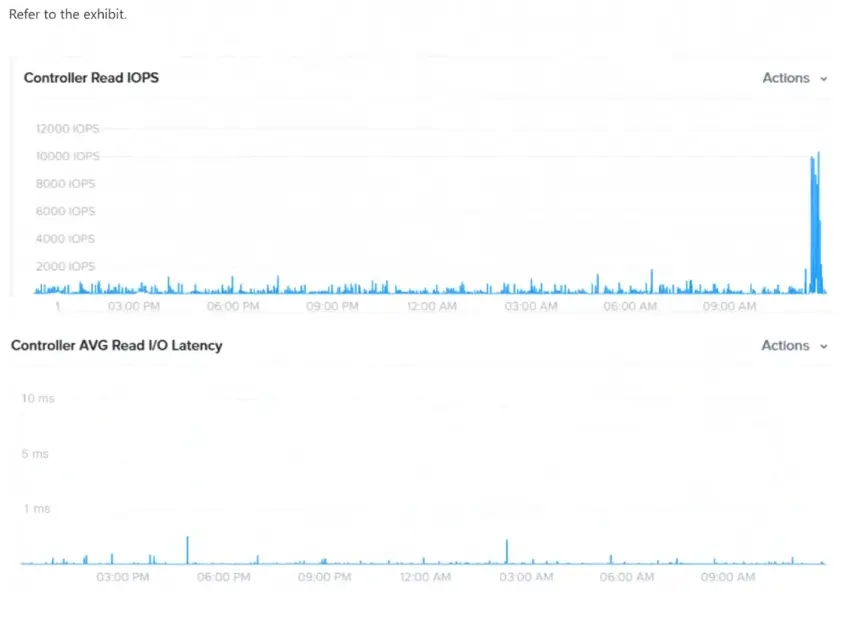
Refer to the exhibit.
An administrator is monitoring cluster I/O and Latency during VDI user logins shortly after 9:00am.
Which option best describes what is shown in this scenario?
Correct Answer:C. Data Locality
Explanation:
Without access to the specific exhibit mentioned, I can provide general analysis of what monitoring cluster I/O and latency during VDI logins typically shows:
Typical Pattern During User Logins:
Spike in Latency: Shortly after login time (9:00am), latency typically spikes due to concurrent profile loading, disk I/O for boot operations, and authentication processes
User profiles are loaded from network storage (FSLogix, UPM, etc.)
VMs boot and load user applications
User data and preferences are retrieved
Peak Activity Period: This typically represents the login storm - when multiple users log in simultaneously
Likely Description: The monitoring graph would show:
A pronounced spike or peak in both I/O operations and latency around 9:00am
Gradual decline as login period progresses
Return to baseline after all users have completed login
What It Indicates: Normal VDI login storm behavior, where concurrent logins create temporary I/O and latency spikes that resolve once login phase completes.