Limited-Time Offer: Enjoy 50% Savings! Ends in 00h 00m 00s Coupon code: 50OFF
Skip to content

Free Nutanix Certified Professional - Multicloud Infrastructure v6.10 NCP-MCI-6.10 Exam Questions

Page: 1 / 13 Total 121 questions

Want more questions? Get Premium Access.

Question 1

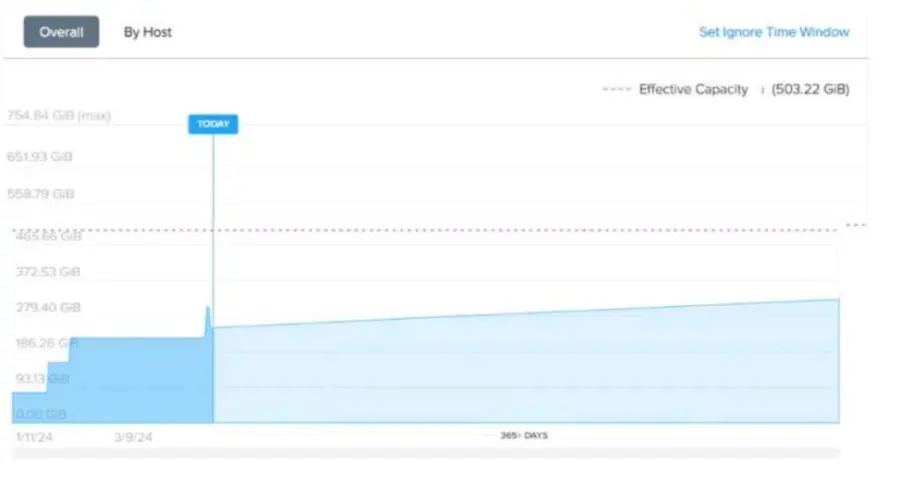
Refer to Exhibit:

An administrator is looking at the memory cluster runway diagram as shown in exhibit, in Prism Central. The environment has three hosts with the following configuration:

CPU: 2x Intel Xeon Gold (8 cores, 2.6 GHz)

RAM: 256 GB per host

Storage: SSDs and HDDs

The Intelligent Operations feature has been active for one month, but no further configurations were applied.

What does the dotted red line mean?

Correct Answer: C. It is the calculated memory oversubscription limit for currently running VMs.

Question 2

Which two entities can be categorized? (Choose two.)

Correct Answer: B. Alerts; C. Virtual Machines
Explanation:

In Nutanix Prism Central, categories allow administrators to group and organize entities for management, automation, and policy enforcement.

Alerts (Option B) can be categorized to group similar system events and create filtering rules.

Virtual Machines (Option C) can be categorized to apply security policies, automation tasks, and resource allocation rules.

Option A (Storage Containers) cannot be categorized in Prism Central. Storage policies apply at the container level but are not managed via categories.

Option D (ISO Images) cannot be categorized because ISOs are static objects, not active entities.

References:

Nutanix Prism Central Guide Working with Categories

Nutanix Bible Category-Based Management and Security Policies

Nutanix KB Using Categories for VM Management in Prism Central


Question 3

An administrator needs to configure NTP on Prism Central running on a Hyper-V cluster.

How should the administrator complete this task?

Correct Answer: A. Add an external NTP server.
Explanation:

Nutanix requires that all cluster components synchronize time using an external NTP (Network Time Protocol) server.

Option A (Adding an external NTP server) is correct because Nutanix best practices recommend using an external time source to prevent clock drift between cluster nodes.

Option B (DNS server IP) is incorrect: A DNS server does not provide NTP services.

Option C (Server with DNS hostname) is incorrect unless the DNS hostname resolves to an NTP server.

Option D (IP of the Domain Controller) is incorrect because not all domain controllers provide NTP services unless explicitly configured.

References:

Nutanix Best Practices: NTP Configuration for Hyper-V Clusters

Nutanix KB: Ensuring Proper Time Synchronization Across Cluster Nodes

Nutanix Documentation: Prism Central NTP Settings Configuration


Question 4

An administrator is tasked with optimizing a VM's storage to leverage compression features. Currently, vDisks are in a storage container default-container-91753272703541 that has no optimization activated. The administrator must move the VM's storage to the storage container Production.

What is the most efficient way to achieve this operation?

Correct Answer: C. Migrate VM to the Production storage container.
Explanation:

The most efficient way to move a VM's storage to a container that has different storage optimization policies (like compression) is to perform a VM migration to the target container. This operation ensures that all the VM's vDisks are moved to the destination container and allows leveraging the configured optimizations on the Production container.

From the Nutanix Enterprise Cloud Administration (ECA) course materials:

''VM migration to another storage container in Nutanix Prism Central is supported and can be performed with minimal disruption. When moving a VM to a new container, it inherits the storage optimization policies of that container, including compression, deduplication, and encryption.''

Furthermore:

''Migrations can be initiated at the VM level in Prism Central or Prism Element. This is the most streamlined method to ensure all vDisks for a VM are moved together, preserving data integrity and performance characteristics.''

Recreating the VM or vDisks would be cumbersome and require manual data copying, introducing potential risks and downtime.


Question 5

An administrator needs to enable Windows Defender Credential Guard to comply with company policy.

The new VM configurations include:

Legacy BIOS

4 vCPUs

8 GB RAM

Windows Server 2019

What must be changed in order to properly enable Windows Defender Credential Guard?

Correct Answer: B. Enable UEFI with Secure Boot.
Explanation:

Windows Defender Credential Guard requires UEFI firmware and Secure Boot to function properly.

Option B (Enable UEFI with Secure Boot) is correct:

Credential Guard requires a UEFI-based boot mode rather than Legacy BIOS.

Secure Boot ensures only trusted OS components load, reducing attack surface for credential theft.

Option A (Update vCPU to 8) is incorrect:

Increasing vCPUs does not impact Credential Guard compatibility.

Option C (Use Windows Server 2022) is incorrect:

Windows Server 2019 supports Credential Guard; upgrading to 2022 is not required.

Option D (Update Memory to 16GB) is incorrect:

Credential Guard has no minimum RAM requirement beyond general OS needs.

References:

Microsoft Docs Requirements for Windows Defender Credential Guard

Nutanix AHV VM Management Guide Enabling Secure Boot & UEFI for Windows VMs


Question 6

Which task should be performed first when upgrading host memory?

Correct Answer: D. Place node into the maintenance mode
Explanation:

The Nutanix ECA course provides detailed procedures for performing hardware upgrades, such as adding host memory, to ensure cluster stability and data availability. Upgrading host memory requires safely preparing the node to avoid disrupting running VMs or cluster operations.

Extract from Nutanix Enterprise Cloud Administration (ECA) Course Documents:

Module: Cluster Management, Section: Hardware Upgrades 'Before performing hardware upgrades, such as adding host memory, the node must be placed into maintenance mode. This ensures that all VMs are migrated to other nodes and the host is safely isolated from cluster operations.'

Module: Host Maintenance, Section: Maintenance Mode 'Placing a node into maintenance mode is the first step for hardware upgrades. Maintenance mode migrates all VMs to other nodes, stops the Controller VM (CVM), and prepares the host for safe shutdown or hardware changes.'

Explanation of Options:

A. Gracefully stop the host by using the out of band management interface This is incorrect. Stopping the host via the out-of-band management interface (e.g., IPMI or iLO) without first entering maintenance mode risks disrupting running VMs and cluster services. The ECA course warns: 'Shutting down a host without maintenance mode can cause VM crashes and data unavailability, as VMs are not migrated.'

B. Remove node from the cluster This is incorrect. Removing a node from the cluster is a permanent action that detaches it from the cluster's metadata and storage pool, requiring re-imaging to rejoin. It is not appropriate for a temporary hardware upgrade like adding memory. The ECA course states: 'Removing a node is not required for hardware upgrades and should be avoided, as it disrupts cluster configuration.'

C. Execute 'shutdown -h now' from the AHV command line interface This is incorrect. Running shutdown -h now on the AHV host without entering maintenance mode will abruptly stop the host, potentially crashing VMs and disrupting cluster operations. The ECA course notes: 'Directly shutting down a host via CLI without maintenance mode risks data loss and service disruption.'

D. Place node into maintenance mode This is the correct answer. Placing the node into maintenance mode is the first step for hardware upgrades, as it safely migrates all VMs to other nodes, stops the CVM, and prepares the host for shutdown or hardware changes. The ECA course emphasizes that maintenance mode ensures cluster stability during upgrades.

Supporting Extract: 'To upgrade host memory, place the node into maintenance mode using Prism Element or the CLI command ncli host maintenance_mode. This ensures safe VM migration and host isolation.'

Additional Context from ECA:

Maintenance Mode Process: In Prism Element, maintenance mode can be enabled under Hardware > Host > Enter Maintenance Mode. The process automatically migrates VMs using live migration, stops the CVM, and isolates the host. For AHV, the CLI command is ncli host maintenance_mode id=<host_id> enable=true.

Memory Upgrade: After entering maintenance mode, the host can be safely powered off to add memory, then powered back on and exited from maintenance mode.

Supporting Reference from Web Results:

The Nutanix Bible (https://www.nutanix.com/go/the-nutanix-bible) confirms: 'Maintenance mode is the required first step for host hardware upgrades, ensuring VMs are migrated and the node is isolated before changes like memory upgrades.'

Question 7

An administrator needs to ensure that a VM is powered on before the rest of the VMs when starting a host.

Which configuration option allows this behavior?

Correct Answer: D. Agent VM
Explanation:

In Nutanix AHV-based clusters, when you want to ensure that a specific VM (e.g., a critical VM like a domain controller) is powered on before other VMs during a host startup or failover scenario, you use the Agent VM configuration setting.

Here's the exact explanation from the Nutanix ECA course:

''Agent VMs are special VMs that are automatically powered on before other user VMs during host startup or recovery. This ensures that critical VMs, such as those that provide essential services, are always available first.''

In contrast:

Recovery Plan (A) --- This is used in the context of DR and failover, typically with Nutanix Leap.

Host Affinity (B) --- Host affinity rules control placement policies of VMs but not startup priority.

High Availability (C) --- HA ensures VMs are restarted on surviving hosts but does not control startup order.

Therefore, setting the VM as an Agent VM guarantees that it is powered on before the other VMs during host start-up. Let me know if you'd like steps on how to configure an Agent VM within Prism Central or Prism Element!


Question 8

An administrator has been tasked with developing a Prism Central Recovery Plan for 50 workloads that will be assigned new IP addresses and will need to utilize a new DNS server upon instantiation of workloads in the Disaster Recovery (DR) location.

What is the best way to accomplish this?

Correct Answer: B. Enable scripting within Recovery Sequence & utilize custom script per VM.
Explanation:

For workloads requiring new IP addresses and DNS server settings during DR recovery, using custom scripting within the Recovery Plan is the recommended and supported method.

From the Nutanix Enterprise Cloud Administration (ECA) course materials:

''Recovery Plans support scripting within the Recovery Sequence to enable administrators to perform post-recovery customization tasks, such as updating IP addresses, configuring DNS, or applying application-specific settings.''

''This scripting capability provides a flexible, automated approach to ensure that VMs are correctly reconfigured to operate within the DR environment's network and DNS settings.''

This avoids the need for manual reconfiguration post-recovery or adjusting settings in production prior to failover.


Question 9

An administrator receives complaints about VM performance.

After reviewing the VM's CPU Ready Time data, which step should the administrator take to diagnose the issue further?

Correct Answer: B. Review host CPU utilization.
Explanation:

CPU Ready Time indicates how long a VM waits for CPU resources due to contention.

Option B (Review host CPU utilization) is correct:

If CPU utilization is high, there may be excessive CPU overcommitment, leading to high CPU Ready Time.

Adding more hosts or reducing vCPU allocations may resolve the issue.

Option A (Check CVM vCPUs) is incorrect:

The Controller VM (CVM) does not directly impact application VM performance in this case.

Option C (Assess SSD capacity) is incorrect:

CPU Ready Time is unrelated to storage performance.

Option D (Enable VM memory oversubscription) is incorrect:

Memory oversubscription does not affect CPU contention.

References:

Nutanix Prism Central Guide Troubleshooting VM Performance

Nutanix KB Identifying High CPU Ready Time and Solutions


Question 10

Which two actions occur by default on a node that is placed in Maintenance Mode? (Choose two.)

Correct Answer: B. All eligible VMs on the host are migrated to other hosts in the cluster.; D. Non-migratable VMs are powered off.
Explanation:

When a node is placed into Maintenance Mode, Nutanix follows a structured process to ensure service continuity and data integrity.

Option B (All eligible VMs on the host are migrated to other hosts) is correct:

Live Migration automatically moves VMs to other hosts to avoid downtime.

This ensures workloads remain operational during maintenance.

Option D (Non-migratable VMs are powered off) is correct:

Some VMs, such as those using GPU pass-through or local storage dependencies, cannot be live-migrated.

These VMs must be powered off before placing the host into Maintenance Mode.

Option A is incorrect:

Non-migratable VMs are not automatically restarted on other hosts---they remain powered off until manually restarted.

Option C is incorrect:

Eligible VMs are live-migrated, not powered off.

References:

Nutanix AHV Best Practices Understanding Maintenance Mode Behavior

Nutanix KB VM Migration and Power-Off Scenarios in Maintenance Mode