Limited-Time Offer: Enjoy 50% Savings! Ends in 00h 00m 00s Coupon code: 50OFF
Skip to content

Free Oracle Solaris 11 System Administration 1Z0-821 Exam Questions

Page: 1 / 17 Total 243 questions

Want more questions? Get Premium Access.

Question 1

A user jack, using a korn shell, requests a directory listing as follows:

jack@solaris:/export/home/jack $ 1s

File filea Filea fileb Fileb filec Filec

Which two statements are correct?

Correct Answer: A. The pattern [?i]*a will expand to filea Filea.; C. The pattern [gfe] * will expand to file filea fileb filec.
Explanation:

A: starting with one single character, second character must be letter i, any characters, ending with letter a.

C: starting with letter e, f, or g, followed by anything.


Question 2

You have been tasked with creating a dedicated virtual network between two local zones within a single system. In order to isolate the network traffic from other zones on that system.

To accomplish this, you will create__________.

Correct Answer: A. An ether stub
Explanation:

Etherstubs are pseudo ethernet NICs which are managed by the system administrator. You can create VNICs over etherstubs instead of over physical links. VNICs over an etherstub become independent of the physical NICs in the system. With etherstubs, you can construct a private virtual network that is isolated both from the other virtual networks in the system and from the external network. For example, you want to create a network environment whose access is limited only to your company developers than to the network at large. Etherstubs can be used to create such an environment.

Note: Oracle Solaris 11 introduces a new and powerful network stack architecture which includes:

* Networking virtualization with virtual network interface cards (VNICs) and virtual switching (etherstubs)

* Tight integration with zones

* Network resource management - efficient and easy to manage integrated quality of service (QoS) to enforce bandwidth limit on VNICs and traffic flows


Question 3

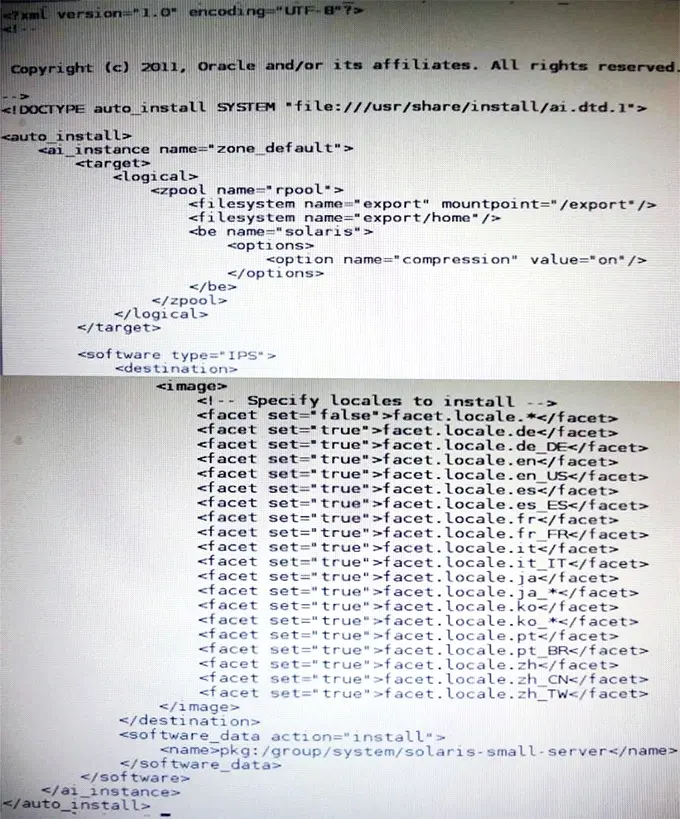
View the Exhibit.

The file came from your Automated Installer (AI) install server.

The file is ____________.

Correct Answer: D. A custom AI manifest
Explanation:

ai_manifest

- Automated installation manifest file format

Synopsis

/usr/share/install/ai.dtd.1

Some customizations have been made, such as the selection of specific locales.


Question 4

New features wore added to ZFS in Oracle Solaris11. Your justification to upgrade from Solaris10 to oracle Solaris11 is that it will be possible to take advantage of the enhancements that were made to ZFS.

Identify the three ZFS functions and features that are included in Oracle Solaris 11, but not in Solaris 10.

Correct Answer: A. Encrypted ZFS datasets; B. Ability for ZFS to detect and remove redundant data from the tile system; C. Shadow Data Migration

Question 5

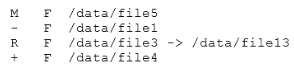
Review the ZFS dataset output that is displayed on your system:

Which four correctly describe the output?

Correct Answer: A. /data/file4 has been added.; C. /data/file3 has been renamed to /data/file13.; E. /data/file1 has been deleted.; G. /data/file5 has been modified.
Explanation:

A: + Indicates the file/directory was added in the later dataset

C: R Indicates the file/directory was renamed in the later dataset

E: - Indicates the file/directory was removed in the later dataset

G: M Indicates the file/directory was modified in the later dataset

Note: Identifying ZFS Snapshot Differences (zfs diff)

You can determine ZFS snapshot differences by using the zfs diff command.

The following table summarizes the file or directory changes that are identified by the zfs diff command.

File or Directory Change Identifier

* File or directory is modified or file or directory link changed

M

* File or directory is present in the older snapshot but not in the newer snapshot

---

* File or directory is present in the newer snapshot but not in the older snapshot

+

* File or directory is renamed

R


Question 6

You are attempting to edit your crontab file in the bash shell. Instead of getting your usual vi interface, you are presented with an unfamiliar interface. In order to have your editor of choice-vi- what command must you type after exiting the unfamiliar editor?

Correct Answer: A. EDITOR=vi
Explanation:

Set the EDITOR variable to vi.

Commands like `crontab -e` will use ed per default. If you'd like to use some better editor (like vi) you can use the environment variable EDITOR:

# EDITOR=vi; crontab --e will open the users crontab in vi. Of course you can set this variable permanently.

Incorrect answers

C: -e Edits a copy of the current user's crontab file, or creates an empty file to edit if crontab does not exist. When editing is complete, the file is installed as the user's crontab file. If a username is given, the specified user's crontab file is edited, rather than the current user's crontab file; this can only be done by a user with the solaris.jobs.admin authorization. The environment variable EDITOR determines which editor is invoked with the -e option. The default editor is ed(1). All crontab jobs should be submitted using crontab. Do not add jobs by just editing the crontab file, because cron is not aware of changes made this way.


Question 7

You want to deploy Oracle Solaris 11 with the Automated Installer (AI). You need to make sure that your server and network meet the requirements for using AI.

Choose the three options that describe the requirements for using AI.

Correct Answer: B. If two client machines have different architectures and need to be installed with the same version of the Oracle Solaris 11 OS, then create two AI manifests and a single install service.; E. The install server needs to be able to access an Oracle Solaris Image Packaging System (IPS) software package repository; the clients do not.; F. The install server can be either an x86 machine or a SPARC machine.
Explanation:

B (not A, not D, Not C): If two client machines need to be installed with the same version of the Oracle Solaris 11 OS but

need to be installed differently in other ways, then create two AI manifests for the AI install service. The different AI manifests can specify different packages to install or a different slice as the install target, for example.

Note: An AI manifest provides installation instructions.

The AI manifest specifies one or more IPS package repositories where the client retrieves the packages needed to complete the installation. The AI manifest also includes the names of additional packages to install and information such as target installation device and partition information.

F: The install server can be either an x86 machine or a SPARC machine.


Question 8

You need to connect two nonglobal zones using a private virtual network.

Identify the network resources required in the global zone to accomplish this.

Correct Answer: A. an etherstub and two virtual network interfaces

Question 9

You need to make sure that all of the software packages on your server are up to date. Without installing any updates, which two commands would display .my software updates that are available in the default Oracle repository?

Correct Answer: A. pkg list -u; D. pkg info --r '*'
Explanation:

A: the pgk list command display a list of packages in the current image, including state and other information. By default, package variants for a different architecture or zone type are excluded.

D: pkginfo displays information about software packages that are installed on the system (with the first synopsis, with -l) or that reside on a particular device or directory (with the second synopsis, with -r).

Without options, pkginfo lists the primary category, package instance, and the names of all completely installed and partially installed packages. It displays one line for each package selected.

With -r, retrieve the data from the repositories of the image's configured publishers. Note that you must specify one or more package patterns in this case.


Question 10

You want to deploy Oracle Solaris 11 with the Automated Installer (AI). You need to make sure that your server and network meet the requirements for using AI.

Identify two requirements for using AI.

Correct Answer: A. You should set up DHCP. The DHCP server and AI install server can be the same machine or two different machines.; D. If two client machines have different architectures and need to be installed with the same version of the Oracle Solaris 11 OS, then you should create two AI manifests and a single install service.
Explanation:

A: An automated installation of a client over the network consists of the following high-level steps:

Step 1. The client system boots over the network and gets its network configuration and the location of the install server from the DHCP server.

Step 2: The install server provides a boot image to the client.

Etc.

D: If two client machines need to be installed with the same version of the Oracle Solaris 11 OS but need to be installed differently in other ways, then create two AI manifests for the AI install service. The different AI manifests can specify different packages to install or a different slice as the install target, for example.


Question 11

Which network protocol provides connectionless, packet-oriented communication between applications?

Correct Answer: B. UDP
Explanation:

The User Datagram Protocol (UDP) is one of the core members of the Internet Protocol Suite, the set of network protocols used for the Internet. With UDP, computer applications can send messages, in this case referred to as datagrams, to other hosts on an Internet Protocol (IP) network without requiring prior communications to set up special transmission channels or data paths.

Compared to TCP, UDP is a simpler message-based connectionless protocol.


Question 12

View the Exhibit.

After Installing the OS, you need to verify the network interface information. Which command was used to display the network interface information in the exhibit?

Correct Answer: B. ipadm show-addr
Explanation:

'ipadm show-addr' displays all the configured addresses on the system.

Example:

# ipadm show-addr

ADDROBJ TYPE STATE ADDR

lo0/v4 static ok 127.0.0.1/8

lo0/v6 static ok ::1/128


Question 13

You are installing Oracle Solaris 11 on a SPARC-based system by using the Test Installer. Which three statements are true?

Correct Answer: B. The root filesystem will always be deployed on ZFS.; D. The network can be configured using DHCP.; E. The set of packages that will be installed are server based.

Question 14

_________ serves as the interface between the SMF repository and the user to ensure that a consistent, picture of the repository is presented to the user.

Correct Answer: D. svc.configd
Explanation:

SVC.CONFIGD is the repository daemon responsible for maintaining /etc/svc/repository.db. The repository.db must come clean during this integrity check otherwise it is a 'no go' for usual boot sequence to run level 3. The repository may get corrupted due to various hardware issues, software bugs, disk write failures, etc.

Note: When svc.configd(1M), the Solaris Repository Daemon, is started, it does an integrity check of the smf(5) repository, stored in /etc/svc/repository.db. This integrity check can fail due to a disk failure, the database file being corrupted either due to a hardware bug, a software bug, or an accidental overwrite. If the integrity check fails, svc.configd will write a message to the console.


Question 15

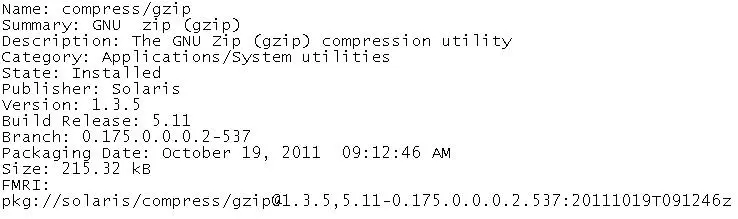
View the following information for a software package:

Which command would you use to display this information for a software package that is not currently installed on your system?

Correct Answer: B. pkg info -r gzip
Explanation:

By default, the pkg info command only lists information about installed packages on the system; however, we can use a similar command to look up information about uninstalled packages, as shown in here:

Example:

Listing Information About an Uninstalled Package

# pkg info -r php-52

Name: web/php-52

Summary: PHP Server 5.2

Description: PHP Server 5.2

Category: Development/PHP

State: Not Installed

Publisher: solaris

Build Release: 5.11

Branch: 0.175.0.0.0.1.530

Packaging Date: Wed Oct 12 14:01:41 2011

Size: 44.47 MB

FMRI: pkg://solaris/web/php-52@5.2.17, 5.11-0.175.0.0.0.1.530:20111012T140141Z

Note: pkg info command displays information about packages in a human-readable form.

Multiple FMRI patterns may be specified; with no patterns, display information on all installed packages in the image.

With -l, use the data available from locally installed packages.

This is the default.

With -r, retrieve the data from the repositories of the image's configured publishers. Note that you must specify one or more package patterns in this case.