
Limited-Time Offer: Enjoy 50% Savings! Ends in 00h 00m 00s Coupon code: 50OFF
Skip to content

Free Palo Alto Networks SD-WAN Engineer SD-WAN-Engineer Exam Questions

Page: 1 / 9 Total 86 questions

Want more questions? Get Premium Access.

Question 1

There are periodic complaints about the poor performance of a real-time application.
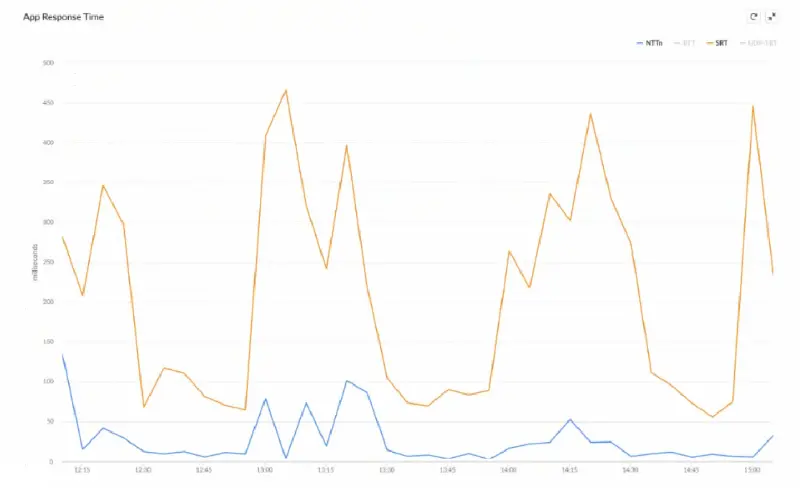
What can be inferred about the performance issue, based on the Network Transfer Time (NTT) and Server Response Time (SRT) image below?

Correct Answer: C. The SRT value increases periodically due to Application Server side issues.
Explanation:

In Prisma SD-WAN, application performance is monitored through distinct metrics that separate network health from application health. The provided graph displays Network Transfer Time (NTT) in blue and Server Response Time (SRT) in orange. NTT measures the round-trip time of packets traversing the WAN fabric, while SRT measures the time elapsed from when the server receives a request to when it sends the first response packet.

Analysis of the telemetry data shows that the NTT (blue line) remains consistently low and stable, generally staying below 100 milliseconds throughout the capture period. This indicates that the SD-WAN path and underlying network circuits are not the source of the latency. Conversely, the SRT (orange line) exhibits significant and erratic spikes, reaching as high as 450 to 475 milliseconds. These spikes occur while the network latency (NTT) remains flat.

Because the latency increases are isolated to the SRT metric, the root cause is confirmed to be on the Application Server side. This pattern typically suggests that the server is struggling with resource exhaustion, high CPU utilization, or database query delays during peak processing times. For a real-time application, these SRT spikes translate directly to jitter and 'lag' for the end-user. By distinguishing between these two metrics, Prisma SD-WAN allows network administrators to prove that the network is performing within SLA and shift the troubleshooting focus to the application or server management teams, significantly reducing mean time to innocence (MTTI).

Question 2

In a Prisma SD-WAN deployment, what is the defining characteristic of a "Standard VPN" compared to a "Secure Fabric Link"?

Correct Answer: C. Standard VPNs are manually configured IPSec tunnels to non-ION endpoints, while Secure Fabric Links are automated tunnels between ION devices.
Explanation:

Comprehensive and Detailed Explanation

In the Prisma SD-WAN architecture, the terminology distinguishes between 'Native' automation and 'Legacy' interoperability.

Secure Fabric Links: These are the proprietary, automated overlay tunnels created between two Prisma SD-WAN ION devices (e.g., Branch ION to Data Center ION). The controller automatically manages the IP addressing, key rotation, and routing for these links. You do not manually configure 'Phase 1' or 'Phase 2' parameters for Secure Fabric links.

Standard VPNs: These are traditional, standards-based IPSec tunnels configured to connect an ION device to a Non-ION endpoint (Third-Party Peer). This is used for 'Data Center to Data Center' connections where one side is a legacy firewall (e.g., Cisco ASA, Palo Alto Networks NGFW) or for connecting to cloud security services (SSE) that do not have a specific CloudBlade integration. For a Standard VPN, the administrator must manually define the IKE/IPSec profiles, pre-shared keys, and peer IP addresses to match the third-party device's configuration.


Question 3

An administrator is configuring a High Availability (HA) pair of ION 3000 devices at a Data Center.

Which statement accurately describes the requirement for the HA Control Interface connection between the two devices?

Correct Answer: B. The HA Control interface must be a direct physical connection or a Layer 2 adjacent connection on a dedicated VLAN, with no routing between them.
Explanation:

Comprehensive and Detailed Explanation

In a Prisma SD-WAN High Availability (HA) deployment, the HA Control Interface is the critical lifeline used to synchronize state, heartbeats, and flow information between the Active and Standby ION devices.

The strict requirement for this connection is that it must be Layer 2 adjacent.

Best Practice: A direct physical cable connection between the designated HA ports of the two devices (e.g., Port 2 on Device A to Port 2 on Device B).

Alternative: Connectivity through a switch on a dedicated, isolated VLAN is supported, provided the devices are in the same broadcast domain and subnet.

Routing (Layer 3) is not supported for the HA Control link because the keepalive mechanism relies on low-latency, multicast/broadcast-level adjacency to detect failures instantly (sub-second failover). If the HA link were routed (Option A), network latency or router convergence issues could cause 'Split-Brain' scenarios where both devices assume the Active role, leading to IP conflicts and traffic loops. Option C is incorrect because the Controller is too slow to manage real-time failover; the decision must be local.


Question 4

A network installer is attempting to claim a new ION device using the "Claim Code" method. The device is connected to the internet, but the status in the portal remains stuck at "Claimed" and does not transition to "Online". The installer connects a laptop to the LAN port of the ION and can successfully browse the internet, confirming the uplink is active.

What is the most likely cause of the device failing to reach the "Online" state?

Correct Answer: B. The upstream firewall is blocking outbound TCP port 443 or UDP port 123 (NTP).
Explanation:

Comprehensive and Detailed Explanation

The transition from 'Claimed' to 'Online' depends entirely on the ION device's ability to establish a secure, persistent management tunnel to the Prisma SD-WAN Controller.

Connectivity Requirements: The ION device initiates an outbound connection to the controller on TCP Port 443 (HTTPS). It also requires accurate time synchronization to validate SSL certificates, necessitating access to NTP (UDP Port 123).

Scenario Analysis: Since the installer can browse the internet from the LAN, we know the physical link and basic routing/NAT are functional. The issue is specific to the management plane traffic.

Root Cause: If an upstream firewall (e.g., a corporate edge firewall or ISP filter) is inspecting SSL traffic or blocking specific FQDNs/Ports required by the ION, the device cannot complete the handshake. Consequently, it remains 'Claimed' (registered in the database) but cannot go 'Online' (active management session). Options A, C, and D prevent provisioning (configuration push) but generally do not prevent the device from initially checking in and going 'Online' if the pipe is open.


Question 5

When defining a Path Quality Profile (SLA) for a "Transactional" application group (e.g., Citrix, Oracle), the administrator sets the "Packet Loss" threshold to 1%.

What happens to the traffic for this application if all active paths currently exceed this 1% loss threshold?

Correct Answer: B. The system selects the best available path (lowest loss) among the active paths, even if it violates the profile.
Explanation:

Comprehensive and Detailed Explanation

This behavior describes the 'Best Available Path' logic inherent in Prisma SD-WAN's availability design.

SLA Thresholds: Path Quality Profiles act as filters to identify compliant paths.

Total Violation: If all configured 'Active' paths violate the SLA (e.g., Path A has 2% loss, Path B has 5% loss, and the threshold is 1%), the system does not drop the traffic (Option A) because maintaining connectivity is prioritized over perfect quality.

Selection Logic: The system enters a fallback state where it compares the available active paths and selects the 'Least Bad' one---the path that is closest to meeting the SLA (in this case, Path A with 2% loss).

Backup Paths: Traffic would only move to a Backup path (Option D) if the policy explicitly configures the backup path to engage upon SLA violation of the active set. However, strictly speaking, if only active paths are considered and all fail, it picks the best of the active group rather than blackholing the traffic.


Question 6

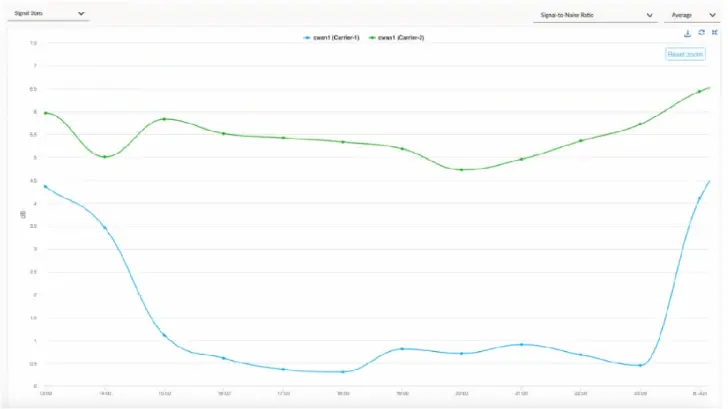
When troubleshooting an issue at a site that is running on two cellular links from two carriers, the operations team shared some evidence shown in the graph below:

For the time duration shown in the graph, what are two inferences about the site's traffic that can be made? (Choose two.)

Correct Answer: A. Using Carrier-1 as the WAN path may have experienced some performance degradation.; D. Using Carrier-1 as the WAN path may have switched over to Carrier-2.
Explanation:

The provided graph displays the Signal-to-Noise Ratio (SNR) for two cellular carriers, Carrier-1 (blue line) and Carrier-2 (green line), over a specific period. In cellular communications, SNR is a critical metric used to determine the quality of a wireless signal. A higher SNR indicates a cleaner, stronger signal, while a lower SNR indicates that the signal is being 'drowned out' by background noise or interference, which directly correlates to performance degradation, packet loss, and lower throughput.

Looking at the graph, Carrier-1 experiences a significant and sustained drop in SNR, falling from roughly 4.5 dB to nearly 0.5 dB for the majority of the time duration. This drastic reduction in signal quality strongly suggests that Carrier-1 may have experienced performance degradation (Option A). During this dip, the link quality would likely fall below the configured thresholds for business-critical application traffic.

Because Prisma SD-WAN is an application-defined fabric that continuously monitors path health, the ION device would detect this degradation on Carrier-1. If Carrier-2 maintains a significantly higher and more stable SNR (as shown by the green line remaining between 4.5 dB and 6.5 dB), the ION device's Path Selection engine would automatically steer traffic away from the degraded link. Consequently, it is highly probable that Carrier-1 traffic switched over to Carrier-2 (Option D) to maintain the application SLA. This automated failover is a core strength of the Prisma SD-WAN architecture, ensuring that the best available path is utilized based on real-time link statistics rather than simple 'up/down' states.


Question 7

When an ION device has been claimed, the cloud-based controller generates and communicates with the device by which method?

Correct Answer: A. Manufacturer Installed Certificate (MIC)
Explanation:

In the Prisma SD-WAN (formerly CloudGenix) architecture, the security and authenticity of device-to-controller communication are paramount. When a new ION (Instant-On Network) device is powered on and connected to the internet, it initiates a secure 'phone home' process to the Prisma SD-WAN Cloud Controller. To ensure that the controller is communicating with a genuine Palo Alto Networks hardware or software instance, the system utilizes a Manufacturer Installed Certificate (MIC).

The MIC is a unique digital certificate burned into the hardware's Trusted Platform Module (TPM) or secure storage during the manufacturing process. This certificate acts as the device's foundational identity. When a customer 'claims' a device in the Prisma SD-WAN portal using its serial number, the controller maps that serial number to the specific MIC associated with that unit.

Once the device is claimed and attempts to connect, a mutual TLS (mTLS) handshake occurs. The ION device presents its MIC to the controller to prove its identity, and the controller validates this against its records. This method eliminates the need for manual staging, pre-configuration, or the complexity of managing a Customer Installed Certificate (CIC) or a private Public Key Infrastructure (PKI) during the initial deployment phase. By leveraging the MIC, Prisma SD-WAN achieves true Zero Touch Provisioning (ZTP), ensuring that only authorized, authentic devices can join the fabric and receive configuration policies, thereby maintaining a secure and automated onboarding workflow.


Question 8

Site templates are to be used for the large-scale deployment of 100 Prisma SD-WAN branch sites across different regions.

Which two statements align with the capabilities and best practices for Prisma SD-WAN site templates? (Choose two.)

Correct Answer: B. Mandatory variables for any site template include the site name, ION software version, and at least one ION serial number /device name pair.; C. Site templates offer the capability to pre-stage device configurations by creating a device shell.
Explanation:

Comprehensive and Detailed Explanation

Site Templates (often referred to as Site Configuration Templates) are a critical tool for the Zero Touch Provisioning (ZTP) of large-scale deployments in Prisma SD-WAN.

1. Device Pre-staging (Statement C):

One of the primary capabilities of Site Templates is the creation of Device Shells. A device shell is a configuration container that exists in the controller before the physical hardware is installed or connected. By using a template, an administrator can pre-provision the entire configuration (interfaces, routing, subnets) for the 'Site' and 'Element' (Device). When the physical ION device is later connected to the internet and claimed (associated with the shell via its Serial Number), it immediately inherits this pre-staged configuration, enabling a true 'plug-and-play' deployment.

2. Mandatory Variables (Statement B):

To successfully instantiate a functional site from a generic template, specific unique identifiers are required in the variable data set (typically a CSV file).

Site Name: Identifies the location in the portal.

ION Software Version: Ensures the device boots to the specific validated code version required for the deployment, preventing inconsistencies.

ION Serial Number / Device Name: Required to bind the logical configuration (Shell) to the physical hardware. Even if the serial is added later during the claim process, the structure of the template and the deployment workflow mandates these variables to ensure the device can be uniquely identified and managed within the fabric.

Note on Option D: While it is technically possible to re-deploy a template, the Best Practice for 'Day 2' operations (updating or modifying configuration after deployment) is to use Prisma SD-WAN Stacks (Network Stacks, Security Stacks, etc.). Stacks allow for granular, policy-based updates across multiple sites without the destructive or rigid nature of re-applying a full site initialization template. Therefore, D is not the aligned best practice.


Question 9

In a Data Center deployment, what is the key functional difference between configuring a BGP neighbor as a "Core Peer" versus an "Edge Peer"?

Correct Answer: A. A Core Peer is used for LAN-side routing to learn DC prefixes, while an Edge Peer is used for WAN-side routing to the Service Provider.
Explanation:

Comprehensive and Detailed Explanation

In the Prisma SD-WAN Data Center (DC) model, the terminology for BGP peers defines their role in the topology and how the system generates route maps.

Core Peer: This peer type is designated for the LAN-side connection (facing the DC Core Switch or internal Routers). Its primary purpose is to learn the subnets/prefixes hosted in the data center so the ION can advertise them to the remote branches. The system automatically creates route maps to facilitate this redistribution into the fabric.

Edge Peer: This peer type is designated for the WAN-side connection (facing the Edge Router or MPLS PE). Its primary purpose is to provide reachability to the underlay network.

Distinction: Selecting the correct type affects the default Route Maps and Prefix Lists generated by the controller. Configuring a Core Peer correctly ensures that the DC's internal subnets are properly learned and propagated to the overlay, whereas an Edge Peer configuration focuses on WAN next-hop reachability.


Question 10

An administrator is configuring an ION 2000 device for a deployment where high availability is required, but the site has only a single internet circuit. The administrator configures a Bypass Pair (Fail-to-Wire) on ports 1 and 2 connecting the ISP modem to the legacy firewall.

If the ION device loses power, what is the resulting behavior of the traffic flowing through this Bypass Pair?

Correct Answer: B. The internal relay closes, physically bridging Port 1 and Port 2, allowing traffic to flow transparently between the modem and firewall.
Explanation:

Comprehensive and Detailed Explanation

The Bypass Pair feature on Prisma SD-WAN ION devices (specifically supported models like ION 2000, 3000, 7000, 9000) is a hardware-based resiliency mechanism known as Fail-to-Wire.

Operation: A 'Bypass Pair' logically groups two physical interfaces (e.g., WAN 1 and LAN 1). Under normal operation, the ION processes traffic between them.

Power Loss: In the event of a total power loss (or critical software failure), a mechanical relay inside the device physically closes the circuit between the two ports.

Result: This creates a direct electrical connection (like a patch cable) between the upstream device (ISP Modem) and the downstream device (Legacy Firewall or Router). This ensures that internet connectivity is preserved for the site, even if the SD-WAN appliance is completely dead. This is critical for single-point-of-failure deployments where maintaining basic dial-tone is more important than SD-WAN optimization during a hardware outage.