Limited-Time Offer: Enjoy 50% Savings! Ends in 00h 00m 00s Coupon code: 50OFF
Skip to content

Free Palo Alto Networks XDR Analyst XDR-Analyst Exam Questions

Page: 1 / 10 Total 91 questions

Want more questions? Get Premium Access.

Question 1

Which engine, of the following, in Cortex XDR determines the most relevant artifacts in each alert and aggregates all alerts related to an event into an incident?

Correct Answer: B. Causality Analysis Engine
Explanation:

The engine that determines the most relevant artifacts in each alert and aggregates all alerts related to an event into an incident is the Causality Analysis Engine. The Causality Analysis Engine is one of the core components of Cortex XDR that performs advanced analytics on the data collected from various sources, such as endpoints, networks, and clouds. The Causality Analysis Engine uses machine learning and behavioral analysis to identify the root cause, the attack chain, and the impact of each alert. It also groups related alerts into incidents based on the temporal and logical relationships among the alerts.The Causality Analysis Engine helps to reduce the noise and complexity of alerts and incidents, and provides a clear and concise view of the attack story12.

Let's briefly discuss the other options to provide a comprehensive explanation:

A . Sensor Engine: This is not the correct answer. The Sensor Engine is not responsible for determining the most relevant artifacts in each alert and aggregating all alerts related to an event into an incident. The Sensor Engine is the component that runs on the Cortex XDR agents installed on the endpoints. The Sensor Engine collects and analyzes endpoint data, such as processes, files, registry keys, network connections, and user activities.The Sensor Engine also enforces the endpoint security policies and performs prevention and response actions3.

C . Log Stitching Engine: This is not the correct answer. The Log Stitching Engine is not responsible for determining the most relevant artifacts in each alert and aggregating all alerts related to an event into an incident. The Log Stitching Engine is the component that runs on the Cortex Data Lake, which is the cloud-based data storage and processing platform for Cortex XDR. The Log Stitching Engine normalizes and stitches together the data from different sources, such as firewalls, proxies, endpoints, and clouds.The Log Stitching Engine enables Cortex XDR to correlate and analyze data from multiple sources and provide a unified view of the network activity and threat landscape4.

D . Causality Chain Engine: This is not the correct answer. Causality Chain Engine is not a valid name for any of the Cortex XDR engines. There is no such engine in Cortex XDR that performs the function of determining the most relevant artifacts in each alert and aggregating all alerts related to an event into an incident.

In conclusion, the Causality Analysis Engine is the engine that determines the most relevant artifacts in each alert and aggregates all alerts related to an event into an incident. By using the Causality Analysis Engine, Cortex XDR can provide a comprehensive and accurate detection and response capability for security analysts.


Cortex XDR Pro Admin Guide: Causality Analysis Engine

Cortex XDR Pro Admin Guide: View Incident Details

Cortex XDR Pro Admin Guide: Sensor Engine

Cortex XDR Pro Admin Guide: Log Stitching Engine
Question 2

What license would be required for ingesting external logs from various vendors?

Correct Answer: C. Cortex XDR Pro per TB
Explanation:

To ingest external logs from various vendors, you need a Cortex XDR Pro per TB license. This license allows you to collect and analyze logs from Palo Alto Networks and third-party sources, such as firewalls, proxies, endpoints, cloud services, and more. You can use the Log Forwarding app to forward logs from the Logging Service to an external syslog receiver. The Cortex XDR Pro per Endpoint license only supports logs from Cortex XDR agents installed on endpoints. The Cortex XDR Vendor Agnostic Pro and Cortex XDR Cloud per Host licenses do not exist.Reference:

Features by Cortex XDR License Type

Log Forwarding App for Cortex XDR Analytics

SaaS Log Collection


Question 3

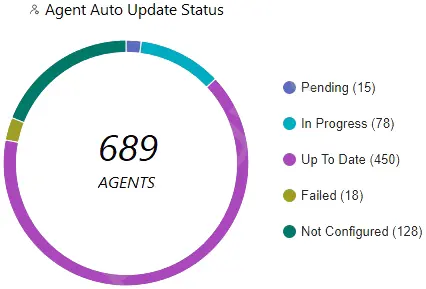
Which statement is true based on the following Agent Auto Upgrade widget?

Correct Answer: B. Agent Auto Upgrade was enabled but not on all endpoints.
Explanation:

The Agent Auto Upgrade widget shows the status of the agent auto upgrade feature on the endpoints. The widget displays the number of agents that are up to date, in progress, pending, failed, and not configured. In this case, the widget shows that there are 450 agents that are up to date, 78 in progress, 15 pending, 18 failed, and 128 not configured. This means that the agent auto upgrade feature was enabled but not on all endpoints.Reference:

Cortex XDR Agent Auto Upgrade

PCDRA Study Guide


Question 4

What are two purposes of ''Respond to Malicious Causality Chains'' in a Cortex XDR Windows Malware profile? (Choose two.)

Correct Answer: B. Automatically kill the processes involved in malicious activity.; D. Automatically block the IP addresses involved in malicious traffic.
Explanation:

The ''Respond to Malicious Causality Chains'' feature in a Cortex XDR Windows Malware profile allows the agent to take automatic actions against network connections and processes that are involved in malicious activity on the endpoint.The feature has two modes: Block IP Address and Kill Process1.

The two purposes of ''Respond to Malicious Causality Chains'' in a Cortex XDR Windows Malware profile are:

Automatically kill the processes involved in malicious activity. This can help to stop the malware from spreading or doing any further damage.

Automatically block the IP addresses involved in malicious traffic. This can help to prevent the malware from communicating with its command and control server or other malicious hosts.

The other two options, automatically close the connections involved in malicious traffic and automatically terminate the threads involved in malicious activity, are not specific to ''Respond to Malicious Causality Chains''. They are general security measures that the agent can perform regardless of the feature.


Cortex XDR Agent Security Profiles

Cortex XDR Agent 7.5 Release Notes

PCDRA: What are purposes of ''Respond to Malicious Causality Chains'' in ...

Question 5

Which of the following paths will successfully activate Remediation Suggestions?

Correct Answer: B. Causality View > Actions > Remediation Suggestions
Explanation:

Remediation Suggestions is a feature of Cortex XDR that provides you with recommended actions to remediate the root cause and impact of an incident. Remediation Suggestions are based on the analysis of the causality chain, the behavior of the malicious files or processes, and the best practices for incident response. Remediation Suggestions can help you to quickly and effectively contain and resolve an incident, as well as prevent future recurrence.

To activate Remediation Suggestions, you need to follow these steps:

In the Cortex XDR management console, go toIncidentsand select an incident that you want to remediate.

ClickCausality Viewto see the graphical representation of the causality chain of the incident.

ClickActionsand selectRemediation Suggestions. This will open a new window that shows the suggested actions for each node in the causality chain.

Review the suggested actions and select the ones that you want to apply. You can also edit or delete the suggested actions, or add your own custom actions.

ClickApplyto execute the selected actions on the affected endpoints. You can also schedule the actions to run at a later time or date.


Remediate Changes from Malicious Activity: This document explains how to use Remediation Suggestions to remediate the root cause and impact of an incident.

Causality View: This document describes how to use Causality View to investigate the causality chain of an incident.

Question 6

What is the outcome of creating and implementing an alert exclusion?

Correct Answer: B. The Cortex XDR console will hide those alerts.
Explanation:

The outcome of creating and implementing an alert exclusion is that the Cortex XDR console will hide those alerts that match the exclusion criteria. An alert exclusion is a policy that allows you to filter out alerts that are not relevant, false positives, or low priority, and focus on the alerts that require your attention. When you create an alert exclusion, you can specify the criteria that define which alerts you want to exclude, such as alert name, severity, source, or endpoint. After you create an alert exclusion, Cortex XDR will hide any future alerts that match the criteria, and exclude them from incidents and search query results. However, the alert exclusion does not affect the behavior of the Cortex XDR agent or the security policy on the endpoint. The Cortex XDR agent will still create an alert for the event and apply the appropriate action, such as blocking or quarantining, according to the security policy. The alert exclusion only affects the visibility of the alert on the Cortex XDR console, not the actual protection of the endpoint.Therefore, the correct answer is B, the Cortex XDR console will hide those alerts12


Alert Exclusions

Create an Alert Exclusion Policy

Question 7

What is an example of an attack vector for ransomware?

Correct Answer: C. Phishing emails containing malicious attachments
Explanation:

An example of an attack vector for ransomware is phishing emails containing malicious attachments. Phishing is a technique that involves sending fraudulent emails that appear to come from a legitimate source, such as a bank, a company, or a government agency. The emails typically contain a malicious attachment, such as a PDF document, a ZIP archive, or a Microsoft Office document, that contains ransomware or a ransomware downloader. When the recipient opens or downloads the attachment, the ransomware is executed and encrypts the files or data on the victim's system. The attacker then demands a ransom for the decryption key, usually in cryptocurrency.

Phishing emails are one of the most common and effective ways of delivering ransomware, as they can bypass security measures such as firewalls, antivirus software, or URL filtering. Phishing emails can also exploit the human factor, as they can trick the recipient into opening the attachment by using social engineering techniques, such as impersonating a trusted sender, creating a sense of urgency, or appealing to curiosity or greed. Phishing emails can also target specific individuals or organizations, such as executives, employees, or customers, in a technique called spear phishing, which increases the chances of success.

According to various sources, phishing emails are the main vector of ransomware attacks, accounting for more than 90% of all ransomware infections12.Some of the most notorious ransomware campaigns, such as CryptoLocker, Locky, and WannaCry, have used phishing emails as their primary delivery method3. Therefore, it is essential to educate users on how to recognize and avoid phishing emails, as well as to implement security solutions that can detect and block malicious attachments.Reference:

Top 7 Ransomware Attack Vectors & How to Avoid Becoming a Victim - Bitsight

What Is the Main Vector of Ransomware Attacks? A Definitive Guide

CryptoLocker Ransomware Information Guide and FAQ

[Locky Ransomware Information, Help Guide, and FAQ]

[WannaCry ransomware attack]


Question 8

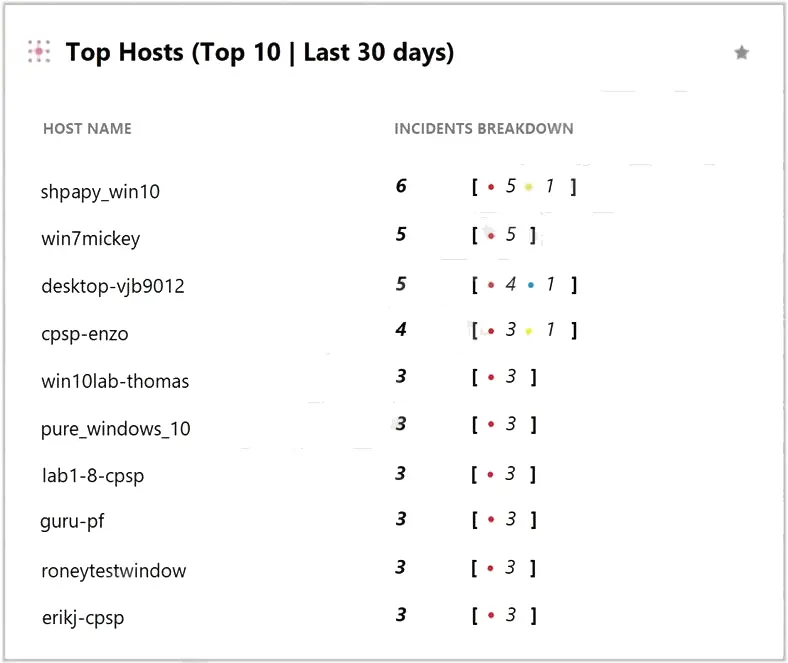
What does the following output tell us?

Correct Answer: D. This is an actual output of the Top 10 hosts with the most malware.
Explanation:

The output shows the top 10 hosts with the most malware in the last 30 days, based on the Cortex XDR data. The output is sorted by the number of incidents, with the host with the most incidents at the top. The output also shows the number of alerts, the number of endpoints, and the percentage of endpoints for each host. The output is generated by using the ACC (Application Command Center) feature of Cortex XDR, which provides a graphical representation of the network activity and threat landscape. The ACC allows you to view and analyze various widgets, such as the Top 10 hosts with the most malware, the Top 10 applications by bandwidth, the Top 10 threats by count, and more .


Use the ACC to Analyze Network Activity

Top 10 Hosts with the Most Malware

Question 9

What is the difference between presets and datasets in XQL?

Correct Answer: B. A dataset is a built-in or third-party source; presets group XDR data fields.
Explanation:

The difference between presets and datasets in XQL is that a dataset is a built-in or third-party data source, while a preset is a group of XDR data fields. A dataset is a collection of data that you can query and analyze using XQL. A dataset can be a Cortex data lake data source, such as endpoints, alerts, incidents, or network flows, or a third-party data source, such as AWS CloudTrail, Azure Activity Logs, or Google Cloud Audit Logs. A preset is a predefined set of XDR data fields that are relevant for a specific use case, such as process execution, file operations, or network activity. A preset can help you simplify and standardize your XQL queries by selecting the most important fields for your analysis. You can use presets with any Cortex data lake data source, but not with third-party data sources.Reference:

Datasets and Presets

XQL Language Reference


Question 10

What kind of the threat typically encrypts user files?

Correct Answer: A. ransomware
Explanation:

Ransomware is a type of malicious software, or malware, that encrypts user files and prevents them from accessing their data until they pay a ransom. Ransomware can affect individual users, businesses, and organizations of all kinds. Ransomware attacks can cause costly disruptions, data loss, and reputational damage. Ransomware can spread through various methods, such as phishing emails, malicious attachments, compromised websites, or network vulnerabilities. Some ransomware variants can also self-propagate and infect other devices or networks. Ransomware authors typically demand payment in cryptocurrency or other untraceable methods, and may threaten to delete or expose the encrypted data if the ransom is not paid within a certain time frame. However, paying the ransom does not guarantee that the files will be decrypted or that the attackers will not target the victim again.Therefore, the best way to protect against ransomware is to prevent infection in the first place, and to have a backup of the data in case of an attack123456


What is Ransomware? | How to Protect Against Ransomware in 2023

Ransomware - Wikipedia

What is ransomware? | Ransomware meaning | Cloudflare

What Is Ransomware? | Ransomware.org

Ransomware --- FBI