
Question 1
To modify an object's default properties before use in a project, which setting must be updated?
Correct Answer:
A. Naming Rules
To modify an object's default properties before use in a project, which setting must be updated?
Which of the following controls cannot be added to the Windows form?
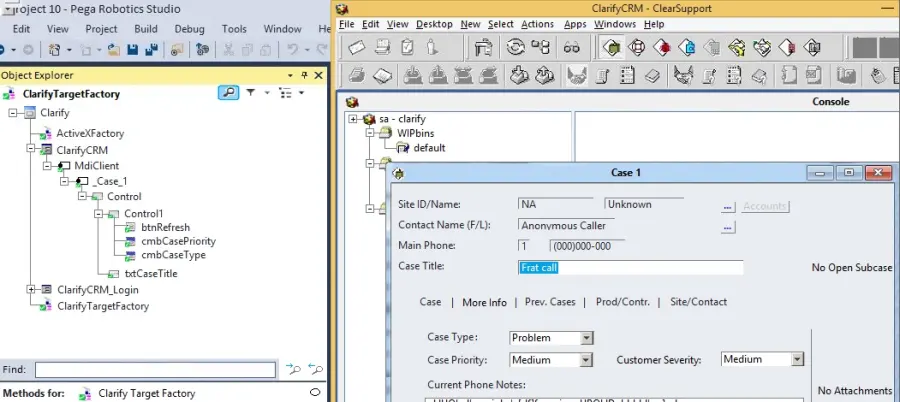
During application discovery of a Clarify application, you determine that the user accesses more than one customer case concurrently within the application, which creates multiple windows of the same type. This requires you to enable the UseKeys property on an application's object.
Based on the image that shows the application and the matched controls in the Object Explorer, which control's UseKeys property must be set to True?
While interrogating a web application, you discover a hidden menu item: AddressType. The AddressType menu item activates when the pointer hovers over the control, and the menu displays a drop-down list.
Which two options can you use to interrogate this hidden drop-down list control? (Choose Two)
Comprehensive and Detailed Explanation From Pega Robotics System Exact Extract:
During interrogation of web applications, developers often encounter dynamic or hidden controls --- such as drop-down menus or hover-triggered lists --- that do not immediately appear on the page.
To successfully interrogate these elements, Pega Robot Studio provides two essential tools:
The Delay option on the Interrogation Form, which allows the developer time to trigger the hidden control before capture.
The Select Element option, which enables precise selection of an element directly from the DOM, even if it is not immediately visible.
According to the Pega Robotics System Design and Implementation Guide, section ''Interrogating Dynamic and Hidden Web Controls'':
''When interrogating hidden or dynamically rendered controls:
Use the Delay option on the Interrogation Form to give yourself time to hover over or activate a hidden control before Robot Studio attempts to capture it.
Use the Select Element option to manually highlight and select a control from the web application's DOM, even when it is displayed only after an interaction such as mouse hover.
These methods are particularly effective for controls that expand or render asynchronously, such as drop-down menus or tooltip-triggered elements.''
Detailed Step Reasoning:
C . Use the Delay option on the Interrogation Form.
Correct.
The Delay setting pauses the interrogation process for a specified number of seconds, allowing you to hover over the hidden element (e.g., AddressType menu) and make it visible before capture.
Once the menu appears, Pega Robot Studio can detect and interrogate it.
D . On the Interrogation Form, select Select Element.
Correct.
The Select Element tool allows manual selection of an element directly from the web page's HTML DOM structure.
This is especially useful for hidden or dynamically rendered elements like the AddressType dropdown that may not be visible until hovered over.
Incorrect Options Explained:
A . In the Interrogation Form dialog box, select HTML Table Editor.
Incorrect.
The HTML Table Editor is used to inspect and modify HTML table-based controls (grid or table structures), not dynamic menus.
B . On the Web Controls tab, select the page, and then click List Web Controls.
Incorrect.
The List Web Controls option lists already recognized controls in the DOM but cannot reveal or capture hidden dynamic elements.
E . On the Application tab, click the Virtual Controls tab.
Incorrect.
Virtual Controls are used for defining custom controls when the default adapter cannot identify one, not for capturing hidden menu elements.
Final Correct Answer:
C . Use the Delay option on the Interrogation Form.
D . On the Interrogation Form, select Select Element.
Extracted and verified from Pega Robotics System Design and Implementation Guide, Interrogating Dynamic, Hidden, and Hover-Activated Controls section (Pega Robotics 19.1 and later).
Which project property setting do you set to True to automatically adjust the version numbering when deploying a project?
A. Environment Overrides B. Version field C. Description field D. Increase Deployment Version
Comprehensive and Detailed Explanation From Pega Robotics System Exact Extract:
In Pega Robot Studio, the Increase Deployment Version property in the project settings is used to automatically update the deployment version number each time the project is deployed. This ensures version consistency across builds and deployments in environments managed by Pega Robot Manager.
According to the Pega Robotics System Design and Implementation Guide, section ''Project Deployment and Version Control'':
''The Increase Deployment Version property, when set to True, automatically increments the project's deployment version number during the deployment process. This feature helps maintain proper version tracking and eliminates the need for manual version adjustments before deployment.''
Detailed Reasoning:
A project requirement is to run the solution in multiple environments: Development and Production.
Which two items can be added to the two Project Configuration files? (Choose two.)
You are debugging a script component for your project. When the automation executes your script, the intended result does not occur. You suspect that one or more variables within your script are not being set to the proper value. Your version of Pega Robot Studio does not support the use of breakpoints within the script designer.
In what two ways can you debug the script? (Choose two.)
You are deploying a robotic project to Pega Robot Manager. Which file stores the Pega Robot Manager server settings?
A. PegaStudioConfig.xml B. CommonConfig.xml C. PegaRuntimeConfig.xml D. PegaConfig.xml
Comprehensive and Detailed Explanation From Pega Robotics System Exact Extract:
When deploying robotic solutions to Pega Robot Manager, the connection and authentication details --- such as Robot Manager server URL, authentication mode, and registration configuration --- are stored in the file CommonConfig.xml. This configuration file is shared between both Pega Robot Studio and Pega Robot Runtime, ensuring that both use consistent connectivity settings.
According to the Pega Robotics System Design and Implementation Guide, section ''Pega Robot Manager Integration and Configuration Files'':
''The CommonConfig.xml file contains shared configuration information that is used by both Pega Robot Studio and Pega Robot Runtime. It includes global settings such as:
Connection information for Pega Robot Manager (URL, ports, authentication)
Deployment configuration values
Environment registration and runtime connectivity settings.
PegaRuntimeConfig.xml and PegaStudioConfig.xml are used for local settings only, while CommonConfig.xml stores the Robot Manager connection configuration used during deployment.''
Detailed Reasoning:
The variable varInput is a String that holds the value What is the output?
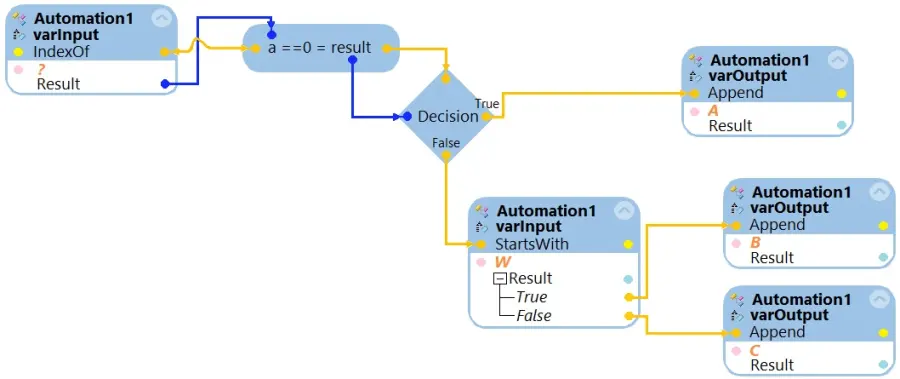
What is the outcome of the above automation?
Which two statements are valid for the given automation? (Choose two.)
