
Limited-Time Offer: Enjoy 50% Savings! Ends in 00h 00m 00s Coupon code: 50OFF
Skip to content

Free Proofpoint Certified Threat Protection Analyst Exam PPAN01 Exam Questions

Page: 1 / 6 Total 52 questions

Want more questions? Get Premium Access.

Question 1

Which two threat protection capabilities are available as part of Proofpoint's Targeted Attack Protection (TAP)? (Select two.)

Correct Answer: C. Provides protection against URL-based email threats; E. Protects users against threats in email attachments
Explanation:

TAP is Proofpoint's detection and analysis layer for advanced email threats, with core capabilities focused on URL-based threats and attachment-based threats. URL Defense (C) rewrites links and performs time-of-click analysis to block newly malicious destinations and provide click telemetry for investigations. Attachment Defense (E) analyzes file payloads (including sandbox/detonation and static reputation approaches depending on configuration) to detect malware and suspicious content that may evade traditional gateway signatures. These two capabilities are central to TAP's role in detection and analysis: they generate verdicts, campaign clustering, and exposure metrics (Intended/At Risk/Impacted) used by SOC teams to prioritize response. Post-delivery remediation (''pull from inbox'' or ''remediate post-delivery'') is not TAP's primary function; that is typically handled by TRAP/Cloud Threat Response capabilities (A/D). User training is handled by Proofpoint Security Awareness/ZenGuide solutions (B), which complement TAP by reducing click rates and improving reporting, but are not TAP threat protection capabilities. TAP's value in IR is turning email threat content (URLs/attachments) into actionable, scoped, measurable incidents.
Question 2

What does a notification of ''Cleared'' mean when shown in the header of an individual threat tab?

Correct Answer: B. The threat has been successfully neutralized and no longer poses a risk.
Explanation:

In Proofpoint TAP/Threat Protection Workbench-style workflows, ''Cleared'' indicates the threat is no longer considered active or dangerous in the environment. This status is used after Proofpoint systems (and/or analyst actions) determine that the malicious component is neutralized---commonly because URLs are now blocked, the threat has been remediated post-delivery (pulled/quarantined), or further analysis reclassified the item as safe. In containment terms, ''Cleared'' communicates that the immediate risk has been reduced: users should not be able to access the malicious URL through URL Defense, and attachment-based threats may have been condemned and/or removed from mailboxes where applicable. IR teams still use the cleared state as a pivot point: they confirm whether any users were already impacted (clicks/credential entry), validate that remediation actions succeeded across all intended mailboxes (no ''unavailable'' gaps), and ensure preventive controls are in place (custom blocklists, authentication enforcement, banner rules, supplier controls). ''Cleared'' is not the same as ''not important''; it means the threat no longer poses an ongoing hazard, but scoping and user follow-up may still be required.


Question 3

What action does Proofpoint Collab Protection take when a malicious URL is detected?

Correct Answer: D. Redirects the browser to a block page.
Explanation:

Proofpoint Collab Protection extends threat controls into collaboration channels (e.g., links shared in chat/collaboration platforms). When a malicious URL is detected, the immediate containment objective is to prevent a user from reaching the destination. The standard enforcement action is to redirect the user to a block page (D), analogous to URL Defense time-of-click blocking in email. This prevents credential harvesting and drive-by compromise while providing clear user feedback that the link was identified as unsafe. From an IR containment perspective, a block-page redirect also creates consistent telemetry: analysts can correlate attempted access events, identify which users attempted to follow the link, and scope the spread of the malicious content across channels (who posted it, who received it, who clicked). Unlike ''deleting the URL from the system,'' which is not realistic in distributed collaboration content, the block-page model is an enforceable control that works at access time. In recovery, responders still validate whether any users accessed the URL outside protected paths and then apply additional mitigations (IOC blocking, user notification, and account checks if the link was credential-phishing).


Question 4

Which TAP condemnation results from an analysis of emails submitted via Proofpoint ZenGuide Report Suspicious (formerly PhishAlarm)?

Correct Answer: B. Proofpoint Threat Analyst
Explanation:

Emails submitted through ZenGuide ''Report Suspicious'' (PhishAlarm) enter a workflow where Proofpoint performs analysis and can apply an analyst-driven verdict, commonly reflected as a ''Proofpoint Threat Analyst'' condemnation. This matters in IR because user-reported messages are a major signal source for early detection---often before automated detections fully classify a campaign, especially for fast-flux phishing infrastructure or novel lures. Proofpoint's analyst verdict provides a higher-confidence classification that can drive downstream actions such as campaign correlation, threat labeling, and remediation recommendations (blocking URLs/domains, searching for related messages, and pulling delivered copies via TRAP/Cloud Threat Response). In a SOC workflow, the condemnation source is important for auditability: it clarifies whether the disposition came from automated engines (sandbox/reputation), a customer policy, end-user feedback alone, or Proofpoint human analysis. Treating these submissions properly improves detection coverage and reduces dwell time because a single user report can trigger organization-wide scoping and cleanup. It also supports post-incident improvement by identifying detection gaps (why it wasn't auto-detected sooner) and tuning controls to catch similar messages earlier in the delivery pipeline.


Question 5

When filtering for threats on the TAP People page, which two filters have the highest chance of finding compromises? (Select two.)

Correct Answer: A. Exposure > Permitted Clicks; C. Exposure > Delivered with Accessible Threat
Explanation:

Compromise likelihood increases sharply when users both (1) received a threat that remained accessible and (2) successfully interacted with it. ''Exposure > Permitted Clicks'' (A) directly indicates that a user clicked a rewritten/protected URL and the click was permitted (not blocked), which is one of the strongest leading indicators for credential theft or malware execution pathways. ''Exposure > Delivered with Accessible Threat'' (C) indicates delivery of a message that still contained an accessible malicious component at the time of access (e.g., URL remained reachable/uncleared), raising the chance of interaction leading to compromise. In Proofpoint IR, these two filters are used to rapidly build a ''likely compromised'' watchlist for immediate follow-up: validate click details, check for credential submission, correlate with suspicious logins, review mailbox rules/forwarding, and trigger post-delivery remediation (quarantine/pull) if copies remain. ''Users > VIP'' is important for business impact, but VIP status alone doesn't indicate compromise. ''False Positives Only'' reduces compromise likelihood by definition, and location filtering is contextual---not a direct compromise signal.


Question 6

What is a defining characteristic of Advanced Persistent Threat (APT) actors?

Correct Answer: D. They are state-sponsored and target strategic assets.
Explanation:

APT actors are characterized by strategic intent, persistence, and resourcing---commonly associated with state sponsorship or alignment---targeting sensitive assets such as government, defense, critical infrastructure, research IP, and executive communications. In Proofpoint-centered investigations, APT-style campaigns often show tailored lures (highly contextual pretexting), careful targeting (VIPs, finance, legal, IT), and ''low-and-slow'' operational patterns that reduce obvious malware signals. They may use credential phishing, session hijacking, or BEC-style social engineering as initial access, then pivot to living-off-the-land techniques and stealthy persistence in cloud mailboxes (inbox rules, forwarding, OAuth grants). Proofpoint telemetry (campaign clustering, threat actor mapping where available, impersonation indicators, supplier compromise signals) supports detection and scoping, but the defining attribute remains the attacker's strategic targeting and persistence rather than any single technique. This distinction matters operationally: APT suspicion raises escalation thresholds, broadens scoping (adjacent mailboxes, suppliers, cloud audit logs), increases evidence preservation rigor, and typically triggers executive/legal coordination earlier in the response lifecycle.


Question 7

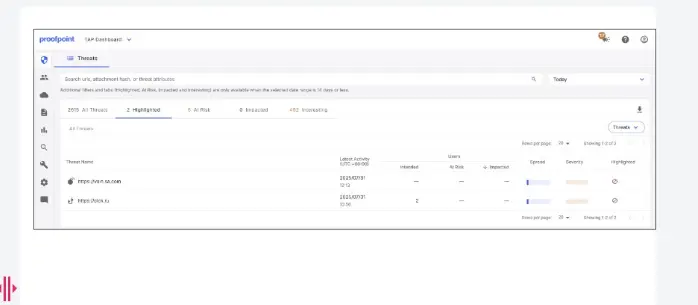
Exhibit:

What is indicated by the icon shown in the ''Highlighted'' column?

Correct Answer: C. The threat has been reported as a false positive.
Explanation:

In the TAP Dashboard, the ''Highlighted'' column is used to surface items that require analyst attention beyond basic volume metrics, including items that have been explicitly flagged for investigation outcomes. The icon shown corresponds to a false positive report (C), meaning the message or threat classification is being contested as benign but incorrectly condemned or prioritized as malicious. In Proofpoint workflows, this matters because false positives can disrupt business operations (legitimate suppliers, customer mail, internal systems) and can also hide real threats if analysts become desensitized to noisy alerting. Handling a highlighted false positive typically involves validating message authentication (SPF/DKIM/DMARC), reviewing TAP verdict drivers (URL/attachment detonation, reputation, MLX scoring where applicable), and confirming business legitimacy (known sender relationship, expected content, and user confirmation). When confirmed, analysts submit false positive feedback through the correct channel to improve future detection fidelity and reduce repeat quarantines. Operationally, false positive handling is part of detection hygiene: it improves signal quality, reduces alert fatigue, and ensures that high-confidence threats rise to the top of the triage queue.


Question 8

An analyst wants to use the Threats page in TAP Dashboard to review all messages related to a phishing campaign that contain an attachment. What is the correct method to filter these messages?

Correct Answer: A. Use the threat filter to set the category, grouping, and type.
Explanation:

The TAP Threats page is designed for investigation by applying structured filters that constrain the dataset by threat category (e.g., phishing), grouping (e.g., campaigns), and threat type (e.g., attachment vs URL). Using the threat filter controls (A) is the most reliable, repeatable method because it leverages the dashboard's native taxonomy and ensures you are viewing only messages that meet both conditions: campaign association and attachment presence. The Impacted tab (B) is user-impact oriented and does not inherently filter to ''phishing campaign + attachment''; it is used after threats are identified to see interactions. The Highlighted tab (D) is focused on notable techniques and analyst-marked items rather than campaign scoping. While the search bar can be useful for pivots, the most ''documented workflow'' approach for consistent IR triage is applying the built-in threat filters, which also supports sharing consistent views across analysts and generating stable results for incident notes and reporting. This is aligned with Proofpoint IR operational practice: filter pivot into details scope recipients take remediation actions.


Question 9

As a new analyst, you need to review threat intelligence related to threats in your environment. Which Proofpoint product provides this data?

Correct Answer: C. Proofpoint TAP Dashboard
Explanation:

Proofpoint TAP Dashboard is the primary interface for threat intelligence and threat context about attacks observed against your organization (C). In IR practice, TAP provides threat-level enrichment such as threat type (credential phishing, malware, BEC/impostor), campaign clustering, indicators (URLs, domains, attachment hashes), and exposure/interaction telemetry (Intended, At Risk, Impacted, clicks). This is the data analysts use to prioritize investigations, identify related messages, and determine whether a threat is isolated or part of a broader campaign. By contrast, PoD (Email Protection) is the mail security administration and policy layer; it enforces gateway decisions but is not the main threat intel workbench. Smart Search is a message trace tool focused on tracking messages and dispositions rather than threat intelligence aggregation and campaign analytics. TRAP is the post-delivery remediation capability (quarantine/pull/orchestration) rather than the system that provides consolidated threat intelligence views. For Proofpoint-focused detection and analysis, TAP is the investigative hub that connects threat research, verdicts, and user exposure into a single operational picture.


Question 10

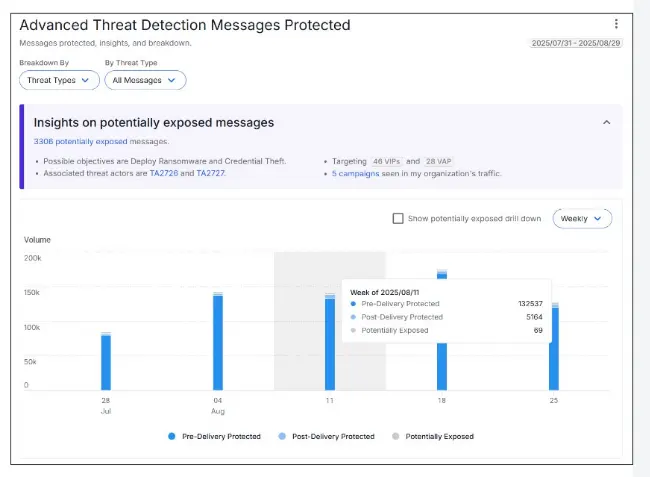
Refer to the exhibit.

Based on the metrics for the highlighted week, how many malicious messages were blocked by TAP at the email gateway?

Correct Answer: C. 132,537
Explanation:

In TAP reporting and weekly dashboard metrics, ''blocked at the email gateway'' represents messages prevented from reaching user mailboxes by the Proofpoint email security layer (pre-delivery containment). The highlighted week's gateway-blocked malicious count in the exhibit corresponds to 132,537 (C), which reflects the volume of threats stopped before user exposure---an important operational metric for prevention effectiveness. In Proofpoint-focused IR, analysts use this metric to distinguish between (1) threats fully contained pre-delivery (lower immediate response burden) and (2) threats delivered or interacted with (higher incident risk requiring containment and user remediation). High gateway-blocked numbers can still indicate an active campaign targeting the organization and may justify proactive measures: tightening policy thresholds, reviewing top senders/domains, and validating that URL/attachment defenses are functioning as expected. It also supports post-incident reporting by showing ''prevented impact'' and helping stakeholders understand defense value. For detection and analysis, the key is correlating this figure with At Risk/Impacted trends; a high blocked count with low impacted is a healthy posture, while any spike in impacted warrants immediate investigation.