Limited-Time Offer: Enjoy 50% Savings! Ends in 00h 00m 00s Coupon code: 50OFF
Skip to content

Free Pure Storage FlashArray Architect Associate FAAA_004 Exam Questions

Page: 1 / 6 Total 60 questions

Want more questions? Get Premium Access.

Question 1

A manufacturing customer is running Oracle volumes on their existing //X90R3 array and would like to use FlashArray for their Windows file shares. They are asking if it is feasible to do this.

How should the SE respond?

Correct Answer: C. The customer should be able to use their current FlashArray.
Explanation:

The SE should respond that the customer can use their current FlashArray for Windows file shares alongside their existing Oracle workloads. Pure Storage FlashArray is a versatile platform capable of supporting multiple workloads, including block storage for databases (e.g., Oracle) and file services for Windows file shares.

Why This Matters:

FlashArray Versatility:

Pure Storage FlashArray supports both block and file workloads through its integrated architecture. While FlashArray is primarily known for block storage, it can also support file workloads using FA File Services , which provides NFS and SMB protocols for file sharing.

The customer does not need to migrate their Windows file servers or upgrade their hardware unless there are specific capacity or performance constraints.

Current Array Feasibility:

Assuming the existing //X90R3 array has sufficient capacity and performance headroom, it can handle the additional workload without requiring upgrades.

Why Not the Other Options?

A . The customer should migrate their Windows file servers to Pure:

While migrating file servers to Pure Storage can provide benefits like simplified management and improved performance, it is not a requirement. The customer can continue using their existing file servers while leveraging FlashArray for block storage.

B . The customer needs to upgrade to XL to be able to use FA File:

Upgrading to a higher-end model like FlashArray//XL is unnecessary unless the current array lacks the required capacity or performance for the additional workload. The //X90R3 is fully capable of supporting FA File Services.

Key Points:

Versatility: FlashArray can support both block and file workloads simultaneously.

No Immediate Upgrades Needed: The current array can likely handle the additional workload without requiring hardware changes.

Workload Consolidation: Using a single platform for multiple workloads simplifies infrastructure and reduces costs.


Pure Storage FlashArray Documentation: 'FA File Services Overview'

Pure Storage Whitepaper: 'Consolidating Workloads on FlashArray'

Pure Storage Knowledge Base: 'Supporting Multiple Workloads with FlashArray'

Question 2

A customer has presented two workloads that need to be replicated. One is a highly transactional database workload and the other is a VM datastore with tier one applications.

The customer has the following requirements:

* The database workload is highly reliant on storage performance The VM datastore requires zero downtime.

* The customer has advised the two FlashArrays will be 20 miles apart and they are worried that this could impact their internal SLAs.

What replication strategies should be advised for these workloads?

Correct Answer: C. ActiveCluster should be used for the VM workloads and ActiveDR for the database workload.
Explanation:

To address the customer's requirements, we need to evaluate the replication strategies offered by Pure Storage FlashArray: ActiveCluster and ActiveDR , and how they align with the specific needs of the two workloads.

Workload Analysis:

Transactional Database Workload :

This workload is highly reliant on storage performance. Any replication strategy must ensure minimal latency and high availability to avoid impacting transactional throughput and response times.

The database workload typically benefits from synchronous replication to maintain consistency and performance across sites.

VM Datastore (Tier 1 Applications) :

This workload requires zero downtime, meaning it must remain accessible even in the event of a site failure. High availability and seamless failover are critical.

The VM datastore can tolerate some level of asynchronous replication as long as it does not compromise availability or recovery objectives.

Replication Strategies:

ActiveCluster :

ActiveCluster is a synchronous replication solution that provides active-active high availability across two FlashArrays. It ensures zero RPO (Recovery Point Objective) and zero RTO (Recovery Time Objective), making it ideal for workloads requiring continuous availability and zero downtime.

ActiveCluster is well-suited for the VM datastore workload because it guarantees seamless failover and high availability, meeting the zero-downtime requirement.

ActiveDR :

ActiveDR is an asynchronous replication solution designed for disaster recovery scenarios. It provides near-zero RPO (typically seconds to minutes) and allows for non-disruptive testing of failover scenarios.

ActiveDR is better suited for the transactional database workload because it minimizes the impact of latency over the 20-mile distance while still maintaining high performance and consistency.

Distance Consideration:

The 20-mile distance between the two FlashArrays introduces latency concerns. Synchronous replication (ActiveCluster) can handle this distance effectively for the VM datastore workload due to its tolerance for slightly higher latency. However, for the transactional database workload, the latency could degrade performance, making ActiveDR a better choice.

Final Recommendation:

Use ActiveCluster for the VM datastore workload to achieve zero downtime and high availability.

Use ActiveDR for the transactional database workload to balance performance and disaster recovery needs over the 20-mile distance.


Pure Storage ActiveCluster Documentation :

Explains the synchronous replication capabilities and use cases for ActiveCluster.

Pure Storage ActiveCluster

Pure Storage ActiveDR Documentation :

Details the asynchronous replication features and disaster recovery use cases for ActiveDR.

Pure Storage ActiveDR

Pure Storage Best Practices for Replication :

Provides guidance on selecting the appropriate replication strategy based on workload requirements and distance considerations.

Pure Storage Replication Best Practices

Pure Storage Architectural Guides :

Covers architectural considerations for deploying ActiveCluster and ActiveDR in multi-site environments.

Pure Storage Architectural Guides

This approach ensures that both workloads meet their respective SLAs while addressing the customer's concerns about distance and performance.

Question 3

A customer is in the very early stages of designing a storage solution at a greenfield site.

They wish to use NVMe-TCP connectivity and require approximately:

* 100 Gbps of consistent raw network throughput between the FlashArray and the dedicated SAN switches.

* The dedicated SAN switches support up to 25 Gbps connectivity.

What is the minimum number of Ethernet ports in total they should connect from the FlashArray to the SAN switches while still ensuring resiliency?

Correct Answer: A. 8
Explanation:

To achieve 100 Gbps of consistent raw network throughput between the FlashArray and the dedicated SAN switches, while ensuring resiliency , the customer must connect a sufficient number of Ethernet ports from the FlashArray to the SAN switches. Given that the dedicated SAN switches support up to 25 Gbps connectivity per port , the calculation is as follows:

Throughput Requirement:

The customer requires 100 Gbps of raw throughput.

Each Ethernet port provides 25 Gbps of bandwidth.

Number of Ports Needed:

To meet the 100 Gbps requirement:

Resiliency Requirement:

Resiliency ensures that the solution can tolerate failures (e.g., switch or link failures). To achieve this, the customer must double the number of ports to provide redundant paths.

Therefore, the total number of ports required is:42=8ports.

Why Not the Other Options?

B . 2:

Two ports would only provide 50 Gbps of raw throughput (2 25 Gbps), which does not meet the 100 Gbps requirement. Additionally, there would be no redundancy, violating the resiliency requirement.

C . 4:

Four ports would meet the 100 Gbps throughput requirement but would lack redundancy, making the solution vulnerable to failures.

D . 16:

Sixteen ports would exceed the required throughput and redundancy, resulting in unnecessary costs and complexity.

Key Points:

Throughput Calculation: Ensure the total bandwidth meets the 100 Gbps requirement.

Resiliency: Double the number of ports to provide redundant paths for high availability.

Optimization: Use the minimum number of ports that satisfy both throughput and resiliency requirements.


Pure Storage FlashArray Documentation: 'Network Design and Configuration Best Practices'

Pure Storage Whitepaper: 'NVMe-TCP Connectivity and Performance Optimization'

Pure Storage Knowledge Base: 'Calculating Required Network Ports for FlashArray'

Question 4

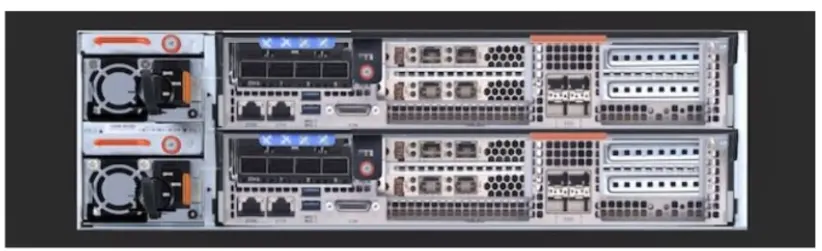
Refer to the exhibit.

Which FlashArray controller(s) does the exhibit show?

Correct Answer: A. Top: CT1, Bottom: CT2
Explanation:

Exhibit controllers of a Pure Storage FlashArray , specifically labeled as CT1 (top) and CT2 (bottom). This labeling is consistent with Pure Storage's naming convention for its controllers.

Why This Matters:

Controller Identification:

Pure Storage FlashArray controllers are typically labeled as CT1 and CT2 to distinguish between the two controllers in an active/active architecture.

Both controllers work together to provide high availability and redundancy, ensuring seamless operation even if one controller is offline for maintenance or upgrades.

Active/Active Architecture:

In an active/active design, both controllers share the workload equally. If one controller is taken offline, the other seamlessly handles all I/O operations without impacting performance or availability.

Why Not the Other Options?

B . Top: Primary, Bottom: Secondary:

Pure Storage does not use 'Primary' and 'Secondary' labels for its controllers. Instead, it uses specific identifiers like CT1 and CT2 to refer to the controllers.

C . Top: CTO, Bottom: CT1:

The label 'CTO' is not a valid designation for FlashArray controllers. Pure Storage consistently uses CT1 and CT2 to identify the controllers.

Key Points:

Controller Labels: Pure Storage FlashArray controllers are labeled as CT1 and CT2.

Active/Active Design: Both controllers operate simultaneously to ensure high availability and performance.

Redundancy: The dual-controller architecture provides fault tolerance and minimizes downtime during maintenance or failures.


Pure Storage FlashArray Documentation: 'Understanding FlashArray Controller Architecture'

Pure Storage Knowledge Base: 'Identifying FlashArray Controllers'

Pure Storage Whitepaper: 'Active/Active Controller Design for High Availability'

Question 5

A customer that produces video media content needs to replace their multi-rack HDD-based storage array used for video archive. Which Pure Storage solution will meet the customer's needs in the most cost-effective way?

Correct Answer: C. FlashArray//C
Explanation:

For a customer producing video media content and needing a cost-effective solution to replace their multi-rack HDD-based storage array for video archiving, the best choice is FlashArray//C .

Why This Matters:

FlashArray//C is designed for capacity-optimized workloads, making it ideal for use cases like video archiving, backups, and large-scale data repositories.

It offers high-density storage with QLC flash technology, which provides a balance of performance and cost-effectiveness for less performance-intensive workloads.

Compared to HDD-based systems, FlashArray//C delivers faster access times, lower latency, and improved reliability, all at a lower cost per terabyte than higher-performance arrays like FlashArray//X or //XL.

Why Not the Other Options?

A . FlashArray//X:

FlashArray//X is optimized for high-performance workloads, such as databases and mission-critical applications. While it offers exceptional performance, it is more expensive and not the most cost-effective solution for video archiving.

B . FlashArray//XL:

FlashArray//XL is designed for extreme-scale workloads requiring massive performance and capacity. It is overkill for video archiving and would significantly increase costs without providing proportional benefits.

Key Points:

FlashArray//C: Designed for capacity-optimized workloads, offering a cost-effective solution for video archiving.

QLC Flash Technology: Provides high density and reliability at a lower cost per terabyte compared to traditional HDDs or higher-performance flash arrays.

Cost Efficiency: Balances performance and cost, making it ideal for large-scale, less performance-intensive workloads like video media archives.


Pure Storage FlashArray//C Documentation: 'Use Cases for FlashArray//C'

Pure Storage Whitepaper: 'Optimizing Storage Costs with FlashArray//C'

Pure Storage Knowledge Base: 'Choosing the Right FlashArray Model for Your Workload'

Question 6

What architectural design simplifies controller upgrades from FlashArray//XR2 to //XR3?

Correct Answer: A. Common controller chassis for both models
Explanation:

The architectural design that simplifies controller upgrades from FlashArray//XR2 to //XR3 is the use of a common controller chassis for both models. This design allows customers to upgrade their controllers without replacing the entire array chassis, minimizing downtime and complexity during the upgrade process.

Why This Matters:

The common controller chassis ensures that the physical infrastructure (e.g., drive shelves, power supplies, and other components) remains unchanged during the upgrade. Only the controllers themselves need to be swapped out, which significantly reduces the time and effort required for the upgrade.

This approach also eliminates the need for re-cabling or reconfiguring the array, as the chassis and its connections remain consistent between the two models.

Why Not the Other Options?

B . InfiniBand connectivity between controllers: While InfiniBand is used for high-speed communication between controllers in FlashArray systems, it is not directly related to simplifying controller upgrades. It is a feature of the architecture but does not address the ease of upgrading between models.

C . NVRAM modules in both controllers: NVRAM (Non-Volatile RAM) is used to ensure data integrity during power loss, but it is not a factor in simplifying controller upgrades. Both XR2 and XR3 models include NVRAM, so this is not unique to the upgrade process.

D . Re-use of existing HBAs to prevent WWN changes: While reusing HBAs can help avoid changes to World Wide Names (WWNs), this is not a key factor in simplifying the upgrade process. The common controller chassis is the primary design feature that streamlines the upgrade.

Key Points:

Common Controller Chassis: Enables seamless upgrades by allowing the replacement of controllers without changing the rest of the array infrastructure.

Minimized Downtime: Reduces the time and complexity of upgrades, ensuring minimal disruption to operations.

Consistency Across Models: Ensures compatibility and continuity between different generations of FlashArray controllers.


Pure Storage FlashArray//X Documentation: 'Controller Upgrade Process and Best Practices'

Pure Storage Whitepaper: 'Evergreen Architecture and Controller Upgrades'

Pure Storage Knowledge Base: 'Upgrading FlashArray Controllers Without Downtime'

Question 7

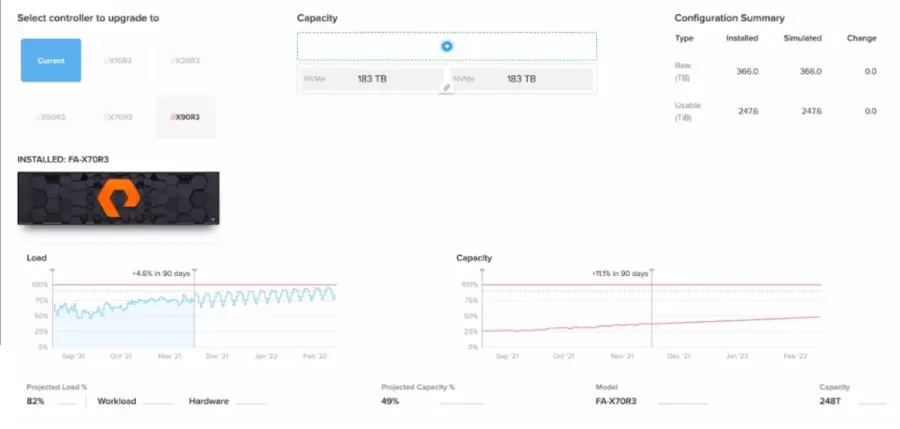
Refer to the exhibit.

A customer is assessing the health of their FlashArray.

What should the customer discuss with their SE based on this information?

Correct Answer: B. Adding a second shelf of NVMe DirectFlash modules
Explanation:

Based on the exhibit (referenced via the link), the customer should discuss adding a second shelf of NVMe DirectFlash modules with their SE. This recommendation is based on the assumption that the exhibit indicates the array is nearing its capacity limits or requires additional storage to accommodate future growth.

Why This Matters:

Capacity Planning:

FlashArray uses DirectFlash Modules to provide high-performance, low-latency storage. If the array is approaching its physical capacity, adding a second shelf of NVMe modules is the most effective way to expand storage without requiring a full hardware upgrade.

This approach ensures the array can continue to meet the customer's growing storage needs while maintaining performance and reliability.

Scalability:

Pure Storage arrays are designed to scale seamlessly by adding expansion shelves. This allows customers to increase capacity without disrupting operations or replacing existing hardware.

Why Not the Other Options?

A . Upgrading the controller to the //X90R3 model:

Upgrading the controller is only necessary if the current controller is nearing its performance limits. The exhibit does not indicate performance bottlenecks, so this step is likely unnecessary.

C . Adding more network ports:

Adding network ports is relevant for improving connectivity or bandwidth but does not address capacity concerns. If the array is running out of storage space, adding network ports will not resolve the issue.

Key Points:

Capacity Expansion: Adding a second shelf of NVMe modules provides additional storage capacity to support future growth.

Non-Disruptive Scaling: Expansion shelves can be added without downtime, ensuring continuous availability.

Cost Efficiency: Avoids unnecessary upgrades or replacements, optimizing costs while meeting capacity requirements.


Pure Storage FlashArray Documentation: 'Expanding FlashArray Capacity with DirectFlash Modules'

Pure Storage Whitepaper: 'Scaling Storage with FlashArray Expansion Shelves'

Pure Storage Knowledge Base: 'Best Practices for Capacity Planning and Expansion'

Question 8

What does Pure Storage's Right-Size Guarantee promise?

Correct Answer: B. The effective capacity of the FlashArray
Explanation:

Pure Storage's Right-Size Guarantee promises the effective capacity of the FlashArray , ensuring that customers receive the logical capacity they expect based on their workload's data reduction profile.

Why This Matters:

Effective Capacity:

Effective capacity refers to the logical capacity available after applying data reduction techniques like deduplication, compression, and pattern removal.

The Right-Size Guarantee ensures that customers achieve the expected effective capacity for their workloads, aligning with Pure Storage's commitment to delivering predictable and reliable storage solutions.

Customer Assurance:

If the actual effective capacity does not meet expectations, the customer can work with their SE to address the issue, potentially adjusting their subscription or configuration.

Why Not the Other Options?

A . The performance of the FlashArray model:

The Right-Size Guarantee does not specifically address performance metrics like latency or IOPS. It focuses on capacity-related assurances.

C . The Data Reduction Rate by workload:

While data reduction contributes to effective capacity, the guarantee is not tied to a specific data reduction rate. Instead, it ensures the overall effective capacity meets expectations.

D . The customer's Total Efficiency Ratio:

The Total Efficiency Ratio combines data reduction and other factors but is not the focus of the Right-Size Guarantee.

Key Points:

Effective Capacity: The guarantee ensures customers receive the expected logical capacity based on data reduction.

Data Reduction Techniques: Deduplication, compression, and pattern removal contribute to effective capacity.

Customer Support: Customers can collaborate with their SE if the guaranteed capacity is not achieved.


Pure Storage Evergreen//Forever Documentation: 'Understanding the Right-Size Guarantee'

Pure Storage Whitepaper: 'Maximizing Data Reduction with FlashArray'

Pure Storage Knowledge Base: 'Right-Size Guarantee Terms and Conditions'

Question 9

An existing customer wants a new set of arrays with the following characteristics:

* Business critical workload that requires sub millisecond response times

* Synchronous replication configured to their secondary site

* Offload snapshots to a third location where they do not have a FlashArray

Which solution will meet the customer's needs?

FlashArray//Xs with ActiveDR and CloudSnap

Correct Answer: A. FlashArray//Xs with ActiveCluster and CloudSnap
Explanation:

The customer has the following requirements:

Business-critical workload that requires sub-millisecond response times

Synchronous replication configured to their secondary site

Offload snapshots to a third location where they do not have a FlashArray

The best solution to meet these needs is FlashArray//Xs with ActiveCluster and CloudSnap .

Why This Matters:

FlashArray//Xs:

FlashArray//X is optimized for high-performance workloads , delivering sub-millisecond response times required for business-critical applications.

ActiveCluster:

ActiveCluster provides synchronous replication between two sites within a stretched cluster, ensuring zero RPO and near-zero RTO for high availability.

CloudSnap:

CloudSnap offloads snapshots to cloud storage (e.g., AWS S3 or Azure Blob), enabling disaster recovery or archival at a third location without requiring an additional FlashArray.

Why Not the Other Options?

B . FlashArray//Cs with ActiveDR and Snapshot Replication:

FlashArray//C is designed for capacity-optimized workloads and does not provide the sub-millisecond response times required for business-critical applications.

ActiveDR provides asynchronous replication, which does not meet the requirement for synchronous replication.

C . FlashArray//Cs with ActiveCluster and Snapshot Replication:

Again, FlashArray//C is not suitable for sub-millisecond response times. Additionally, snapshot replication to a third location is less efficient than CloudSnap for offloading data to the cloud.

Key Points:

FlashArray//Xs: Delivers the high performance required for business-critical workloads.

ActiveCluster: Ensures synchronous replication for high availability across two sites.

CloudSnap: Provides cost-effective offsite protection by offloading snapshots to the cloud.


Pure Storage FlashArray Documentation: 'ActiveCluster with CloudSnap'

Pure Storage Whitepaper: 'Disaster Recovery Strategies with FlashArray'

Pure Storage Knowledge Base: 'Using Protection Groups in Stretched Pods'

Question 10

A healthcare customer who is already leveraging a FlashArray//X50 for VMware datastores has added a radiology department to their facility and requires a file-based storage solution for medical imaging.

* They have 35 usable TB free.

* They anticipate storing 15 TB in images.

* System load is currently 35%.

Which approach will enable this workload?

Correct Answer: B. They can use FA File on the array as-is.
Explanation:

The healthcare customer already has a FlashArray//X50 with 35 usable TB free and anticipates storing 15 TB of medical imaging data . Since the system load is currently 35% , they can enable FA File on the array as-is to support the new workload.

Why This Matters:

FA File:

FA File Services enables file-based storage (NFS and SMB) on FlashArray, allowing the array to handle both block and file workloads simultaneously.

With 35 TB of free capacity and only 15 TB required for medical imaging, there is sufficient space to accommodate the new workload.

The current system load of 35% indicates that the array has ample headroom to handle the additional workload without requiring upgrades.

Why Not the Other Options?

A . They must first upgrade the controllers to a //X70 and enable FA File:

Upgrading to a //X70 is unnecessary given the available capacity and low system load. The current //X50 is capable of supporting the workload.

C . Medical imaging always belongs on a FlashBlade:

While FlashBlade is ideal for large-scale, high-performance unstructured data workloads, it is not mandatory for this use case. FA File on FlashArray//X50 is sufficient for 15 TB of medical imaging data.

D . They should purchase a FlashArray//C and enable FA File:

Purchasing a new array is unnecessary given the available resources on the existing FlashArray//X50.

Key Points:

FA File: Enables file-based storage on FlashArray without requiring additional hardware.

Capacity and Load: The array has sufficient free space and performance headroom to handle the new workload.

Cost Efficiency: Avoids unnecessary upgrades or purchases, optimizing costs while meeting requirements.


Pure Storage FlashArray Documentation: 'FA File Services Overview'

Pure Storage Whitepaper: 'Consolidating Workloads on FlashArray'

Pure Storage Knowledge Base: 'Supporting Multiple Workloads with FlashArray'