Limited-Time Offer: Enjoy 50% Savings! Ends in 00h 00m 00s Coupon code: 50OFF
Skip to content

Free Python Institute PCPP1 - Certified Professional in Python Programming 1 PCPP-32-101 Exam Questions

Page: 1 / 8 Total 45 questions

Want more questions? Get Premium Access.

Question 1

Select the true statements about sockets. (Select two answers)

Correct Answer: A. A socket is a connection point that enables a two-way communication between programs running in a network.; D. A socket can be used to establish a communication endpoint for processes running on the same or different machines.
Explanation:

1. A socket is a connection point that enables a two-way communication between programs running in a network.

This statement is true because a socket is a software structure that serves as an endpoint for sending and receiving data across a network. A socket is defined by an application programming interface (API) for the networking architecture, such as TCP/IP.A socket can be used to establish a communication channel between two programs running on the same or different network nodes12.

2. A socket is always the secure means by which computers on a network can safely communicate, without the risk of exposure to an attack.

This statement is false because a socket by itself does not provide any security or encryption for the data transmitted over the network. A socket can be vulnerable to various types of attacks, such as eavesdropping, spoofing, hijacking, or denial-of-service.To ensure secure communication, a socket can use additional protocols or mechanisms, such as SSL/TLS, SSH, VPN, or firewall3.

3. A socket is a connection point that enables a one-way communication only between remote processes.

This statement is false because a socket can enable both one-way and two-way communication between processes running on the same or different network nodes. A socket can be used for connection-oriented or connectionless communication, depending on the type of protocol used.For example, TCP is a connection-oriented protocol that provides reliable and bidirectional data transfer, while UDP is a connectionless protocol that provides unreliable and unidirectional data transfer12.

4. A socket can be used to establish a communication endpoint for processes running on the same or different machines.

This statement is true because a socket can be used for inter-process communication (IPC) within a single machine or across different machines on a network.A socket can use different types of addresses to identify the processes involved in the communication, such as IP address and port number for network sockets, or file name or path for Unix domain sockets12.


1: https://en.wikipedia.org/wiki/Network_socket2: https://www.geeksforgeeks.org/socket-in-computer-network/3: https://www.tutorialspoint.com/what-is-a-network-socket-computer-networks

Question 2

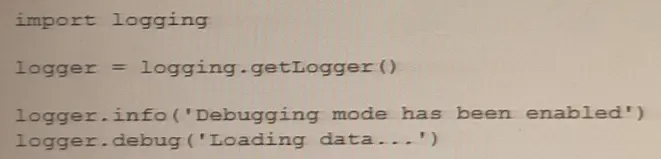
What is the result of the following code?

What is the result of the following code?

Correct Answer: B. Loading data...
Explanation:

This statement is true because the code uses the logging module to create a logger object and set its level to logging.INFO. The logging module provides a way of reporting events that occur during the execution of a program. The logging level determines which events are reported and which are ignored. The logging module defines five levels of severity: DEBUG, INFO, WARNING, ERROR, and CRITICAL. The lower the level, the more events are reported.

The code then uses the logger object to log two messages: one with the level logging.DEBUG and one with the level logging.INFO. The logger object only reports the messages that have a level equal or higher than its own level. Therefore, the message with the level logging.DEBUG is ignored, while the message with the level logging.INFO is reported. The default format for reporting messages is ''level name: message''. Therefore, the output of the code is:

INFO: Loading data...


Question 3

What is true about the unbind () method? (Select two answers.)

Correct Answer: B. It is invoked from within a widget's object; D. It needs the event name as an argument
Explanation:

Option B is true because theunbind()method is invoked from within a widget's object1.

Option D is true because theunbind()method needs the event name as an argument1.

Theunbind()method in Tkinter is used to remove a binding between an event and a function. It can be invoked from within a widget's object when a binding is no longer needed. The method requires the event name as an argument to remove the binding for that specific event. For example:

button = tk.Button(root, text='Click me')

button.bind('<Button-1>', callback_function) # bind left mouse click event to callback_function

button.unbind('<Button-1>') # remove the binding for the left mouse click event


Question 4

What will happen if the mam window is too small to fit all its widgets?

Correct Answer: A. Some widgets may be invisible
Explanation:

If the main window is too small to fit all its widgets,some widgets may be invisible. So, the correct answer isOption A.

When a window is not large enough to display all of its content, some widgets may be partially or completely hidden. The window will not automatically expand to fit all of its content, and no exception will be raised. The widgets will not be automatically scaled down to fit the window's size.

If the main window is too small to fit all its widgets, some of the widgets may not be visible or may be partially visible. This is because the main window has a fixed size, and if there are more widgets than can fit within that size, some of them will be outside the visible area of the window.

To avoid this issue, you can use layout managers such asgrid,pack, orplaceto dynamically adjust the size and position of the widgets as the window changes size. This will ensure that all the widgets remain visible and properly arranged regardless of the size of the main window.


https://www.tkdocs.com/tutorial/widgets.html#managers

https://www.geeksforgeeks.org/python-tkinter-widgets/

https://anzeljg.github.io/rin2/book2/2405/docs/tkinter/introduction.html

Question 5

If w is a correctly created main application window, which method would you use to foe both of the main window's dimensions?

Correct Answer: C. w. resizable ()
Explanation:

1. w.resizable()

Theresizable()method takes two Boolean arguments,widthandheight, that specify whether the main window can be resized in the corresponding directions. PassingFalseto both arguments makes the main window non-resizable, whereas passingTrueto both arguments (or omitting them) makes the window resizable.

Here is an example that sets the dimensions of the main window to 500x400 pixels and makes it non-resizable:

import tkinter as tk

root = tk.Tk()

root.geometry('500x400')

root.resizable(False, False)

root.mainloop()


Tkinter documentation:https://docs.python.org/3/library/tk.html

Tkinter tutorial:https://www.python-course.eu/python_tkinter.php

The resizable () method of a tkinter window object allows you to specify whether the window can be resized by the user in the horizontal and vertical directions. You can pass two boolean arguments to this method, such as w.resizable (False, False), to prevent both dimensions from being changed.Alternatively, you can pass 0 or 1 as arguments, such as w.resizable (0, 0), to achieve the same effect1.

1: https://stackoverflow.com/questions/36575890/how-to-set-a-tkinter-window-to-a-constant-size

Other methods that can be used to control the window size are:

w.geometry () : This method allows you to set the initial size and position of the window by passing a string argument in the format ''widthxheight+x+y'', such as w.geometry (''500x500+100+100'')12.

w.minsize () and w.maxsize (): These methods allow you to set the minimum and maximum size of the window in pixels, such as w.minsize (500, 500) and w.maxsize (1000, 1000)12.

w.pack_propagate () and w.grid_propagate (): These methods allow you to enable or disable the propagation of the size of the widgets inside the window to the window itself. By default, these methods are set to True, which means that the window will adjust its size according to the widgets it contains. You can set these methods to False or 0 to prevent this behavior, such as w.pack_propagate (0) or w.grid_propagate (0).

w.place (): This method allows you to place the window at a specific position and size relative to its parent window or screen. You can use keyword arguments such as x, y, width, height, relx, rely, relwidth, and relheight to specify the coordinates and dimensions of the window in absolute or relative terms, such as w.place (x=0, y=0, relwidth=1, relheight=1).

2: https://stackoverflow.com/questions/25690423/set-window-dimensions-in-tkinter-python-3 : https://stackoverflow.com/questions/36575890/how-to-set-a-tkinter-window-to-a-constant-size/36576068#36576068 : https://www.skotechlearn.com/2020/06/tkinter-window-position-size-center-screen-in-python.html

Question 6

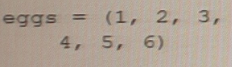
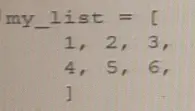
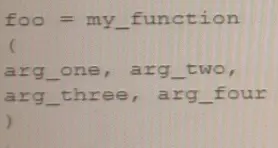
Which of the following examples using line breaks and different indentation methods are compliant with PEP 8 recommendations? (Select two answers.)

A)

B)

C)

Correct Answer: B. Option B; D. Option D
Explanation:

The correct answers areB. Option BandD. Option D. Both options B and D are compliant with PEP 8 recommendations for line breaks and indentation. PEP 8 recommends using 4 spaces per indentation level and breaking lines before binary operators. In option B, the arguments to theprintfunction are aligned with the opening delimiter, which is another acceptable way to format long lines according to PEP 8. In option D, the second line is indented by 4 spaces to distinguish it from the next logical line.