Limited-Time Offer: Enjoy 50% Savings! Ends in 00h 00m 00s Coupon code: 50OFF
Skip to content

Free Qlik Sense Data Architect Certification Exam - 2024 QSDA2024 Exam Questions

Page: 1 / 9 Total 50 questions

Want more questions? Get Premium Access.

Question 1

A data architect inherits an app that takes too long to load and overruns the data load window.

The app pulls all records (new and historical) from three large databases. The reload process puts a heavy load on the source database servers. All of the data is required for analysis.

What should the data architect do?

Correct Answer: C. Implement incremental load on each database using QVD files
Explanation:

The scenario describes an app that is experiencing long load times due to the need to pull all records, both new and historical, from three large databases. This situation puts a strain on both the Qlik environment and the source databases. Given that all data is required for analysis, a full reload each time can be inefficient and resource-intensive.

Implementing incremental load is a widely recommended approach in such cases. Incremental loading allows you to load only new or changed data since the last reload, rather than reloading all the data every time. This significantly reduces the time and resources required for reloading, as only a subset of the data needs to be processed during each reload. QVD (QlikView Data) files are typically used to store the historical data, while only the new or updated records are fetched from the source databases.

This approach would help:

Reduce the load on the source databases.

Shorten the data reload window.

Maintain historical data efficiently while ensuring that all new data is captured.

Question 2

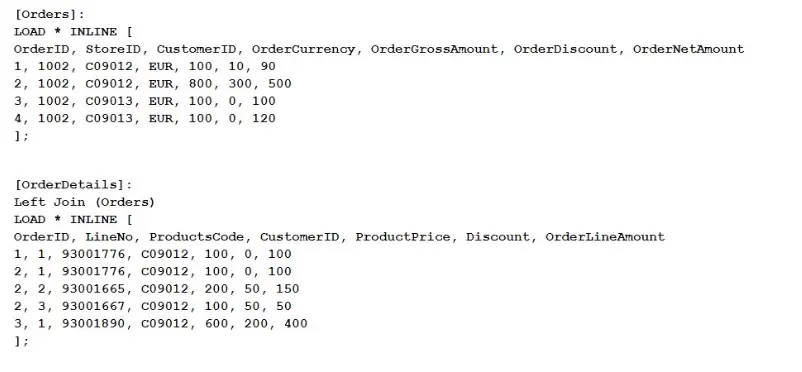
Refer to the exhibit.

Refer to the exhibit.

What does the expression sum< [orderMetAmount ]) return when all values in LineNo are selected?

Correct Answer: B. 1490
Explanation:

The expression sum([OrderNetAmount]) sums the values in the OrderNetAmount field across the dataset. Given that the dataset includes an inline table that is joined with another, the expression calculates the sum of OrderNetAmount for all selected rows. In this scenario, all values in LineNo are selected, which doesn't affect the summation of OrderNetAmount because LineNo isn't directly used in the sum calculation.

Step-by-step Calculation:

The Orders table contains the OrderNetAmount for each order. The values provided are 90, 500, 100, and 120.

Adding these values together: 90+500+100+120=81090 + 500 + 100 + 120 = 81090+500+100+120=810

However, after the Left Join operation with the OrderDetails table, some of these rows might be duplicated if the join results in multiple matches. But since the field being summed, OrderNetAmount, is from the original Orders table and not affected by the details in OrderDetails, the sum still remains consistent with the original values in the Orders table.

Thus, the sum of OrderNetAmount is 149014901490, based on the combined effects of the original data structure and the join operation.


Question 3

Sales managers need to see an overview of historical performance and highlight the current year's metrics. The app has the following requirements:

* Display the current year's total sales

* Total sales displayed must respond to the user's selections

Which variables should a data architect create to meet these requirements?

A)

B)

C)

D)

Correct Answer: C. Option C
Explanation:

To meet the requirements of displaying the current year's total sales in a way that responds to user selections, the correct approach involves using both SET and LET statements to define the necessary variables in the data load editor.

Explanation of Option C:

SET vCurrentYear = Year(Today());

The SET statement is used here to assign the current year to the variable vCurrentYear. The SET statement treats the variable as a text string without evaluation. This is appropriate for a variable that will be used as part of an expression, ensuring the correct year is dynamically set based on the current date.

LET vCurrentYTDSales = '=SUM({$<Year={'$(vCurrentYear)'}>} [Sales Amount])';

The LET statement is used here to assign an evaluated expression to the variable vCurrentYTDSales. This expression calculates the Year-to-Date (YTD) sales for the current year by filtering the Year field to match vCurrentYear. The LET statement ensures that the expression inside the variable is evaluated, meaning that when vCurrentYTDSales is called in a chart or KPI, it dynamically calculates the YTD sales based on the current year and any user selections.

Key Points:

Dynamic Year Calculation: Year(Today()) dynamically calculates the current year every time the script runs.

Responsive to Selections: The set analysis syntax {$<Year={'$(vCurrentYear)'}>} ensures that the sales totals respond to user selections while still focusing on the current year's data.

Appropriate Use of SET and LET: The combination of SET for storing the year and LET for storing the evaluated sum expression ensures that the variables are used effectively in the application.


Question 4

A data architect needs to develop three separate apps (Sales, Finance, and Operations). The three apps share numerous identical calculation expressions.

The goals include:

* Reducing duplicate script

* Saving time on expression modifications

* Increasing reusable Qlik developer assets.

The data architect creates a common script and stores it on a file server that Qlik Sense can access. How should the data architect complete the requirements?

Correct Answer: C. Include script function
Explanation:

When developing multiple Qlik Sense applications (Sales, Finance, Operations) that share numerous identical calculation expressions, it is crucial to have a centralized, reusable script to avoid redundancy, save time on modifications, and increase the reusability of the assets.

The best approach in Qlik Sense to achieve these goals is to use the Include script function. This function allows the data architect to reference a script file that is stored on a file server. The Include function will inject the contents of the external script file into the Qlik Sense script at the point where the Include statement is called. This means that all three apps (Sales, Finance, Operations) can include this common script, and any updates made to the script will automatically apply to all apps that include it.

This method provides a highly maintainable solution because:

No Duplicate Script: The shared logic is maintained in a single file, eliminating redundancy.

Ease of Modifications: Any changes made to the script are propagated to all applications that include it.

Reusable Assets: The script can be reused across different applications, enhancing efficiency and consistency.


Question 5

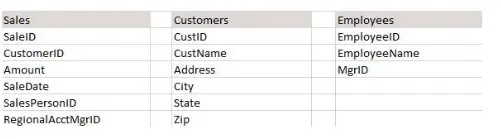
Refer to the exhibit.

Refer to the exhibit.

A data architect needs to create a data model for a new app. Users must be able to see:

* Total sales for each customer

* Total sales for a given state

* Customers that have not had any sales

* Names of salesperson and regional account managers

* Total number of sales by date

Which steps should the data architect perform to meet these requirements?

Which steps should the data architect perform to meet these requirements?

Correct Answer: C. 1. Load the Sales table 2. Load the Customers table 3. Load the Employees table twice; name it and alias the EmployeelD field appropriately each time
Explanation:

In the provided scenario, the data architect needs to create a data model that supports various analyses, including total sales for each customer, total sales by state, identifying customers with no sales, and displaying the names of salespersons and regional account managers.

Here's why Option C is the correct choice:

Loading the Sales Table: The Sales table contains key information related to sales transactions, including SaleID, CustomerID, Amount, SaleDate, SalesPersonID, and RegionalAcctMgrID. This table must be loaded first as it will be central to the analysis.

Loading the Customers Table: The Customers table includes customer details such as CustID, CustName, Address, City, State, and Zip. Loading this table and linking it to the Sales table via the CustomerID field allows you to perform analyses such as total sales per customer and total sales by state. Importantly, loading the customers separately will also allow the identification of customers without any sales.

Loading the Employees Table Twice: The Employees table must be loaded twice because it is used to look up two different roles in the sales process: the SalesPersonID and the RegionalAcctMgrID. When loading the table twice:

The first instance of the Employees table will be used to map the SalesPersonID to EmployeeName.

The second instance will be used to map the RegionalAcctMgrID to EmployeeName.

Aliasing the EmployeeID field appropriately in each instance is crucial to prevent creating synthetic keys and to ensure the correct association with the roles in the sales process.

This approach ensures that the data model will correctly support all the required analyses, including identifying customers without sales, which is crucial for meeting the business requirements.

Option A and Option B propose using a mapping load and ApplyMap, which can complicate the model and does not directly address all the business requirements.

Option D involves aliasing fields in a way that could create unnecessary complexity and might not accurately reflect the relationships in the data.

Thus, Option C is the correct answer as it best meets the requirements while maintaining a clear and functional data model.


Question 6

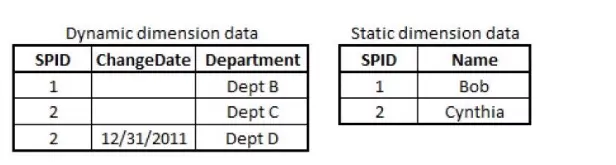
Exhibit.

A large electronics company re-assigns sales people once per year from one Department to another.

SPID is the Salesperson ID; the SPID for each individual sales person Name remains constant. The Department for a SPID may change; each change is stored in the Dynamic Dimension data.

Four tables need to be linked correctly: a transaction table, a dynamic salesperson dimension, a static salesperson dimension, and a department dimension.

Which script prefix should the data architect use?

Correct Answer: B. IntervalMatch
Explanation:

In the scenario described, the Dynamic Dimension data tracks changes in department assignments for salespeople over time. To correctly link the transaction data with the salesperson data and ensure that sales are associated with the correct department based on the date, an IntervalMatch function should be used.

IntervalMatch is designed to match discrete data (like transaction dates) with a range of dates. In this case, each salesperson's department assignment is valid over a period of time, and the IntervalMatch function can be used to link the transaction data with the correct department for each salesperson based on the transaction date.

Option A (Merge): This option is incorrect as it refers to combining data sets, which doesn't address the need to handle the dynamic, date-based department assignments.

Option B (IntervalMatch): This is the correct choice because it allows you to match each transaction with the correct department assignment based on the ChangeDate in the Dynamic Dimension data.

Option C (Partial Reload): This refers to reloading only part of the data, which is not relevant to linking tables based on date ranges.

Option D (Semantic): This option is not applicable as it refers to a broader approach to data modeling and interpretation rather than specifically linking data based on time intervals.

Thus, IntervalMatch is the correct method for linking the transaction data with the dynamic salesperson dimension, ensuring that each transaction is associated with the correct department based on the historical assignment data.