
Limited-Time Offer: Enjoy 50% Savings! Ends in 00h 00m 00s Coupon code: 50OFF
Skip to content

Free Salesforce Accredited B2B Commerce Developer Professional B2B-Commerce-Developer Exam Questions

Page: 1 / 15 Total 221 questions

Want more questions? Get Premium Access.

Question 1

A developer needs to debug a flow tracing a single input in complete detail, watching all variable changes as the checkout process is executed. Which feature should the developer enable? ~.

Correct Answer: D. Show execution details inline
Explanation:

To debug a flow with detailed tracing of a single input, including watching all variable changes as the checkout process is executed, the developer should enable 'Show execution details' (inline) within the Flow Debugger. This feature allows developers to see a step-by-step execution of the flow, including the values of variables at each step. This is crucial for understanding how data is being passed through the flow and for identifying any issues. Salesforce documentation on debugging flows provides more information on this feature: Salesforce Flow Debugging Documentation.

Question 2

How are variables bound when services use the ccSercviceDao classto execute queries?

Correct Answer: C. String substitution
Explanation:

When services use the ccServiceDao class to execute queries, variables are bound by string substitution. This means that the query string contains placeholders for variables that are replaced by their values at runtime. For example,ccrz.ccServiceDao.getQuery('SELECT Id FROM Account WHERE Name = :name')will replace:namewith the value of thenamevariable.


Question 3

Numerous flags, when set, have a direct impact on the result set provided by the

Global API's. What is the default Global API DataSizing convention flag that is used by

theAPI's unless otherwise specified?

Question 4

A user wants to leverage a three columnlayout on a page. The user also wants to move the mini-cart widget from the right to the center column. How can this requirement be fulfilled?

Question 5

Which two statements are true regarding the cc_CallContext class in Salesforce B2B Commerce? (2 answers)

Correct Answer: B. The class can be used internally within Salesforce B2B Commerce and in subscriber code to access context level parameters; D. The current storefront is accessible via thisclass
Explanation:

The cc_CallContext class is a utility class that provides access to various context level parameters, such as the current storefront, user, cart, price list, currency, locale, and session. The class can be used internally within Salesforce B2B Commerce and in subscriber code to access these parameters. The current storefront is accessible via this class by using the getStorefront method, which returns a cc_Storefront__c object. The userLocale variable returns the current Locale for storefront, but it is not part of the cc_CallContext class. It is a global variable that can be accessed from any Visualforce page or component by using {!userLocale}. The Salesforce session is accessible via the getSession method, but it is not part of the cc_CallContext class either. It is a method of the cc_SessionUtil class, which is another utility class that provides methods for managing sessions. Salesforce Reference: [B2B Commerce Developer Guide: cc_CallContext Class], [B2B Commerce Developer Guide: cc_SessionUtil Class]


Question 6

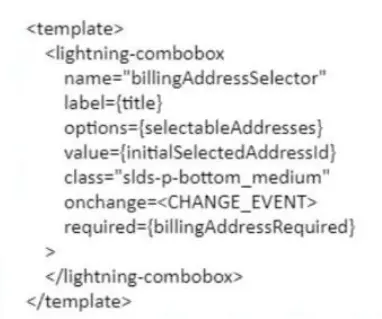
A developer has made a component with a lightning combobox in the follow! markup. To handle changes on the combobox, what should replace ?

Correct Answer: D. {handleChange}
Explanation:

To handle changes on the combobox, the developer should replace <CHANGE EVENT> with {handleChange}. The handleChange is a function that is defined in the JavaScript file of the Lightning web component and is invoked when the value of the combobox changes. The developer can use this function to perform custom logic or actions based on the selected value of the combobox, such as updating other components or properties, calling Apex methods or services, or firing events. The developer can use the onchange attribute to bind the handleChange function to the combobox element in the HTML file of the Lightning web component. The onchange attribute is an HTML attribute that specifies a function to be executed when the value of an element changes. {event:handleChange} is not a valid way to handle changes on the combobox, as it is not a valid syntax for binding a function to an element. javascript:void(0);handleChange(); is not a valid way either, as it is not a valid syntax for binding a function to an element. {handleChange()} is not a valid way either, as it is not a valid syntax for binding a function to an element. Salesforce Reference: Lightning Web Components Developer Guide: Handle Events, Lightning Web Components Developer Guide: Communicate with Properties, Lightning Web Components Developer Guide: lightning-combobox


Question 7

Universal Containers (UC) is ready to build a tax provider class using the interfaces available in the Buyer Experience SDK. When creating a tax provider, what are three things that a developer should consider first?

Correct Answer: A. Steps to complete in the Tax Service; B. How to handle results; D. What to implement
Explanation:

When creating a tax provider, three things that a developer should consider first are: steps to complete in the tax service, how to handle results, and what to implement. Steps to complete in the tax service are the actions that the developer needs to perform to connect to and use the third-party tax service provider's API or service. These steps may include authentication, authorization, request formatting, response parsing, error handling, and logging. How to handle results are the actions that the developer needs to perform to process and apply the tax calculation results from the tax service to the cart or order. These actions may include creating or updating cart items with type of Charge and charge type of Tax, applying tax adjustments or exemptions, and displaying tax amounts and details on the storefront. What to implement are the methods that the developer needs to define in their custom Apex class that implements the sfdc_checkout.TaxCalculations interface. The interface provides methods for customizing the tax calculation logic for a cart or an order, such as getTaxRatesAndRules, applyTaxAmountsAndAdjustments, and handleTaxErrorsAndExceptions. Whether to use JSON or XML is not something that the developer should consider first, as it is not a critical or relevant factor for creating a tax provider. It may depend on the format that the tax service provider supports or prefers, but it does not affect the overall functionality or performance of the tax integration. What events to fire in the Lightning web component is not something that the developer should consider first either, as it is not related to creating a tax provider. It may be an optional feature that the developer can add to enhance the user interface or user experience of their storefront, but it does not affect the core logic or functionality of the tax integration. Salesforce Reference:B2B Commerce Developer Guide: Tax Integration, [B2B Commerce Developer Guide: Tax Calculations Interface]


Question 8

Which three pages should be enabled for the Guest user profile for a storefront to have anonymous checkout? (3 answers)

Correct Answer: A. CCPaymentInfo; B. CheckoutNew; E. OrderConfirmation
Explanation:

Three pages that should be enabled for the Guest user profile for a storefront to have anonymous checkout are:

CCPaymentInfo: This page allows the guest user to enter their payment information, such as credit card number, expiration date, and security code. The page also displays the order summary and total amount.

CheckoutNew: This page allows the guest user to enter their shipping and billing information, such as name, address, phone number, and email. The page also displays the cart items and shipping options.

OrderConfirmation: This page displays the confirmation message and order number after the guest user places their order. The page also provides a link to view the order details or print the invoice. Salesforce Reference:B2B Commerce and D2C Commerce Developer Guide,Anonymous Checkout


Question 9

An administrator has just provided a developer with a new org and username. Which two sets of steps can the developer use to authorize the org and begin deploying Lightning web components?

What should a developer do to expose a public property in a Lightning web component?

Question 10

Which three attributes are true regarding Subscriber pages? (3 answers)

Correct Answer: A. Subscriber pages can include additional standard Salesforce B2B Commerce components such as featured products, category tree, and mini cart.; C. Subscriber pages allow customers to quickly create new custom pages for their storefront.; D. Out of the Box, Subscriber Pages are completely blank HTML pages.
Explanation:

Three attributes that are true regarding Subscriber Pages are:

Subscriber Pages can include additional standard Salesforce B2B Commerce components such as featured products, category tree, and mini cart. These components can be added to the Subscriber Pages by using the CCRZ.pagevars.pageLabels and CCRZ.pagevars.pageSections objects, which contain the page labels and page sections that are defined in CCAdmin.

Subscriber Pages allow customers to quickly create new custom pages for their storefront. These pages can be used to display any content or functionality that is not available in the default pages, such as FAQs, testimonials, or promotions.

Out of the Box, Subscriber Pages are completely blank HTML pages. These pages do not have any predefined layout or content, so the user can customize them according to their requirements. The user can use Visualforce, HTML, CSS, JavaScript, or any other web technologies to create their own Subscriber Pages. Salesforce Reference:B2B Commerce and D2C Commerce Developer Guide,Subscriber Pages


Question 11

What are two common and maintainable ways the content layout of a Lightning Web Component can be implemented?

Correct Answer: B. Styling the :host pseudo-element (or other elements) via the CSS file; D. Applying SLDS classes to internal elements
Explanation:

For maintainable and scalable Lightning Web Component development, it's recommended to style components by targeting the :host pseudo-element in the component's CSS file and by applying Salesforce Lightning Design System (SLDS) classes to internal elements. These practices ensure consistent styling that aligns with Salesforce's design standards and provides a clear separation of concerns between component structure and styling.


Question 12

Question 13

A developer has made some changes to the products of an existing storefront, but they are unable to see the changes in the products from the store.

Which action did the developer forget to take?

Correct Answer: B. Publish the storefront.
Explanation:

The developer forgot to publish the storefront after making changes to the products. Publishing the storefront is a necessary step to make the changes visible to the store visitors. Publishing the storefront updates the site's metadata and content, and also triggers the site index and search index rebuilds. If the developer does not publish the storefront, the changes will not be reflected on the live site.

The following actions are not required or relevant for the scenario:

Activate the product list. This action is only needed when creating a new product list or modifying an existing one. It does not affect the visibility of the products on the storefront.

Rebuild the search index. This action is automatically performed when the developer publishes the storefront. It is not a separate step that the developer needs to take manually.

Publish the catalog. This action is not applicable for Salesforce B2B Commerce for Visualforce, which does not use catalogs. Catalogs are only used by Salesforce B2B Commerce for Lightning Experience.


Finalize and Publish Your Storefront

Customize the D2C Store Template

Configure Public Pages for a Storefront

Question 14

What are three ways to test the value of Page Label on any Salesforce B2B

Commerce Community Page? (3 answers)

Correct Answer: B. Execute CCRZ.pagevars.pageLabels['PAGE_LABEL_NAME') in the JavaScript console.; C. Execute CCRZ.processPageLabelMap('PAGE_LABEL_NAME') in the JavaScript console.; D. Enable the 'display page label names' in cc admin.
Explanation:

Three ways to test the value of Page Label on any Salesforce B2B Commerce Community Page are:

Execute CCRZ.pagevars.pageLabels['PAGE_LABEL_NAME'] in the JavaScript console. This will return the value of the page label with the given name from the pagevars object, which contains all the page labels that are used on the page.

Execute CCRZ.processPageLabelMap('PAGE_LABEL_NAME') in the JavaScript console. This will return the value of the page label with the given name from the pageLabelMap object, which contains all the page labels that are defined in CCAdmin.

Enable the 'display page label names' in cc admin. This will display the name of each page label next to its value on the storefront pages, which can help identify and verify the page labels. Salesforce Reference:B2B Commerce and D2C Commerce Developer Guide,Page Labels


Question 15

Which cart item type is created with the Cart Delivery Group Method after the shipping integration?

Correct Answer: B. Charge
Explanation:

A cart item with a type of Charge is created with the Cart Delivery Group Method after the shipping integration. A shipping integration is an integration that calculates and applies shipping costs and options to a cart or an order based on various factors, such as product weight, dimensions, quantity, location, and carrier service level. A shipping integration can use either an external shipping service provider or custom Apex code to perform the shipping calculation. The Cart Delivery Group Method is a method that determines how products are grouped into delivery groups based on their shipping methods and addresses. A delivery group is a logical grouping of products that are shipped together using the same shipping method and address. After performing the shipping calculation for each delivery group, the shipping integration creates a cart item with a type of Charge and a charge type of Shipping for each delivery group. These cart items represent the shipping costs and options that are applied to each delivery group. A cart item with a type of Surcharge, Shipping, or Delivery does not exist or is not related to the shipping integration. Salesforce Reference: [B2B Commerce Developer Guide: Shipping Integration], [B2B Commerce Developer Guide: Cart Delivery Group Method]