Limited-Time Offer: Enjoy 50% Savings! Ends in 00h 00m 00s Coupon code: 50OFF
Skip to content

Free SAP Certified Associate - Implementation Consultant - SAP Service Cloud Version 2 C_C4H56_2411 Exam Questions

Page: 1 / 8 Total 80 questions

Want more questions? Get Premium Access.

Question 1

What features are available in the SAP CX AI Toolkit?

Correct Answer: B. Draft emails
Explanation:

The SAP CX AI Toolkit in SAP Service Cloud Version 2 includes features to enhance customer experience processes. Draft emails is a key feature, allowing AI to generate email responses based on case context, improving agent efficiency. According to SAP documentation, 'The SAP CX AI Toolkit provides capabilities such as drafting emails to streamline service interactions.'

Predict product availability (A) is relevant to supply chain solutions, not the CX AI Toolkit. Create knowledge articles (C) is a manual process, not AI-driven. Analyze financial reliability (D) is not a feature of the CX AI Toolkit.


SAP Help Portal: SAP CX AI Toolkit in SAP Service Cloud V2

SAP Community: AI Features in SAP CX
Question 2

Which actions could you perform to control the reaction times of a case? Note: There are 3 correct answers to this question.

Correct Answer: A. Adjust the SLA.; B. Change the priority.; C. Escalate the case.
Explanation:

To control the reaction times of a case in SAP Service Cloud V2, you can adjust the SLA to redefine response timelines, change the priority to increase urgency and trigger faster response times, and escalate the case to prioritize it for immediate action. According to SAP documentation, 'Reaction times can be managed by adjusting SLAs, changing case priority, or escalating cases to ensure timely responses.'

Assigning a territory (D) affects routing but not reaction times directly. Assigning a different team (E) may influence handling but does not inherently control reaction times.


SAP Help Portal: Case Management and SLA Configuration

SAP Community: Managing Case Reaction Times

Question 3

Which of the following activities are necessary for using cases in SAP Service Cloud Version 2? Note: There are 2 correct answers to this question.

Correct Answer: A. Activate Scoping Items; D. Set Up Business Roles

Question 4

You want to control the access of fields in SAP Service Cloud Version 2. Which element can help you implement the business need?

Correct Answer: D. Page layout
Explanation:

To control field access in SAP Service Cloud V2, Page layout is used to define which fields are visible, editable, or hidden for specific business roles or users. According to SAP documentation, 'Page layouts allow administrators to control field access by configuring visibility and editability based on business requirements.'

Determination rule (A) is for field value calculations. Approval (B) manages case approvals, not field access. Case routing (C) assigns cases, not controls fields.


SAP Help Portal: Page Layout Configuration in SAP Service Cloud V2

SAP Community: Field Access Control

Question 5

What do you need to configure to access cases in SAP Service Cloud Version 2?

Correct Answer: A. Assign the business service case to a business role.
Explanation:

To access cases in SAP Service Cloud V2, the business service case must be assigned to a business role. Business roles define the permissions and access rights for users, including access to specific objects like cases. According to SAP documentation, 'Assign the business service case to a business role' is a critical step to ensure users have the necessary permissions to view and manage cases.

Creating access rights for read mode (B) is not a standard configuration step for case access. Assigning the employee to a case type (C) is related to routing, not access. Assigning access rights directly to the user (D) is not supported, as access is managed through business roles.


SAP Help Portal: Business Role Configuration in SAP Service Cloud V2

SAP Learning: Access Management in SAP Service Cloud

Question 6

Which of the following services can be activated in SAP Service Cloud Version 2? Note: There are 2 correct answers to this question.

Correct Answer: C. Live activity configuration; D. Agent Desktop
Explanation:

In SAP Service Cloud V2, Live activity configuration can be activated to enable real-time interaction features like phone or chat channels. The Agent Desktop is also a service that can be activated to provide agents with a centralized interface for case management. According to SAP documentation, 'Services such as Live Activity Configuration and Agent Desktop can be activated to enhance service delivery in SAP Service Cloud V2.'

Maintenance plans (A) are managed in SAP S/4HANA, not Service Cloud V2. Templates (B) are configured but not activated as a service.


SAP Help Portal: Service Activation in SAP Service Cloud V2

SAP Learning: Agent Desktop and Live Activity Setup

Question 7

Which of the following API types does SAP recommend to achieve clean core integrations? Note: There are 2 correct answers to this question.

Correct Answer: C. SOAP; D. OData
Explanation:

For clean core integrations, SAP recommends using modern, standards-based APIs like SOAP and OData. These API types ensure interoperability, scalability, and alignment with SAP's clean core strategy, which emphasizes minimal customizations and standardized integrations. According to SAP documentation, 'SAP recommends using OData and SOAP APIs for clean core integrations to maintain system extensibility and future-proofing.'

RFC (A) and IDoc (B) are legacy integration methods that do not align with the clean core approach due to their complexity and lack of flexibility.


SAP Help Portal: Clean Core Integration Strategy

SAP Community: API Integration in SAP Cloud Solutions

Question 8

Which milestone can you use for service levels?

Correct Answer: B. Created-on date

Question 9

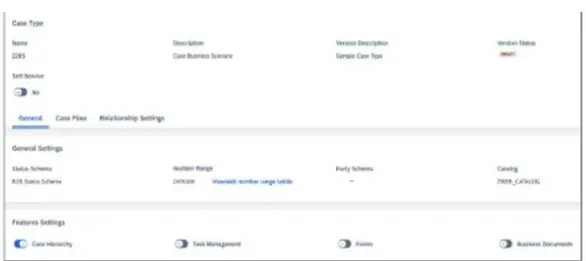
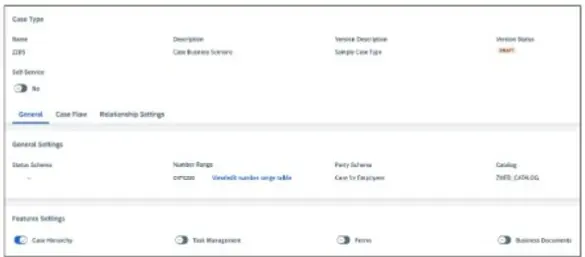
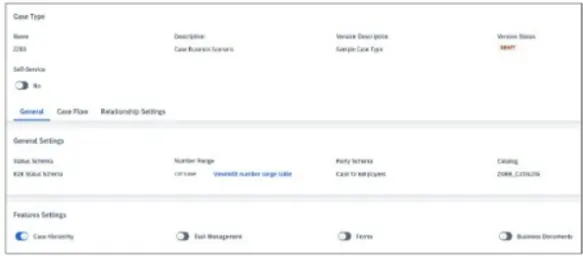
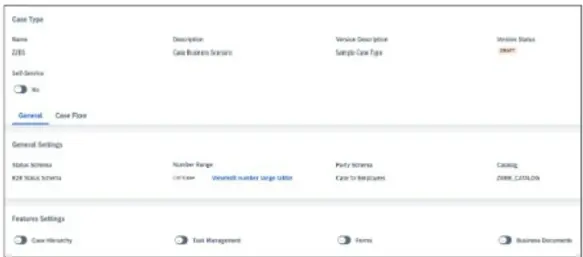
You want to assign employees, status, a service catalog, and a hierarchy to cases. Which of the following configuration options is correct? Note: Scroll down to view all possible answer options.

A)

B)

C)

D)

Correct Answer: A. Option A

Question 10

Which of the following are required to grant access to business users? Note: There are 2 correct answers to this question.

Correct Answer: A. User ID; B. Employee
Explanation:

To grant access to business users in SAP Service Cloud V2, a User ID is required to create a user account with login credentials. Additionally, associating the user with an Employee record is necessary to link the user to organizational roles and permissions. According to SAP documentation, 'Creating a User ID and linking it to an Employee record are essential steps to grant access to business users.'

Access restriction (C) is configured via business roles, not a direct requirement. Assignment to an organizational unit (D) is optional and depends on the organizational structure.


SAP Help Portal: User Management in SAP Service Cloud V2

SAP Learning: Business User Setup