
Limited-Time Offer: Enjoy 50% Savings! Ends in 00h 00m 00s Coupon code: 50OFF
Skip to content

Free SAP Certified Associate - SAP Fiori Application Developer C_FIORD_2502 Exam Questions

Page: 1 / 6 Total 60 questions

Want more questions? Get Premium Access.

Question 1

You want to add a column to the list report table that will display the status of a sales transaction as OK, Warning, or Error. These values should be colored:

OK: green

Warning: Yellow

Error: Red

The field UpdatedStatus has the following values:

'1' = Error

'2' = Warning

'3' = OK

Which of the following ABAP CDS annotation must you add?

Correct Answer: A. @UI.lineItem: [{position: 30, criticality: 'UpdatedStatus '}]
Explanation:

The criticality property in @UI.lineItem enables colored status indicators:

Values are interpreted using SAP-defined criticality semantics:

1 = Negative (Red)

2 = Critical (Yellow)

3 = Positive (Green)

SAP Annotations Guide:

''Use criticality in lineItem annotations to enable status coloring for numeric codes representing status.''

Color is not a valid annotation. @UI.selectionField is unrelated to table columns.

Question 2

What are some examples of extension points?

Note: There are 3 correct answers to this question.

Correct Answer: A. Custom column; C. Custom section; D. Custom action
Explanation:

Extension points allow app developers to inject custom UI or logic into standard apps:

Custom column: Add additional columns to tables.

Custom section: Extend the Object Page with new sections.

Custom action: Trigger application-specific actions.

Field/Table building blocks are reusable constructs, not extension points per se.


Question 3

You are extending an SAP Fiori app.

Which of the extension properties are defined in the manifest.json?

Note: There are 2 correct answers to this question.

Correct Answer: A. sap.ui.viewModifications; D. sap.ui.controllerExtensions
Explanation:

The manifest.json supports various extensibility namespaces:

sap.ui.viewModifications: replaces/changes view content.

sap.ui.controllerExtensions: injects custom logic.

SAP Fiori Extension Documentation:

''The manifest.json file defines UI and logic extensibility using namespaces like viewModifications and controllerExtensions.''

Options B/C are not valid manifest namespaces.


Question 4

What does the following ABAP CDS annotation achieve in an SAP Fiori elements app?

abap

Copy

@UI.lineItem: [{position: 10}]

ProductName;

@UI.lineItem: [{position: 30}]

Price;

@UI.lineItem: [{position: 20}]

Status;

Correct Answer: B. Three columns: ProductName, Status, Price
Explanation:

@UI.lineItem specifies table columns in a List Report.

position determines the order of columns: ProductName, Status, Price.

CDS UI LineItem Documentation:

''The lineItem annotation defines columns for tabular display. position is used to sort fields in the UI.''

These are not form fields; they're tabular entries.


Question 5

Which methods can you use to bind data to the controls in SAPUI5?

Note: There are 3 correct answers to this question.

Correct Answer: A. Property; B. Aggregation; E. Element
Explanation:

SAPUI5 supports different binding types:

Property binding: binds individual attributes (e.g., text='{/name}').

Aggregation binding: binds lists or tables (e.g., items='{/products}').

Element binding: binds a control and its children to a specific path (bindElement('/product')).

SAPUI5 Developer Guide:

''Supported binding types include Property, Aggregation, and Element binding.''

Structure/Combination are not valid SAPUI5 binding categories.


Question 6

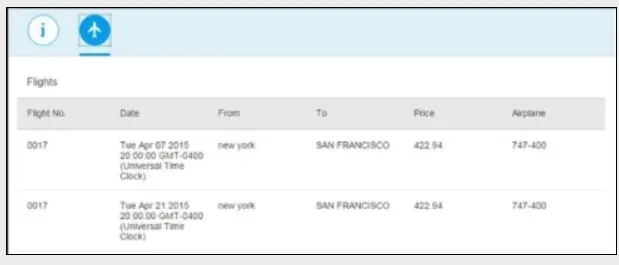
Your customer requires an app to display flight information on a mobile device as detailed in the following screenshot for details.

Which options can you use to display the same data in a readable format on a mobile device?

Note: There are 2 correct answers to this question.

Correct Answer: A. <column demandPopin='true' maxScreenWidth='mobile'> </column>; C. <column demandPopin='true' maxScreenWidth='mobile' popinDisplay='Inline'></column>
Explanation:

Responsive tables (sap.m.Table) in SAPUI5 use demandPopin, popinDisplay, and screen width qualifiers to optimize mobile display. Correct settings include:

maxScreenWidth='mobile' ensures pop-in on small devices.

demandPopin='true' triggers field reformatting into pop-ins.

popinDisplay='Inline' keeps visual alignment.

SAPUI5 SDK -- Responsive Table Control:

''Use demandPopin with maxScreenWidth and popinDisplay to handle narrow screen layouts.''

Options with minScreenWidth do not apply to mobile-focused pop-in logic.


Question 7

You develop an SAPUI5 app and implement a FacetFilter.

What events are triggered when the user interacts with the FacetFilter control?

Note: There are 2 correct answers to this question.

Correct Answer: A. confirm; B. reset
Explanation:

The sap.m.FacetFilter control fires:

confirm: when filters are applied.

reset: when the user clears filters.

SAPUI5 API Reference - FacetFilter: ''Events include 'confirm', 'reset', triggered by user interactions.''

listFilter/oninit are not defined FacetFilter events.


Question 8

In an SAP Fiori hub deployment, where is the SAPUI5 application code stored for a transactional app?

Correct Answer: D. SAP Front-End Server (FES)
Explanation:

In a hub deployment:

UI5 app code (HTML/CSS/JS) is deployed on SAP Front-End Server (FES).

Business logic (OData services) remains on Back-End Server (BES).

SAP Fiori Deployment Guide:

''FES hosts the UI components and handles UI5 resource loading. BES contains the application data logic.''

Web Dispatcher only routes traffic. XS Engine is for HANA-native apps.


Question 9

What can you do to create a worklist SAP Fiori elements application?

Note: There are 3 correct answers to this question.

Correct Answer: C. Add a setting to the manifest.json file of your list report.; D. Add the UI.hideFilterBar annotation in the backend.; E. Use the Application Generator with a suitable template.
Explanation:

To build a Worklist-style app using SAP Fiori elements:

Use Application Generator to select List Report and modify it.

In the manifest.json, modify routing and filter bar settings.

Use @UI.hideFilterBar: true annotation in the backend CDS view to suppress the filter bar.

SAP Fiori Elements Implementation Guide: ''@UI.hideFilterBar is used to hide the SmartFilterBar if a minimal worklist-style view is intended.''


Question 10

What are some benefits of using OData V4 compared to OData V2?

Note: There are 3 correct answers to this question.

Correct Answer: C. Advanced analytical capabilities; D. Improved data types; E. Flexible programming model
Explanation:

OData V4 offers:

Advanced analytical capabilities: including grouping and aggregation.

Improved data types: such as more precise decimal handling.

Flexible Programming Model: thanks to updated APIs and features.

While V4 enables a better technical foundation, UX consistency and compression improvements are not explicitly advantages of V4 over V2.