Question 1
How are business rules handled in Employee Central Quick Actions?
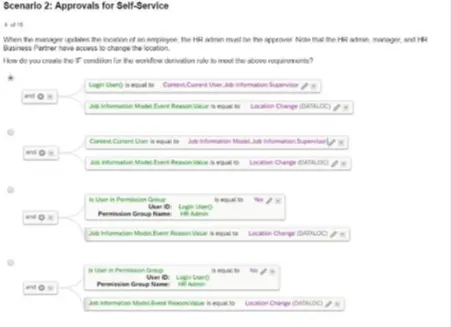
When the manager updates the location of an employee, the HR admin must be the approver Note that the HR admin, manager, and HR
Business Partner have access to change the location.
How do you create the IF condition for the workflow derivation rule lo meet the above requirements?

To meet the requirement where the HR admin must approve the manager's updates to an employee's location, the workflow derivation rule must include the following IF condition:
Option A: Ensures that the condition checks whether the user belongs to the permission group for HR Admins, and the Event Reason value matches 'Location Change'.
This configuration aligns the workflow rule with the scenario requirements, where HR admins are explicitly designated as approvers
Scenario 2: Approvals for Self-Service
What association must you use when configuring a relationship between an MDF-based object and a Foundation Object wrapper?
Which object supports &&NO_OVERWRITE&& in imports? Note: There are 2 correct answers to this question.
The &&NO_OVERWRITE&& operator is supported in imports for:
A . Job History
This ensures that existing job history records are not overwritten during imports.
D . Employment Details
Employment details such as hire dates or termination records can also be preserved using this operator.
Job Relationships and Addresses do not support the &&NO_OVERWRITE&& operator.
What tags are supported in alert messages?
Note: There are 2 correct answers to this question.
SAP SuccessFactors Employee Central supports specific tags in alert messages to provide dynamic content. The following tags are supported:
[[SUBJECT_USER]]: Refers to the user for whom the alert is generated.
[[EVENT_REASON]]: Refers to the event reason triggering the alert.
Correct Answers:
A: [[SUBJECT_USER]]
B: [[EVENT_REASON]]
Which of the following can you use to explore released APIs?
The SAP Business Accelerator Hub is the primary platform for exploring released APIs.
It provides a central repository where developers can browse, test, and integrate various APIs across SAP solutions.
The hub is designed for simplifying API access and ensuring integration consistency in SAP environments.
Other options like SAP Application Interface Framework and SAP Integration Suite focus on integration but do not primarily serve as a platform for exploring APIs.
Where can you apply rule contexts?
Note: There are 2 correct answers to this question.
Rule contexts in SAP SuccessFactors Employee Central can be applied in the following scenarios:
A . onChange rules
These rules are triggered when a field value is changed and are used to validate or calculate data dynamically.
C . onSave rules
These rules are executed when a record is saved, ensuring compliance with data validation or propagation requirements.
onInit rules apply during the initialization phase but are not considered part of dynamic user-triggered contexts. onView rules are not available as a configurable option in the rule engine
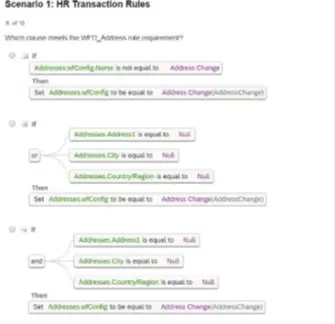
Which clause meets the WFD_Address rule requirement?


The clause in Option D meets the WFD_Address rule requirement because it checks the following conditions comprehensively:
Address is not equal to Null.
City and CountryRegion are equal to Null.
When these conditions are met, it sets the configuration for Address Change accordingly, ensuring data completeness and accuracy for address-related transactions.
Scenario 1: HR Transaction Rules
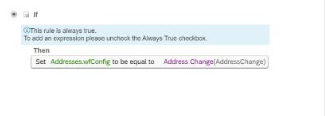
How do you set the Event Reason Derivation rule to ensure event reasons are NOT overwritten?
To ensure that event reasons are not overwritten, the business rule should be configured as follows:
Set the IF statement to Always True: This ensures the rule is triggered every time.
Set the THEN statement as blank: This ensures that no new event reason value overwrites the existing one.
By following this configuration, the system avoids unnecessary overwriting of existing event reason values while processing changes.

In a generic object with a picklist field, what must be entered in the Valid Values Source?
When configuring a picklist field in a generic object within SAP SuccessFactors Employee Central, the Valid Values Source must be set to the Picklist Code. This configuration links the field to the appropriate set of predefined values, ensuring data consistency and integrity.
Options A, C, and D are not applicable in this context:
A . Picklist Value ID
This refers to individual entries within a picklist and is not used to define the source of valid values for a field.
C . Legacy Picklist ID
Legacy Picklist IDs pertain to older configurations and are not relevant for defining valid value sources in the current framework.
D . Picklist Value External Code
This represents specific external codes for picklist entries and is not used to set the valid values source for a field.