Limited-Time Offer: Enjoy 50% Savings! Ends in 00h 00m 00s Coupon code: 50OFF
Skip to content

Free SAS 9.4 Programming Fundamentals Exam A00-215 Exam Questions

Page: 1 / 8 Total 78 questions

Want more questions? Get Premium Access.

Question 1

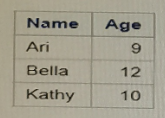
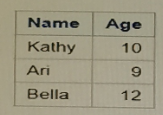
Given the data set NAMES:

Which PROC SORT program creates the NAMES data set shown below?

Correct Answer: A. proc sort data=Names; by Name; run;
Explanation:

The PROC SORT step in SAS is used to sort data sets by one or more variables. The syntax for the proc sort step requires the by statement to specify the variable(s) by which to sort the data. The correct answer is option A:

proc sort data=Names;

by Name;

run;

This sorts the data set by the variable 'Name' in alphabetical order, which matches the sorted NAMES data set shown in the question. Option B uses orderby, which is not a valid SAS statement. Option C sorts by 'Age', which would not give the same result as shown in the question. Option D also incorrectly uses orderby.


Question 2

Which LABEL statement has correct syntax?

Correct Answer: B. Label FName=' First Name' LName =' Last Name' ;
Explanation:

In SAS, the correct syntax for assigning labels to variables is to use the LABEL statement within a DATA step or a PROC step. Labels are assigned to variables using the format variable='label'. The correct syntax for the LABEL statement is represented by option B.

Here's the breakdown:

FName='First Name' correctly assigns the label First Name to the variable FName.

LName='Last Name' correctly assigns the label Last Name to the variable LName.

Each variable and label pair is separated by a space, and the overall statement ends with a semicolon, which is the proper syntax for a LABEL statement in SAS.

Options A, C, and D are incorrect due to various syntax errors like the use of the wrong character for the apostrophe, missing apostrophes, incorrect punctuation, and in the case of option C, an incorrect conjunction 'and' which is not used in LABEL statements.


SAS 9.4 documentation for the LABEL statement: SAS Help Center: LABEL Statement

Question 3

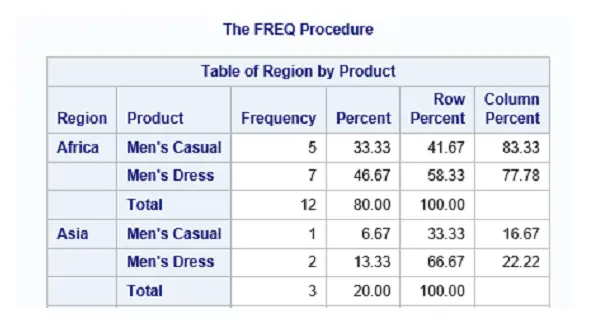
Given the partial report shown below:

Which step will produce this report?

Correct Answer: D. proc freq data=sashelp. shoes; tables region*product / crosslist; run;
Explanation:

The report shown is a cross-tabulation of 'Region' by 'Product'. The FREQ Procedure indicates that PROC FREQ has been used, and the presence of 'Frequency', 'Percent', 'Row Percent', and 'Column Percent' suggests that a cross tabulation (or contingency table) has been requested. The correct code for this output would include the tables statement to specify the two variables ('Region' and 'Product') with an asterisk between them, which indicates a request for a cross-tabulation of these two categorical variables, and the crosslist option to display the table in a cross-tabulated list format. Therefore, option D is the correct answer:

proc freq data=sashelp.shoes;

tables region*product / crosslist;

run;

Options A and C use the order=freq option incorrectly, as this option would order the table by frequency counts rather than providing a cross-tabulation. Option B is missing the crosslist option needed to produce the cross-tabulated format.


Question 4

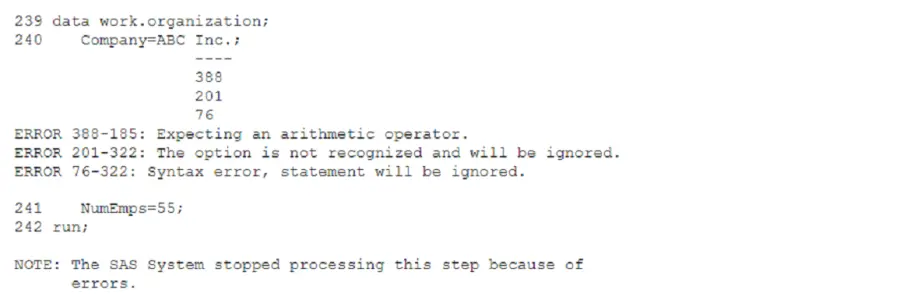
The SAS log of a submitted DATA step is shown below:

Which action resolve the error messages?

Correct Answer: B. Enclose the value of ABC Inc . in quotation marks.
Explanation:

The error messages in the SAS log indicate issues with the treatment of text as a character string. In SAS, character strings must be enclosed in quotation marks. The log shows that 'ABC Inc.' is treated as if it is a variable or an expression, which is causing a syntax error. Enclosing 'ABC Inc.' in quotation marks will correctly identify it as a character string. Therefore, Option B is the correct action to resolve the error messages. This error is evident as the log indicates it was expecting an arithmetic operator, which suggests that the text was misinterpreted as part of an expression.


SAS documentation on character strings and data step options, SAS Institute.

Question 5

What happens when you submit the code shown below?

data table1 table2;

set sashelp.shoes;

output;

run;

Correct Answer: B. Each observation in sashelp. shoes is written to both table1 and table2.
Explanation:

In SAS, the code you provided involves creating two datasets, table1 and table2, from the dataset sashelp.shoes. The key part to understand here is how the DATA statement and OUTPUT statement interact with the specified datasets.

DATA Statement: The statement data table1 table2; initiates the creation of two new datasets named table1 and table2.

SET Statement: The set sashelp.shoes; statement is used to read data from the sashelp.shoes dataset. This dataset includes data on shoe sales from SASHELP library, which is commonly used for demonstration purposes in SAS.

OUTPUT Statement: In the context of the DATA step where multiple datasets are specified in the DATA statement (as in table1 table2), the OUTPUT statement without a dataset name specified outputs the current observation to all datasets listed in the DATA statement. This is a critical point because it determines where the data goes after processing in the DATA step.

Execution: When the run; statement is executed, it processes each observation from sashelp.shoes. For each observation, because there is no condition or additional OUTPUT statements specifying dataset names, each observation is output to both table1 and table2.

Therefore, the correct behavior as described is that each observation in sashelp.shoes is written to both table1 and table2. This effectively duplicates each row from the source into both target datasets.


SAS 9.4 Language Reference: Concepts, 'DATA Step Processing' and 'OUTPUT Statement' sections provide detailed explanations on how DATA steps process and how OUTPUT statement works in different contexts.

Practical examples and explanations from SAS programming courses and official SAS documentation, which discuss DATA and SET statements, and their interaction with OUTPUT in data duplication scenarios.

Question 6

How does SAS display missing values?

Correct Answer: A. a period for missing numeric and a blank for missing character
Explanation:

SAS handles missing values distinctively based on the data type of the variable. For numeric variables, SAS represents missing values with a period (.). For character variables, missing values are represented by a blank space. This handling is crucial for distinguishing between actual data entries and absent data, particularly in statistical calculations and data processing. Options B, C, and D incorrectly describe the representation of missing values in SAS, which does not use special characters like 'N', 'C', or '$' for this purpose.

Reference: SAS documentation on handling missing data, SAS Institute.


Question 7

What type of error does NOT produce the expected results and does NOT generate errors or warnings in the log?

Correct Answer: B. Logic error
Explanation:

The type of error that does not produce expected results and does not generate errors or warnings in the log is a logic error. Logic errors occur when there is a flaw in the program's logic, which causes it to operate incorrectly, but the syntax is correct so it does not produce any error or warning messages. Unlike syntax errors which are mistakes in the program's code that prevent it from compiling or running, logic errors are more insidious because the program still runs but yields incorrect results. For example, a programmer may accidentally code an incorrect formula or use a wrong variable name that still exists, so the program runs but produces incorrect output.


SAS documentation on error types.

Question 8

Fill in blank

____ steps typically report, manage, or analyze data.

Enter your answer in the space above. Case is ignored.

Correct Answer: A. DATA
Explanation:

In SAS, the DATA step is a powerful tool that allows programmers to perform a variety of tasks such as reporting, managing, and analyzing dat

a. The DATA step processes data one observation at a time, making it highly efficient for data manipulation tasks. It enables the creation of new datasets, modification of existing ones, and complex data transformations. Additionally, within a DATA step, you can use a wide range of programming statements and functions to calculate new variables, merge or sort datasets, and perform conditional processing. The flexibility and functionality provided by DATA steps make them a fundamental part of SAS programming for handling and preparing data for further analysis or reporting.


Question 9

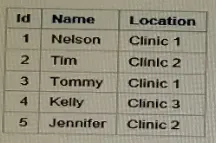
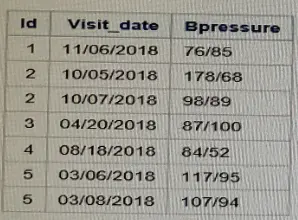
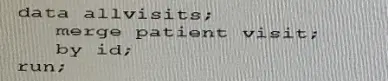
Given the PATIENT and VISIT data sets and the DATA step shown below:

PATIENT

VISIT

How many observations are created in the ALLVISITS data set?

Correct Answer: C. 7
Explanation:

In the provided DATA step, the merge statement is used to combine the PATIENT and VISIT data sets by the variable Id. The number of observations in the resulting ALLVISITS data set will equal the number of unique Id values that appear in both the PATIENT and VISIT data sets, because the merge in SAS is a one-to-one merge by default when the by statement is used without additional options like in=.

Looking at the provided data sets, each Id in the PATIENT data set has corresponding entries in the VISIT data set. Since there are 5 unique Id values and the VISIT data set contains multiple observations for some Id values (specifically, Id 2 and 5 have more than one visit), the ALLVISITS data set will have a total of 7 observations (1 for each patient plus the additional visits for Id 2 and 5).


SAS documentation on the merge statement.

Question 10

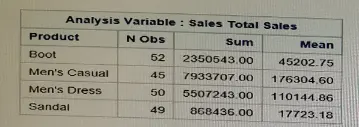
Which PROC MEANS program creates the report below?

Correct Answer: A. proc means data-sashelp. shoes sum mean; var Sales; Class Product; run;
Explanation:

The PROC MEANS statement is used to compute descriptive statistics of data in SAS. Option A is the correct code to produce the report shown in the first image because of the following reasons:

data=sashelp.shoes specifies the dataset on which the procedure is to be performed.

sum mean specifies that the summary statistics should include the sum and mean of the variables.

var Sales; specifies that the variable Sales is the analysis variable for which the summary statistics are to be computed.

class Product; specifies that the procedure should classify results by unique values of the Product variable. This will produce separate statistics for each type of product, which aligns with the structure of the report provided in the image.

Options B, C, and D are incorrect for the following reasons:

B uses group instead of class, and group is not a valid statement in the context of PROC MEANS. Also, var Sale; is incorrect as the variable name is Sales.

C includes nobe; which is not a valid SAS option and seems to be a typo. The by statement is used for sorting data, not for classifying groups as class does.

D incorrectly uses sum Salad; and mean Sales; as separate statements and has an invalid use of by product; which is not needed here.


SAS 9.4 documentation for the PROC MEANS statement: SAS Help Center: PROC MEANS