
Limited-Time Offer: Enjoy 50% Savings! Ends in 00h 00m 00s Coupon code: 50OFF
Skip to content

Free ServiceNow Certified System Administrator CSA Exam Questions

Page: 1 / 36 Total 531 questions

Want more questions? Get Premium Access.

Question 1

What actions are taken to filter a long list of records to show only those with the Category of Hardware?

Correct Answer: C. On the list, locate and right-click on the value Hardware, select Show Matching
Explanation:

When working with a long list of records, users can filter data quickly using the Show Matching feature.

Correct Answer

C . On the list, locate and right-click on the value Hardware, select Show Matching

Right-clicking on the 'Hardware' value and selecting 'Show Matching' filters the list to only show records where the Category is Hardware.

This is the fastest way to apply a quick filter.

Incorrect Answer Choices

A . On Breadcrumb, click the > icon, type Hardware and click enter

Breadcrumbs do not support direct text input for filtering.

Breadcrumbs show existing filters but are not used to type new values.

B . On the Category column header, right-click and select Show > Hardware

Incorrect menu option---There is no 'Show > Hardware' selection.

Instead, users would need to use 'Show Matching' (Correct Answer C).

D . Right-click on magnifier, type Hardware, and click enter

There is no 'magnifier' option for filtering in list view.

E . Click Funnel icon, type Hardware and click enter

The Funnel (Filter) icon is used to create advanced filters, but it does not support direct text input like this.

The correct way to use the Filter would be:

Click the Funnel icon

Set Category = Hardware

Click Run


ServiceNow Documentation: Filtering Data in a List

ServiceNow UI Guide: Using the Show Matching Feature
Question 2

Which Application Access configuration field(s) are NOT available if the Can read configuration field is NOT selected?

Correct Answer: C. Can create, Can update, and Can delete

Question 3

Which options are available in the Data Visualization configuration panel for how the data will be presented? (Choose 2 answers)

Correct Answer: A. O Metrics; D. O Chart mapping

Question 4

Which business requirements and process(es) should be documented as part of the application development plan?

Choose 4 answers

Correct Answer: A. Available licenses; B. Project schedule; D. Business problem; E. Process steps

Question 5

What would you do, on a list, if you wanted to show the records in groups, based on the column category? (Choose two.)

Correct Answer: A. On list Context Menu, select Group By > Category; E. On the Category column title, click Context menu > Group By Category
Explanation:

In ServiceNow, lists allow users to view, filter, and group records dynamically. If you want to group records based on a particular column (e.g., Category), you can use the 'Group By' functionality.

Correct Answers

A . On list Context Menu, select Group By > Category

The List Context Menu (right-clicking anywhere in the list header) provides an option to group records by a specific column.

Selecting 'Group By > Category' organizes records into expandable sections based on the selected field.

This is one of the quickest ways to group records in a list.

E . On the Category column title, click Context menu > Group By Category

Each column header in a list has its own Column Context Menu (accessible by clicking the three-line menu or right-clicking the column title).

Clicking ''Group By Category'' on the Category column will instantly rearrange the list based on the values in that column.

Incorrect Answer Choices

B . On the Filter Menu, select Group By > Category

The Filter Menu is used for setting up filters and conditions, but it does not provide a 'Group By' option.

It allows users to filter records but does not change the list structure.

C . Click Group On icon, select Category

There is no 'Group On' icon in ServiceNow lists.

Grouping is done through context menus, not a dedicated 'Group On' button.

D . On Navigator Filter, type tablename.group.category and press enter

The Application Navigator Filter is used for searching applications, modules, and tables---not for modifying list views.

Entering something like incident.group.category will not perform a grouping action on a list.


Official ServiceNow Documentation: Grouped Lists

ServiceNow User Interface Guide: List Control Features

Question 6

After finishing your work on High Security Settings, what do you do to return to normal admin security levels?

Correct Answer: B. Log out and back in
Explanation:

When using High Security Settings in ServiceNow, administrators often gain temporary elevated privileges. To revert to normal security levels, they must log out and back in to refresh their session.

Why is Option B Correct?

High Security Settings provide elevated security configurations and may override standard role-based access controls.

Logging out clears any temporary security settings and restores normal administrator privileges.

This is the recommended practice after making security changes.

Why Are the Other Options Incorrect?

A. Select Normal role

Incorrect because there is no 'Normal' role in ServiceNow.

C. Use System Administration > Normal Security module

Incorrect because there is no 'Normal Security' module in ServiceNow.

D. Select Global Update Set

Incorrect because Update Sets control customizations and configurations, not security settings.

E. End Impersonation

Incorrect because ending impersonation only switches back to the admin account if you were impersonating a user.

It does not reset security settings from High Security Mode.

Reference to Official Certified System Administrator (CSA) Documentation:

ServiceNow CSA Guide - High Security Settings

ServiceNow Best Practices - Managing Security Configurations


Question 7

Which ServiceNow resource is a framework that ensures the data your ServiceNow application requires maps correctly to the appropriate CMDB tables?

Correct Answer: A. Common Service Data Model (CSDM)
Explanation:

The Common Service Data Model (CSDM) is a framework provided by ServiceNow that ensures your application's data correctly maps to the Configuration Management Database (CMDB) tables. It standardizes how configuration items (CIs), services, and relationships are structured within the CMDB.

Key Functions of CSDM:

Standardized Data Model: Ensures consistent and correct CMDB data structuring.

Alignment with CMDB Best Practices: Helps businesses align their IT assets, services, and business functions effectively.

Better Service Mapping: Provides structured relationships between business services and their technical components.

Compliance & Governance: Ensures data integrity by enforcing best practices for CMDB population.

Incorrect Answer Choices

B. Service Mapping Utility (SMU) -- Service Mapping is used for discovering and mapping dependencies but is not a data model framework.

C. Service Schema Map (SSM) -- No such official term exists in ServiceNow documentation.

D. CMDB Class Manager (CMDBCM) -- This is a tool used to manage CI classes but does not define a data model framework like CSDM.

E. CI Class Manager (CICM) -- Incorrect term; CMDB Class Manager is used for CI class hierarchy management, not for mapping applications to CMDB tables.

Official CSA Documentation Reference:

ServiceNow Documentation: Common Service Data Model (CSDM) CSDM Overview

ServiceNow CMDB Best Practices CMDB and CSDM Alignment


Question 8

What is generated from the Service Catalog once a user places an order for an item or service?

Correct Answer: C. A request
Explanation:

When a user places an order for an item or service from the Service Catalog in ServiceNow, the system generates a Request (REQ). This is a core component of Request Management within the IT Service Management (ITSM) module.

Understanding the Request Process in ServiceNow:

User Places an Order:

The user selects an item from the Service Catalog (e.g., a laptop, software, or an access request).

The order may consist of multiple items, depending on the selection.

ServiceNow Generates a Request (REQ):

This Request (REQ#) acts as the umbrella record that tracks the order as a whole.

It is stored in the sc_request table.

Creation of Requested Items (RITM#):

Each item within the request generates a Requested Item (RITM#), stored in the sc_req_item table.

For example, if the user orders a laptop and a software license, two RITM records are created under the same Request.

Tasks (SCTASK#) Are Created:

Each Requested Item (RITM) may trigger one or more Catalog Tasks (SCTASK#) in the sc_task table.

These tasks define the steps required to fulfill the request (e.g., procurement, approval, and configuration).

Explanation of Incorrect Answers:

A . A Change Request -- Incorrect. A Change Request (CHG#) is created only if the requested item involves changes to the infrastructure, such as a server upgrade. Not all catalog items require a change request.

B . An Order Guide -- Incorrect. An Order Guide is a tool within the Service Catalog that helps users order multiple related items at once. However, it does not get generated when an order is placed.

D . An SLA -- Incorrect. A Service Level Agreement (SLA) may be associated with the request or tasks, but it is not automatically generated when a request is placed.

Reference from Certified System Administrator (CSA) Documentation:

ServiceNow Product Documentation Service Catalog Request Fulfillment

ServiceNow CSA Study Guide Service Catalog and Request Management

ServiceNow Tables Reference sc_request, sc_req_item, sc_task


Question 9

Which modules can you use to create a new table?

Choose 2 answers

Correct Answer: A. Tables & Columns; D. Tables
Explanation:

In ServiceNow, new tables can be created using the Tables & Columns module or the Tables module.

1. Tables & Columns Module ( Correct Answer)

Navigation: System Definition > Tables & Columns

Allows admins to create and modify tables, including:

Adding columns (fields)

Setting relationships

Defining attributes

2. Tables Module ( Correct Answer)

Navigation: System Definition > Tables

A simpler interface for creating tables without managing columns immediately.

Why Other Options Are Incorrect?

B . Schema Map Incorrect

Schema Map visualizes table relationships but does not allow table creation.

C . Dictionary Incorrect

The System Dictionary (sys_dictionary) is used to manage fields and attributes, not create tables.

Official ServiceNow Documentation Reference:

Creating Tables in ServiceNow

Understanding Tables & Columns


Question 10

Which items are valid Ul Action types in ServiceNow?

Choose 3 answers

Correct Answer: A. List banner button; B. Record navigation button; D. Form button

Question 11

On the Cl Dependency View, what enables you to trace from an infrastructure item, like a Server, to the Services that are dependent on that Server?

Correct Answer: C. Relationships
Explanation:

The CI Dependency View in ServiceNow visualizes relationships between Configuration Items (CIs), allowing IT teams to trace dependencies between infrastructure components, such as servers, applications, and services.

Key Concept: CI Relationships

Relationships define dependencies between Configuration Items (CIs) in the Configuration Management Database (CMDB).

The CI Dependency View uses relationships to map infrastructure components and their service dependencies.

Example Scenario:

A Server (CI) hosts a Database (CI) The database supports an Application (CI) The application provides a Service (CI).

By viewing CI Relationships, you can trace failures upstream or downstream to understand the impact.

Why Other Options Are Incorrect?

A . Service Tracer Incorrect

No such feature called 'Service Tracer' exists in ServiceNow.

B . Automapping Utility Incorrect

Auto-Discovery tools help populate the CMDB, but they do not enable tracing in the CI Dependency View.

D . Transform Map Incorrect

Transform Maps are used in Import Sets to map data between tables, not for dependency mapping.

Official ServiceNow Documentation Reference:

CI Dependency Views

Understanding CMDB Relationships


Question 12

What is the purpose of flagging an article in a knowledge base?

Correct Answer: C. Reporting an error
Explanation:

In ServiceNow Knowledge Management, flagging an article is a feature that allows users to report errors or issues within a knowledge article. This helps maintain article accuracy and ensures that outdated or incorrect information is addressed by knowledge managers.

Key Purposes of Flagging an Article:

Error Reporting

Users can flag an article if they find incorrect, outdated, or misleading information.

Knowledge managers receive a notification about flagged articles and can review them for updates.

Article Quality Control

Helps improve knowledge base content by allowing users to point out inaccuracies.

Ensures that knowledge articles remain relevant and useful.

Notifying Knowledge Managers

Flagged articles appear in the Knowledge Base Administration module, allowing managers to track and resolve flagged issues.

Why Other Options Are Incorrect?

A . To mark an article to read later

Incorrect: There is no built-in 'read later' feature in ServiceNow Knowledge Management.

Instead, users can bookmark an article for quick access.

B . Allow a user to submit feedback about an article

Incorrect:

Feedback is submitted through the Feedback feature, which allows users to rate articles and provide comments.

Flagging is specifically for error reporting, not general feedback.

Reference from ServiceNow CSA Documentation:

Flagging Knowledge Articles

Flagging an Article for Review

Managing Flagged Articles

Knowledge Management Administration


Question 13

Record numbers have to be manually incremented

Correct Answer: B. False
Explanation:

In ServiceNow, record numbers are automatically generated and incremented by the system. Each record created in a table receives a unique identifier based on a predefined number format.

How Record Numbering Works:

Each table that extends the 'task' or other core tables has a default numbering format.

Numbering is automatic, meaning users do not have to manually increment numbers.

The numbering format follows a prefix + incremental number (e.g., INC0001001 for incidents, CHG0002001 for changes).

The system ensures unique sequential numbering within each table.

Configuring Auto-Numbering:

Admins can customize numbering formats by modifying the 'Number Maintenance' module:

Navigate to System Definition Number Maintenance.

Select a table and configure the prefix, length, and starting number.

Changes apply automatically to new records created in that table.

Why 'False' is the Correct Answer:

Record numbers do not require manual updates; the system handles it automatically.

Users can change format settings, but cannot manually increment individual record numbers.

ServiceNow prevents duplicate numbers to maintain data integrity.

Why 'True' is Incorrect:

Manual incrementing is not required or possible for individual records.

The platform automatically assigns the next sequential number to each record.

Reference from CSA Documentation:

ServiceNow Documentation: Number Maintenance

CSA Exam Guide: Covers automatic record numbering and Number Maintenance settings.

Thus, the correct answer is: B. False


Question 14

What enables you to trace the connection from an infrastructure item, like a Server, to the Services that are dependent on that Server?

Correct Answer: A. Relationships
Explanation:

In the ServiceNow Configuration Management Database (CMDB), the mechanism that enables the tracing of connections between different Configuration Items (CIs) is Relationships.

1. The Role of Relationships in CMDB:

The CMDB is not just a flat list of assets; its true power lies in its ability to map how different components interact. A Relationship defines the dependency or connection between two CIs. For example, a 'Web Server' CI might run on a 'Linux Server' CI, and an 'Email Service' might depend on that 'Web Server.'

2. The cmdb_rel_ci Table:

Technically, these connections are stored in a specific table called the CI Relationship table (cmdb_rel_ci). This table acts as a bridge, storing three key pieces of information for every connection:

Parent: The upstream item (e.g., the Service or Application).

Child: The downstream item (e.g., the Server or Database).

Type: The nature of the connection (e.g., 'Runs on,' 'Depends on,' 'Hosted on,' 'Members of').

3. Dependency Views:

While the Relationship is the underlying data enabler, ServiceNow visualizes these relationships using Dependency Views (formerly known as Business Service Management or BSM maps). Dependency Views use the relationship data to graphically display the infrastructure. By looking at a Dependency View for a Server, you can trace the lines (relationships) upward to see exactly which Business Services will be impacted if that Server goes down.

4. Why the other options are incorrect:

Transform Map: This is a component of the Import Set process. It is used to map source data (from a spreadsheet or XML) to target fields in a ServiceNow table during data import. It does not define infrastructure dependencies.

Automapping Utility: This is not a standard ServiceNow architectural term. While ServiceNow has a 'Service Mapping' product that automates the discovery of relationships, 'Automapping Utility' is not the specific feature name, nor is it the fundamental element that enables tracing.

Service Tracer: This is a fictitious term and does not exist in the ServiceNow platform.


Question 15

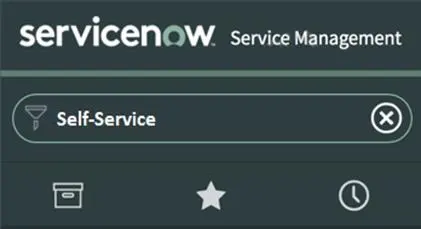
Which icon would you double click, to expand and collapse the list of all Applications and Modules?

Correct Answer: C. Application
Explanation:

In ServiceNow, the Application Navigator allows users to browse and access Applications and Modules. To expand or collapse the Application Navigator, users interact with the Application Menu icon (), commonly known as the 'Hamburger' menu.

How to Expand/Collapse Applications & Modules:

Locate the three-line 'Hamburger' icon () at the top-left of the Application Navigator.

Double-click or single-click to expand/collapse the list of applications and modules.

Explanation of Incorrect Options:

A . Star (Incorrect)

The Star icon () represents Favorites, allowing users to mark frequently used modules for quick access.

B . Clock (Incorrect)

The Clock icon () is for Recently Viewed Items, showing the user's most recent navigations.

D . Funnel (Incorrect)

The Funnel icon () is a filter used to refine search results or application lists, not to expand/collapse the navigator.

Official Reference from Certified System Administrator (CSA) Documentation:

Navigating the Application Menu: https://docs.servicenow.com/en-US/bundle/utah-platform-user-interface/page/administer/navigation-and-ui/concept/c_NavigationAndTheUserInterface.html