
Question 1
What is a characteristic of event notifications in Snowpipe?
Correct Answer:
D. When a pipe Is paused, event messages received for the pipe enter a limited retention period.
What is a characteristic of event notifications in Snowpipe?
Based on the architecture in the image, how can the data from DB1 be copied into TBL2? (Select TWO).
A)
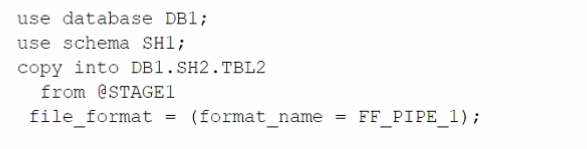
B)
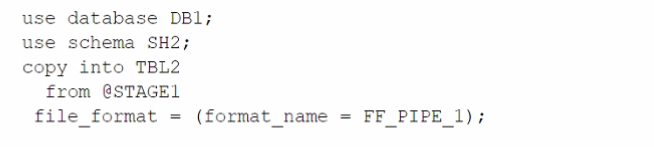
C)
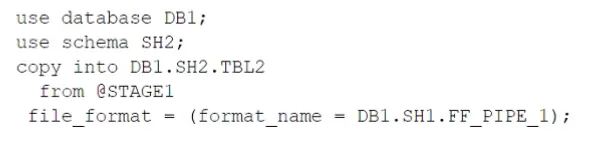
D)
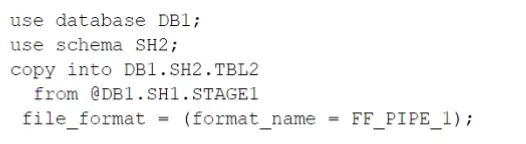
E)

The architecture in the image shows a Snowflake data platform with two databases, DB1 and DB2, and two schemas, SH1 and SH2. DB1 contains a table TBL1 and a stage STAGE1. DB2 contains a table TBL2. The image also shows a snippet of code written in SQL language that copies data from STAGE1 to TBL2 using a file format FF PIPE 1.
To copy data from DB1 to TBL2, there are two possible options among the choices given:
SQLAI-generated code. Review and use carefully.More info on FAQ.
use database DB2;
use schema SH2;
create stage EXT_STAGE1
url = @DB1.SH1.STAGE1;
SQLAI-generated code. Review and use carefully.More info on FAQ.
copy into TBL2
from @EXT_STAGE1
file format = (format name = DB1.SH1.FF PIPE 1);
SQLAI-generated code. Review and use carefully.More info on FAQ.
use database DB2;
use schema SH2;
insert into TBL2
select * from DB1.SH1.TBL1;
The other options are not valid because:
1: CREATE STAGE | Snowflake Documentation
Which of the below commands will use warehouse credits?
Among the commands listed in the question, the following ones will use warehouse credits:
The command that will not use warehouse credits is:
An Architect for a multi-national transportation company has a system that is used to check the weather conditions along vehicle routes. The data is provided to drivers.
The weather information is delivered regularly by a third-party company and this information is generated as JSON structure. Then the data is loaded into Snowflake in a column with a VARIANT data type. This
table is directly queried to deliver the statistics to the drivers with minimum time lapse.
A single entry includes (but is not limited to):
- Weather condition; cloudy, sunny, rainy, etc.
- Degree
- Longitude and latitude
- Timeframe
- Location address
- Wind
The table holds more than 10 years' worth of data in order to deliver the statistics from different years and locations. The amount of data on the table increases every day.
The drivers report that they are not receiving the weather statistics for their locations in time.
What can the Architect do to deliver the statistics to the drivers faster?
To improve the performance of queries on semi-structured data, such as JSON stored in a VARIANT column, Snowflake's search optimization service can be utilized. By adding search optimization specifically for the longitude and latitude fields within the VARIANT column, the system can perform point lookups and substring queries more efficiently. This will allow for faster retrieval of weather statistics, which is critical for the drivers to receive timely updates.
A company is using a Snowflake account in Azure. The account has SAML SSO set up using ADFS as a SCIM identity provider. To validate Private Link connectivity, an Architect performed the following steps:
* Confirmed Private Link URLs are working by logging in with a username/password account
* Verified DNS resolution by running nslookups against Private Link URLs
* Validated connectivity using SnowCD
* Disabled public access using a network policy set to use the company's IP address range
However, the following error message is received when using SSO to log into the company account:
IP XX.XXX.XX.XX is not allowed to access snowflake. Contact your local security administrator.
What steps should the Architect take to resolve this error and ensure that the account is accessed using only Private Link? (Choose two.)
The error message indicates that the IP address in the error message is not allowed to access Snowflake because it is not in the allowed list of the network policy. The network policy is a feature that allows restricting access to Snowflake based on IP addresses or ranges. To resolve this error, the Architect should take the following steps:
Add the IP address in the error message to the allowed list in the network policy. This will allow the IP address to access Snowflake using the Private Link URLs. Alternatively, the Architect can disable the network policy if it is not required for security reasons.
An Architect Is designing a data lake with Snowflake. The company has structured, semi-structured, and unstructured dat
a. The company wants to save the data inside the data lake within the Snowflake system. The company is planning on sharing data among Its corporate branches using Snowflake data sharing.
What should be considered when sharing the unstructured data within Snowflake?
According to the Snowflake documentation, unstructured data files can be shared by using a secure view and Secure Data Sharing. A secure view allows the result of a query to be accessed like a table, and a secure view is specifically designated for data privacy. A scoped URL is an encoded URL that permits temporary access to a staged file without granting privileges to the stage. The URL expires when the persisted query result period ends, which is currently 24 hours. A scoped URL is recommended for file administrators to give scoped access to data files to specific roles in the same account. Snowflake records information in the query history about who uses a scoped URL to access a file, and when. Therefore, a scoped URL is the best option to share unstructured data within Snowflake, as it provides security, accountability, and control over the data access.Reference:
Sharing unstructured Data with a secure view
Introduction to Loading Unstructured Data
A company is storing large numbers of small JSON files (ranging from 1-4 bytes) that are received from IoT devices and sent to a cloud provider. In any given hour, 100,000 files are added to the cloud provider.
What is the MOST cost-effective way to bring this data into a Snowflake table?
What are characteristics of Dynamic Data Masking? (Select TWO).
An Architect is troubleshooting a query with poor performance using the QUERY_HIST0RY function. The Architect observes that the COMPILATIONJHME is greater than the EXECUTIONJTIME.
What is the reason for this?
1: SnowPro Advanced: Architect | Study Guide5
2: Snowflake Documentation | Query Profile Overview6
3: Understanding Why Compilation Time in Snowflake Can Be Higher than Execution Time7
4: Snowflake Documentation | Optimizing Query Performance8
:SnowPro Advanced: Architect | Study Guide
:Understanding Why Compilation Time in Snowflake Can Be Higher than Execution Time
What is a characteristic of loading data into Snowflake using the Snowflake Connector for Kafka?
A company is trying to Ingest 10 TB of CSV data into a Snowflake table using Snowpipe as part of Its migration from a legacy database platform. The records need to be ingested in the MOST performant and cost-effective way.
How can these requirements be met?
For ingesting a large volume of CSV data into Snowflake using Snowpipe, especially for a substantial amount like 10 TB, the on error = SKIP_FILE option in the COPY INTO command can be highly effective. This approach allows Snowpipe to skip over files that cause errors during the ingestion process, thereby not halting or significantly slowing down the overall data load. It helps in maintaining performance and cost-effectiveness by avoiding the reprocessing of problematic files and continuing with the ingestion of other data.
Database DB1 has schema S1 which has one table, T1.
DB1 --> S1 --> T1
The retention period of EG1 is set to 10 days.
The retention period of s: is set to 20 days.
The retention period of t: Is set to 30 days.
The user runs the following command:
Drop Database DB1;
What will the Time Travel retention period be for T1?
The Time Travel retention period for T1 will be 30 days, which is the retention period set at the table level. The Time Travel retention period determines how long the historical data is preserved and accessible for an object after it is modified or dropped. The Time Travel retention period can be set at the account level, the database level, the schema level, or the table level. The retention period set at the lowest level of the hierarchy takes precedence over the higher levels. Therefore, the retention period set at the table level overrides the retention periods set at the schema level, the database level, or the account level. When the user drops the database DB1, the table T1 is also dropped, but the historical data is still preserved for 30 days, which is the retention period set at the table level. The user can use the UNDROP command to restore the table T1 within the 30-day period. The other options are incorrect because:
10 days is the retention period set at the database level, which is overridden by the table level.
20 days is the retention period set at the schema level, which is also overridden by the table level.
37 days is not a valid option, as it is not the retention period set at any level.
What Snowflake features should be leveraged when modeling using Data Vault?
These two features are relevant for modeling using Data Vault on Snowflake. Data Vault is a data modeling approach that organizes data into hubs, links, and satellites. Data Vault is designed to enable high scalability, flexibility, and performance for data integration and analytics. Snowflake is a cloud data platform that supports various data modeling techniques, including Data Vault. Snowflake provides some features that can enhance the Data Vault modeling, such as:
Snowflake Documentation: Multi-table Inserts
Snowflake Blog: Tips for Optimizing the Data Vault Architecture on Snowflake
Snowflake Documentation: Virtual Warehouses
Snowflake Blog: Building a Real-Time Data Vault in Snowflake
A Snowflake Architect is designing a multi-tenant application strategy for an organization in the Snowflake Data Cloud and is considering using an Account Per Tenant strategy.
Which requirements will be addressed with this approach? (Choose two.)
The Account Per Tenant strategy involves creating separate Snowflake accounts for each tenant within the multi-tenant application. This approach offers a number of advantages.
Option B: With separate accounts, each tenant's environment is isolated, making security and RBAC policies simpler to configure and maintain. This is because each account can have its own set of roles and privileges without the risk of cross-tenant access or the complexity of maintaining a highly granular permission model within a shared environment.
Option D: This approach also allows for each tenant to have a unique data shape, meaning that the database schema can be tailored to the specific needs of each tenant without affecting others. This can be essential when tenants have different data models, usage patterns, or application customizations.
An Architect has a VPN_ACCESS_LOGS table in the SECURITY_LOGS schema containing timestamps of the connection and disconnection, username of the user, and summary statistics.
What should the Architect do to enable the Snowflake search optimization service on this table?
According to the SnowPro Advanced: Architect Exam Study Guide, to enable the search optimization service on a table, the user must have the ADD SEARCH OPTIMIZATION privilege on the table and the schema. The privilege can be granted explicitly or inherited from a higher-level object, such as a database or a role. The OWNERSHIP privilege on a table implies the ADD SEARCH OPTIMIZATION privilege, so the user who owns the table can enable the search optimization service on it. Therefore, the correct answer is to assume a role with OWNERSHIP on VPN_ACCESS_LOGS and ADD SEARCH OPTIMIZATION in the SECURITY_LOGS schema. This will allow the user to enable the search optimization service on the VPN_ACCESS_LOGS table and any future tables created in the SECURITY_LOGS schema. The other options are incorrect because they either grant excessive privileges or do not grant the required privileges on the table or the schema.Reference:
SnowPro Advanced: Architect Exam Study Guide, page 11, section 2.3.1
Snowflake Documentation: Enabling the Search Optimization Service