Limited-Time Offer: Enjoy 50% Savings! Ends in 00h 00m 00s Coupon code: 50OFF
Skip to content

Free Splunk Cloud Certified Admin SPLK-1005 Exam Questions

Page: 1 / 8 Total 80 questions

Want more questions? Get Premium Access.

Question 1

What syntax is required in inputs.conf to ingest data from files or directories?

Correct Answer: A. A monitor stanza, sourcetype, and Index is required to ingest data.
Explanation:

In Splunk, to ingest data from files or directories, the basic configuration in inputs.conf requires at least the following elements:

monitor stanza: Specifies the file or directory to be monitored.

sourcetype: Identifies the format or type of the incoming data, which helps Splunk to correctly parse it.

index: Determines where the data will be stored within Splunk.

The host attribute is optional, as Splunk can auto-assign a host value, but specifying it can be useful in certain scenarios. However, it is not mandatory for data ingestion.

Splunk Cloud Reference: For more details, you can consult the Splunk documentation on inputs.conf file configuration and best practices.

Source:

Splunk Docs: Monitor files and directories

Splunk Docs: Inputs.conf examples

Question 2

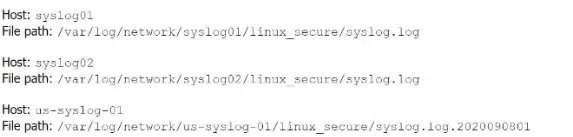
Li was asked to create a Splunk configuration to monitor syslog files stored on Linux servers at their organization. This configuration will be pushed out to multiple systems via a Splunk app using the on-prem deployment server.

The system administrators have provided Li with a directory listing for the logging locations on three syslog hosts, which are representative of the file structure for all systems collecting this dat

a. An example from each system is shown below:

A)

B)

C)

D)

Correct Answer: A. Option A
Explanation:

The correct monitor statement that will capture all variations of the syslog file paths across different systems is [monitor:///var/log/network/syslog*/linux_secure/*].

This configuration works because:

syslog* matches directories that start with 'syslog' (like syslog01, syslog02, etc.).

The wildcard * after linux_secure/ will capture all files within that directory, including different filenames like syslog.log and syslog.log.2020090801.

This setup will ensure that all the necessary files from the different syslog hosts are monitored.

Splunk Documentation Reference: Monitor files and directories


Question 3

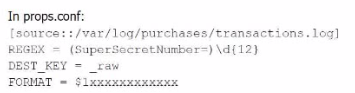
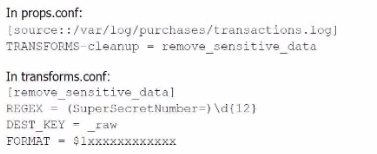
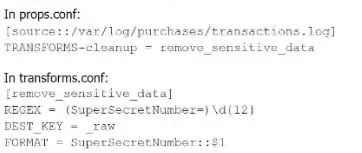
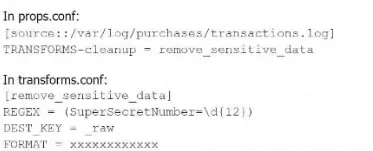
A user has been asked to mask some sensitive data without tampering with the structure of the file /var/log/purchase/transactions. log that has the following format:

A)

B)

C)

D)

Correct Answer: B. Option B
Explanation:

Option B is the correct approach because it properly uses a TRANSFORMS stanza in props.conf to reference the transforms.conf for removing sensitive data. The transforms stanza in transforms.conf uses a regular expression (REGEX) to locate the sensitive data (in this case, the SuperSecretNumber) and replaces it with a masked version using the FORMAT directive.

In detail:

props.conf refers to the transforms.conf stanza remove_sensitive_data by setting TRANSFORMS-cleanup = remove_sensitive_data.

transforms.conf defines the regular expression that matches the sensitive data and specifies how the sensitive data should be replaced in the FORMAT directive.

This approach ensures that sensitive information is masked before indexing without altering the structure of the log files.

Splunk Cloud Reference: For further reference, you can look at Splunk's documentation regarding data masking and transformation through props.conf and transforms.conf.

Source:

Splunk Docs: Anonymize data

Splunk Docs: Props.conf and Transforms.conf


Question 4

Which of the following are valid settings for file and directory monitor inputs?

A)

B)

C)

D)

Correct Answer: B. Option B
Explanation:

In Splunk, when configuring file and directory monitor inputs, several settings are available that control how data is indexed and processed. These settings are defined in the inputs.conf file. Among the given options:

host: Specifies the hostname associated with the data. It can be set to a static value, or dynamically assigned using settings like host_regex or host_segment.

index: Specifies the index where the data will be stored.

sourcetype: Defines the data type, which helps Splunk to correctly parse and process the data.

TCP_Routing: Used to route data to specific indexers in a distributed environment based on TCP routing rules.

host_regex: Allows you to extract the host from the path or filename using a regular expression.

host_segment: Identifies the segment of the directory structure (path) to use as the host.

Given the options:

Option B is correct because it includes host, index, sourcetype, TCP_Routing, host_regex, and host_segment. These are all valid settings for file and directory monitor inputs in Splunk.

Splunk Documentation Reference:

Monitor Inputs (inputs.conf)

Host Setting in Inputs

TCP Routing in Inputs

By referring to the Splunk documentation on configuring inputs, it's clear that Option B aligns with the valid settings used for file and directory monitoring, making it the correct choice.


Question 5

In Splunk terminology, what is an index?

Correct Answer: B. A data repository that contains raw, compressed data along with tsidx files.
Explanation:

In Splunk, an index is a data repository that stores both raw data and associated indexing information. Specifically, the raw data is stored in a compressed format, and the indexing information is stored in tsidx files (time series index files). These tsidx files enable fast searching and retrieval of data based on time. The correct terminology and structure make option B accurate.

Splunk Documentation Reference: Splunk Indexes


Question 6

When adding a directory monitor and specifying a sourcetype explicitly, it applies to all files in the directory and subdirectories. If automatic sourcetyping is used, a user can selectively override it in which file on the forwarder?

Correct Answer: B. props.conf
Explanation:

When a directory monitor is set up with automatic sourcetyping, a user can selectively override the sourcetype assignment by configuring the props.conf file on the forwarder. The props.conf file allows you to define how data should be parsed and processed, including assigning or overriding sourcetypes for specific data inputs.

Splunk Documentation Reference: props.conf configuration


Question 7

Which of the following tasks is not managed by the Splunk Cloud administrator?

Correct Answer: B. Upgrading the indexer's Splunk software.
Explanation:

In Splunk Cloud, several administrative tasks are managed by the Splunk Cloud administrator, but certain tasks related to the underlying infrastructure and core software management are handled by Splunk itself.

B . Upgrading the indexer's Splunk software is the correct answer. Upgrading Splunk software on indexers is a task that is managed by Splunk's operations team, not by the Splunk Cloud administrator. The Splunk Cloud administrator handles tasks like forwarding events, managing knowledge objects, and creating users and roles, but the underlying software upgrades and maintenance are managed by Splunk as part of the managed service.

Splunk Documentation Reference:

Splunk Cloud Administration


Question 8

Which of the following would always require raising a support ticket?

Correct Answer: A. Capacity or configuration changes in Splunk Cloud.
Explanation:

Any modifications in capacity or configurations within Splunk Cloud require an official support ticket, as they are managed by Splunk Cloud support teams to ensure consistent and secure changes. [Reference: Splunk Docs on Splunk Cloud support requests]


Question 9

What is a private app?

Correct Answer: C. An app that is created and used only by a specific organization.
Explanation:

A private app in Splunk is one that is created and used within a specific organization, and is not publicly available in the Splunkbase app store.

C . An app that is created and used only by a specific organization is the correct answer. This type of app is developed internally and used by a particular organization, often tailored to meet specific internal needs. It is not shared with other organizations and remains private within that organization's Splunk environment.

Splunk Documentation Reference:

Private Apps in Splunk


Question 10

The following sample log event shows evidence of credit card numbers being present in the transactions. loc file.

Which of these SEDCM3 settings will mask this and other suspected credit card numbers with an Y character for each character being masked? The indexed event should be formatted as follows:

A)

B)

C)

D)

Correct Answer: A. Option A
Explanation:

The correct SEDCMD setting to mask the credit card numbers, ensuring that the masked version replaces each digit with an 'x' character, is Option A.

The SEDCMD syntax works as follows:

s/ starts the substitute command.

(?cc_num=\d{7})\d{9}/ matches the specific pattern of the credit card number in the logs.

\1xxxxxxxxx replaces the matched portion with the first captured group (the first 7 digits of the cc_num), followed by 9 'x' characters to mask the remaining digits.

/g ensures that the substitution is applied globally, throughout the string.

Thus, Option A correctly implements this requirement.

Splunk Documentation Reference: SEDCMD for Masking Data