Limited-Time Offer: Enjoy 50% Savings! Ends in 00h 00m 00s Coupon code: 50OFF
Skip to content

Free Talend Data Integration Certified Developer Exam Data-Integration-Developer Exam Questions

Page: 1 / 6 Total 55 questions

Want more questions? Get Premium Access.

Question 1

Which statements are true about using the Implicit Context Load feature in Talend Studio?

Choose? answers

Question 2

You built multiple Jobs in Studio, each uses its own tDBInput component to connect to a common database server, but they all use different credentials.

How should you configure the tDBInput components?

Question 3

Which methods car you use to specify the schema in a tFilelnputDelimited component?

Choose 3 answers

Correct Answer: B. Add the component then drag and drop a generic schema metadata item onto the component.; D. Drag a File delimited metadata item from the Repository onto the design workspace.; E. Add the component, open the Component view, select the Built-in schema type, then click the Edit schema button.
Explanation:

The methods that you can use to specify the schema in a tFileInputDelimited component are:

Add the component then drag and drop a generic schema metadata item onto the component. This method allows you to reuse an existing schema that is stored in the Metadata section of the Repository. A generic schema is a schema that is not associated with any specific file format or connection type. You can create a generic schema by right-clicking on Generic Schema in the Repository and selecting Create Generic Schema.

Drag a File delimited metadata item from the Repository onto the design workspace. This method allows you to create a new tFileInputDelimited component with a predefined schema that is based on a specific delimited file. A File delimited metadata item is a metadata item that contains information about a delimited file, such as its path, format, encoding, field separator, etc. You can create a File delimited metadata item by right-clicking on File delimited in the Repository and selecting Create File delimited.

Add the component, open the Component view, select the Built-in schema type, then click the Edit schema button. This method allows you to create a custom schema for the tFileInputDelimited component within the Component view. A built-in schema is a schema that is defined locally for a specific component and cannot be reused by other components. You can edit a built-in schema by clicking on the Edit schema button in the Basic settings tab of the Component view.

Question 4

Question 5

You have a Job that uses a tFileInputDelimited component to extract data from an input file. You built a spate subjob, called W, to handle the condition when the input file is empty.

Which condition syntax is correct for the Run if connection?

Question 6

Which options can you use to add a Joblet to your talend Job?

Choose 3 answers

Correct Answer: B. Type the Joblet name on the Studio canvas, then select if from the Palette drop-down menu.; D. Drag the Jobket from the Repository tree view to designer canvas.; E. Drag the Joblet from Palette to the design workspace.
Explanation:

To add a Joblet to your Talend Job, you can use one of these options:

Type the Joblet name on the Studio canvas, then select it from the Palette drop-down menu. This will create a Joblet container on your canvas that contains all the components and links of your Joblet.

Drag the Joblet from Repository tree view to designer canvas. This will also create a Joblet container on your canvas that contains all components and links of your Joblet.

Drag Joblet from Palette to design workspace. This will open a dialog box where you can select an existing Joblet from Repository or create a new one.

You cannot use a tRunJob component and select Joblet from drop-down menu, nor right-click Joblet from Palette and select Add option. These methods are not available in Talend Studio and may cause errors or unexpected results.Reference:Talend Open Studio: Open-source ETL and Free Data Integration | Talend, [Joblets - 7.3]


Question 7

You have a MySQL table named customers with column named id, address, and country. You need to retrieve records that have a specific based on a variable.

Which steps should you use to achieve this?

Correct Answer: A. Use a tDBInput component with a context variable in the SQL query.
Explanation:

To retrieve records that have a specific value based on a variable, you can use a tDBInput component with a context variable in the SQL query. A context variable is a variable that can store a value that can be changed at runtime or between different contexts. A context variable can be used in various components to parameterize their properties or expressions. A tDBInput component is used to read data from a database table by executing an SQL query. You can use a context variable in the SQL query to filter the records based on a dynamic value. For example, if you have a context variable named country that stores the value of the country you want to filter by, you can use it in the SQL query of the tDBInput component as follows:

SELECT id, address, country FROM customers WHERE country = 'context.country'

This will retrieve only the records that have the same value as the context variable country in the country column.

You do not need to use a Run if trigger, a tMatchGroup component, or a tFilterColumns component to achieve this. A Run if trigger is used to execute a subjob conditionally based on a logical expression. A tMatchGroup component is used to group similar records based on matching rules and output them as master or duplicate records. A tFilterColumns component is used to select or remove columns from an input flow based on a list of column names.Reference:Talend Open Studio: Open-source ETL and Free Data Integration | Talend, [Contexts - 7.3], [tDBInput properties - 7.3], [Run if properties - 7.3], [tMatchGroup properties - 7.3], [tFilterColumns properties - 7.3]


Question 8

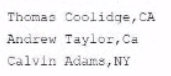
You have a tMap component configured with a single input row1 and three outputs: CA, NY, Rejects. The input row1 consists of two columns. Name and State, containing the following data:

All outputs map only the Name column from row1, but CA employs a filter expression, CA.equals(row1.state), while Ny employs a filter expression, NY. Equals(row1, State). All Rejects have no such configuration.

Under these conditions, how does data flow to the outputs?

Question 9

Which characteristics distinguish Traces Debug from Java Debug?

Choose 2 answers

Correct Answer: A. Allow row-by-row inspection of data flows; D. Supports breakpoints based on input data condition
Explanation:

Trace Debug and Java Debug are two modes that allow you to debug your jobs in Talend Studio. Trace Debug mode allows you to trace each row processed by your job components and see the values of each column in each row. Java Debug mode allows you to debug your job code in Java or Perl and see the values of each variable or expression in your code.

The characteristics that distinguish Trace Debug from Java Debug are:

Trace Debug mode allows row-by-row inspection of data flows, while Java Debug mode does not. Data flows are the links that show the data transfer between components in your job design workspace. In Trace Debug mode, you can see the data flow on each trace and inspect the values of each column for each row processed by your job. You can also use filters to display only the rows that match a condition or an expression. In Java Debug mode, you cannot see the data flow on each trace or inspect the values of each column for each row.

Trace Debug mode supports breakpoints based on input data condition, while Java Debug mode does not. Breakpoints are points where the execution of your job pauses and waits for your action. You can use breakpoints to inspect your data or debug your logic at specific points of your job execution. In Trace Debug mode, you can set breakpoints on traces based on a condition or an expression that involves input data columns. For example, you can set a breakpoint to pause your job when a customer name contains a certain string or when a product price exceeds a certain value. In Java Debug mode, you can only set breakpoints on lines of code based on a condition or an expression that involves variables or expressions.

The characteristics that do not distinguish Trace Debug from Java Debug are:

Both modes require a separate perspective. A perspective is a set of views and editors that are arranged in a specific way to support a specific task. In Talend Studio, you can switch between different perspectives, such as Integration, Debug, Profiling, etc. To use Trace Debug mode, you need to switch to the Debug perspective by clicking on the Open Perspective button and selecting Debug. To use Java Debug mode, you need to switch to the Java perspective by clicking on the Open Perspective button and selecting Java.

Neither mode requires Java development experience. Although Java Debug mode allows you to debug your job code in Java or Perl, you do not need to have Java development experience to use it. You can use the graphical interface of Talend Studio to design your job components and properties without writing any code. You can also use the Code view to see the generated code of your job in Java or Perl and modify it if needed. However, you do not need to write any code from scratch or understand all the details of the code to use Java Debug mode.Reference:Talend Open Studio: Open-source ETL and Free Data Integration | Talend, [Trace Debug mode - 7.3], [Java Debug mode - 7.3]


Question 10

Which factors can affect the context in which a Job is run?

Choose 2 answers

Correct Answer: A. Context chosen by the developer when running the Job. Context available in the Basic Run tab of Run Job section.; D. tRunJob component can influence the context in which the child Job runs.