
Limited-Time Offer: Enjoy 50% Savings! Ends in 00h 00m 00s Coupon code: 50OFF
Skip to content

Free TeraData Vantage Administration Exam TDVAN5 Exam Questions

Page: 1 / 8 Total 72 questions

Want more questions? Get Premium Access.

Question 1

After a recent migration, a request has started to take significant time to complete. Upon a detailed investigation of the EXPLAIN plan, it is found that an accidental unconstrained product join on a very uniformly-distributed large table was the prime reason for the issue. The Administrator needs to use workload management to detect when this request is running.

Which criteria should the Administrator select for this issue?

Correct Answer: B. CPU Skew
Explanation:

CPU Skew is a metric that measures the uneven distribution of CPU usage across AMPs (Access Module Processors). In the case of an accidental unconstrained product join on a large, uniformly distributed table, certain AMPs may handle significantly more work than others, leading to high CPU Skew. This skew occurs because the product join results in an inefficient execution plan, where data from the large table is unnecessarily compared row-by-row with another table.

Option A (AWT Wait Time) refers to the time queries spend waiting for available AMP Worker Tasks, but it is not directly related to detecting the inefficiencies caused by product joins.

Option C (CPU Disk Ratio) measures the relationship between CPU usage and disk I/O. While it could indicate inefficiency, it doesn't directly pinpoint product join issues like CPU Skew does.

Option D (CPU Utilization) reflects overall CPU usage but doesn't indicate imbalance across AMPs, which is critical for detecting issues like product joins.
Question 2

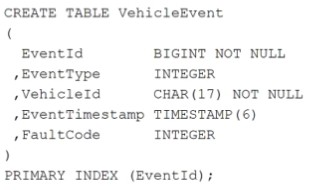
At a large car manufacturer, huge volumes of diagnostic data for cars are collected in the following table:

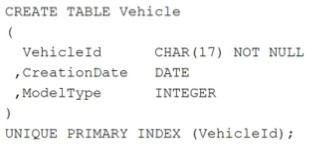
The master data for each car is stored in the following table:

Many reports require data from both tables by joining via column VehicleId.

A very frequently performed query on the system returns the number of events by FaultCode and ModelType. This query consumes many CPU and I/O resources each day.

Which action should the Administrator take to improve the runtime and resource consumption for this query?

Correct Answer: A. Use an aggregate join index with columns FaultCode, ModelType, as well as an appropriate aggregate function.
Explanation:

To improve the runtime and resource consumption for a query that returns the number of events by FaultCode and ModelType from the two tables VehicleEvent and Vehicle, the most appropriate action would be:

A . Use an aggregate join index with columns FaultCode, ModelType, as well as an appropriate aggregate function.

Aggregate Join Index: This type of join index will pre-join the tables VehicleEvent and Vehicle on VehicleId and store the results of frequently queried aggregations (in this case, counts by FaultCode and ModelType). It would significantly reduce the need to perform full joins and aggregations at query time, saving both CPU and I/O resources.

Option B: A sparse join index is useful for selective filtering but does not offer aggregation. Since the query involves counting (aggregation), the aggregate join index is more suitable.

Option C: Creating Non-Unique Secondary Indexes (NUSIs) on FaultCode and ModelType would help speed up searches for those columns, but it won't help with the pre-aggregation or frequent joins that are consuming the majority of the resources.

Option D: Creating separate single table join indexes for FaultCode and ModelType on different tables won't improve the performance of the aggregation and join-heavy query, because the problem stems from the frequent joins and aggregations, not just individual table access.


Question 3

An Administrator has been given a task to generate a list of users who have not changed their password in the last 90 days.

Which DBC view should be used to generate this list?

Correct Answer: B. DBC.USERSV
Explanation:

DBC.USERSV contains information about users, including the passwordlastmodified column, which records the date and time the user last changed their password. By querying this view, the Administrator can identify users who have not updated their password within the specified time frame (in this case, 90 days).

Option A (DBC.LOGONOFFV) logs user logon and logoff events, but it does not track password changes.

Option C (DBC.SECURITYDEFAULTSV) contains system-wide security defaults, but it does not track individual user password activity.

Option D (DBC.ACCESSLOGV) logs access control events, like who accessed which database objects, but it doesn't track password changes either.

Therefore, DBC.USERSV is the appropriate view to use for this task.


Question 4

What is the maximum payload size for CSV and JSON data formats that the NOS_READ function can read, when it is based on the LATIN character set?

Correct Answer: B. 32 MB
Explanation:

When using the NOS_READ function in Teradata to read data in CSV and JSON formats based on the LATIN character set, the maximum payload size that can be read is 32 MB. This limit ensures efficient processing and handling of large datasets, while also maintaining performance.


Question 5

An Administrator wants to see the list of foreign servers and their parameters in a Teradata QueryGrid configuration for a Vantage system.

Which database shows this information?

Correct Answer: B. TD_SERVER_DB
Explanation:

TD_SERVER_DB contains the metadata for foreign servers and their configurations in a Teradata QueryGrid environment. This includes information about the foreign servers and their associated parameters, which is useful for managing and monitoring QueryGrid connections.

The other options are not directly relevant for this purpose:

TD_SYSFNLIB contains system functions and is unrelated to QueryGrid server configurations.

TD_FOREIGN_DB is not a valid database in the context of QueryGrid configuration.

SECADMIN is related to security and user management but does not contain information about foreign servers in QueryGrid.


Question 6

An Administrator notices that a system appears to be near capacity and needs to access a dictionary to assess that AMPs are entering into flow control.

Which dictionary should be accessed for this purpose?

Correct Answer: B. DBC.ResUsageSawt
Explanation:

The DBC.ResUsageSawt view provides detailed information about the resource usage of AMP Worker Tasks (AWTs), including whether AMPs are experiencing flow control. Flow control occurs when AMPs are overwhelmed and need to throttle the workload, and this view tracks metrics related to AWT usage and system resource contention, which would indicate when AMPs are under strain.

Option A (DBC.SessionInfoV) provides information about current user sessions but does not provide insights into AMP-level flow control or resource usage.

Option C (DBC.AMPUsage) provides general statistics about AMP usage but doesn't give detailed information about flow control or AWT usage.

Option D (DBC.ResUsageSldv) tracks statistics related to logical disk usage but isn't focused on AMP flow control.


Question 7

Which QueryGrid connector can only be a target?

Correct Answer: B. Oracle
Explanation:

In QueryGrid, the Oracle connector can only be used as a target, meaning data can be sent to an Oracle database but not sourced from it for querying in Teradata Vantage.

Hive, Presto, and Teradata connectors can act as both source and target, allowing data to be retrieved from or sent to these systems as part of a QueryGrid query.

Thus, Oracle is the connector that can only be a target in QueryGrid.


Question 8

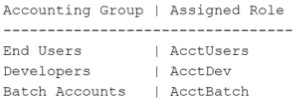
The Administrator has received a request to add SELECT rights on the BusinessViews database to end users, developers, and batch accounts in the accounting unit. The following roles are set up for each group:

The Administrator created the AcctShared role and will use it in a role nesting strategy to provide the required access.

Which actions can the Administrator take to fulfill this request?

Correct Answer: C. Grant SELECT on BusinessViews to AcctShared, then grant AcctShared to AcctUsers. AcctDev, and AcctBatch.
Explanation:

The AcctShared role should be granted SELECT access on the BusinessViews database. This ensures that the role itself has the necessary privileges.

Then, you can nest this role by granting AcctShared to the individual roles of AcctUsers, AcctDev, and AcctBatch. This role nesting strategy allows the users in these groups to inherit the permissions from AcctShared without having to directly grant the privileges to each individual role.

This approach maintains a clean and efficient permission structure using role nesting.


Question 9

A capacity planner wants to keep a record of the number of rows that are added and deleted from certain tables over time and would like to obtain this information without having to change the application itself.

Which DBQL option should be enabled?

Correct Answer: C. OBJECTS
Explanation:

The OBJECTS option in DBQL (Database Query Logging) records the tables and other objects that are accessed by queries, including information on how many rows are added, updated, or deleted. This allows the capacity planner to track changes to specific tables without modifying the application itself.

The other options are less relevant to tracking row changes:

USECOUNT records how often specific queries are executed, but not the number of rows affected.

EXPLAIN captures the query execution plan, which doesn't provide details on rows added or deleted.

VERBOSE XMLPLAN gives detailed execution plans in XML format, but it is more focused on query execution and optimization, not tracking row modifications.


Question 10

An Administrator needs to enforce a security policy which prohibits the use of an application's username from being used by certain query clients.

Which workload management feature should the Administrator use?

Correct Answer: D. Filter
Explanation:

Filters in Teradata workload management allow the Administrator to define rules that restrict or block certain types of queries or connections based on specific criteria, such as the username, query client, or other attributes. In this case, the Administrator can use a filter to prevent queries from specific clients using the application's username, enforcing the security policy.

Option A (Flex Throttle) is used to manage query concurrency and system resources dynamically but is not designed to enforce security policies like user restrictions.

Option B (Utility Session) controls the number of utility sessions but does not help with filtering query clients based on usernames.

Option C (Exception) handles query workload exceptions based on certain thresholds or behaviors but doesn't directly enforce user or client restrictions.