
Limited-Time Offer: Enjoy 50% Savings! Ends in 00h 00m 00s Coupon code: 50OFF
Skip to content

Free Trend Micro Certified Professional for Deep Security Exam Deep-Security-Professional Exam Questions

Page: 1 / 8 Total 80 questions

Want more questions? Get Premium Access.

Question 1

A Recommendation Scan is run to determine which Intrusion Prevention rules are appropriate for a Server. The scan is configured to apply the suggested rules automatically and ongoing scans are enabled. Some time later, an operating system patch is applied. How can you de-termine which Intrusion Prevention rules are no longer needed on this Server?

Correct Answer: B. Since the rules are being applied automatically, when the next Intrusion Prevention Recommendation Scan is run automatically, any rules that are no longer needed will be automatically unassigned. These are rules that are no longer needed as the vulnerability was corrected with the patch.

Question 2

Which of the following correctly identifies the order of the steps used by the Web Reputation Protection Module to determine if access to a web site should be allowed?

Correct Answer: D. Checks the Approved list. 2. Checks the Deny list. 3. Checks the cache. 4. If not found in any of the above, retrieves the credibility score from the Rating Server. 5. Evaluates the credibility score against the Security Level to determine if access to the web site should be allowed.

Question 3

Which of the following is NOT an operation that can be performed on Deep Security resources using the API?

Correct Answer: C. VIEW
Explanation:

Rest API


Question 4

Which of following statements best describes Machine Learning in Deep Security?

Correct Answer: A. Machine Learning is malware detection technique in which features of an executable file are compared against a cloud-based learning model to determine the probability of the file being malware.
Explanation:

Predictive Machine Learning


Question 5

What is the role of Apex Central in the Connected Threat Defense infrastructure?

Correct Answer: D. Apex Central compiles the Suspicious Objects List based on the result of file analysis in Deep Discovery Analyzer.
Explanation:

1 Deep Security Agents are configured with rules to enable detection of malware on the protected computers.

2 Objects deemed to be suspicious are gathered and submitted to Deep Security Manager.

3 Deep Security Manager submits the suspicious objects to Deep Discovery Analyzer for analysis.

4 Deep Discovery Analyzer executes and observes the suspicious object in a secure, isolated virtual sandbox environment.

5 Deep Discovery Analyzer pushes the analysis results to Trend Micro Apex Central, where an action can be specified for the file based on the analysis. Once the action is specified, a list of emerging threats called a Suspicious Object List is created or updated. Other Trend Micro products, such as Apex One, Deep Discovery Inspector or Deep Discovery Email Inspector, may also be connected to Trend Micro Apex Central and be able to update the list.

6 Deep Security Manager receives the list of suspicious objects from Apex Central.

7 The list is forwarded to Deep Security Agents where protection against the suspicious object is applied. Anti-Malware policies define how suspicious objects are to be handled.

Explication: Study Guide - page (387)


Question 6

What is IntelliScan?

Correct Answer: A. IntelliScan is a method of identifying which files are subject to malware scanning as determined from the file content. It uses the file header to verify the true file type.

Question 7

How is scan caching used in agentless implementations of Deep Security?

Correct Answer: D. Scan caching enhances the performance of the Deep Security Virtual Appliance in that files scanned for malware on a virtual machine that appear on other virtual machines may not need to be scanned again.

Question 8

An administrator attempts to activate the Deep Security Agent installed on a server by typing the following command in the Command Prompt on the Deep Security Agent computer:

dsa_control -a dsm://server1.acme.com:4120

The Agent does not activate as expected. What is a valid reason for this issue?

Correct Answer: D. 'Allow Agent-Initiated Activation' is currently not enabled in Deep Security Manager.
Explanation:

dsa_control -a dsm://<host or IP>:/

For the command-line Agent activation option to work, Deep Security Manager must be set to ac-cept Agent-Initiated Activations (AIA) commands. This method is particularly useful when using scripts or in Cloud environments like Amazon Web Services where Deep Security Manager can not typically connect to Deep Security Agents to activate them, but the Agents can connect to Deep Security Manager.

Explication: Study Guide - page (90)


Question 9

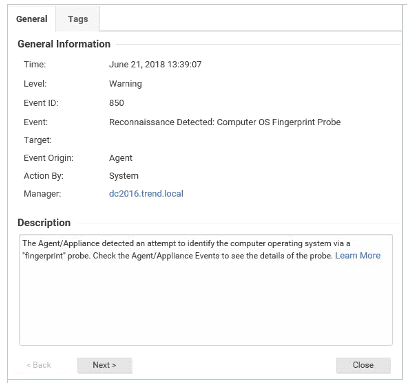
Based on the details of event displayed in the exhibit, which of the following statements is false?

Correct Answer: C. The scan may be generated from an IP address which may be known to you. If so, the source IP address can be added to the reconnaissance whitelist.

Question 10

Multiple Application Control Events are being displayed in Deep Security after a series of ap-plication updates and the administrator would like to reset Application Control. How can this be done?

Correct Answer: C. Application Control can be reset by disabling the Protection Module, then enabling it once again. This will cause local rulesets to be rebuilt.