Limited-Time Offer: Enjoy 50% Savings! Ends in 00h 00m 00s Coupon code: 50OFF
Skip to content

Free UiPath Automation Developer Professional v1 Exam UiPath-ADPv1 Exam Questions

Page: 1 / 14 Total 205 questions

Want more questions? Get Premium Access.

Question 1

A developer is using the REFramework template to automate a process. In "SetTransactionStatus" file, there is the following sequence of activities, where the last Log

Message activity was added by the developer:
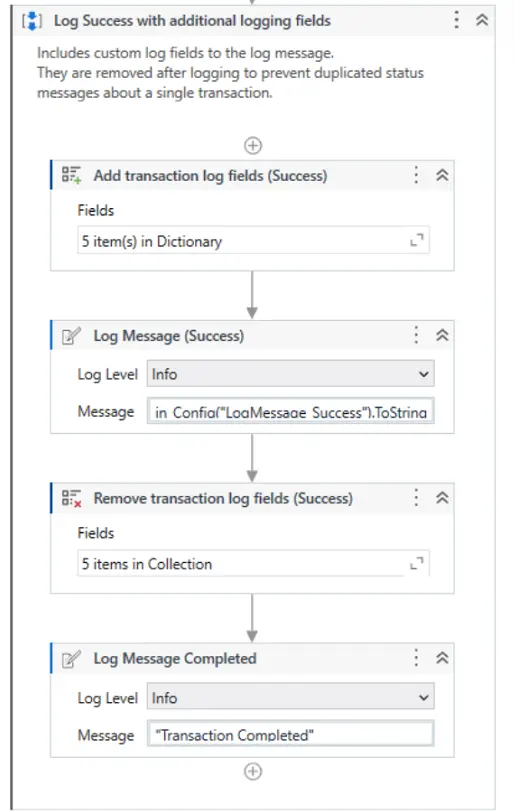
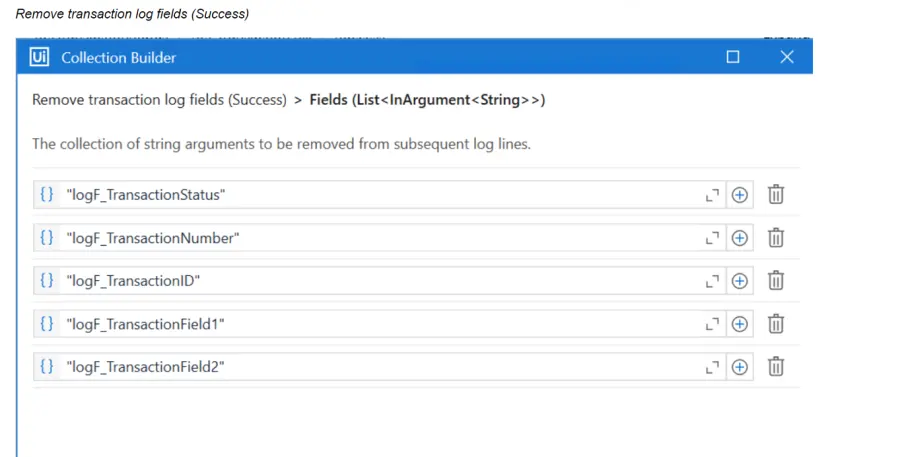
The configuration for Add Log Fields and Remove Log Fields activities are shown below:

Add transaction log fields (Success)
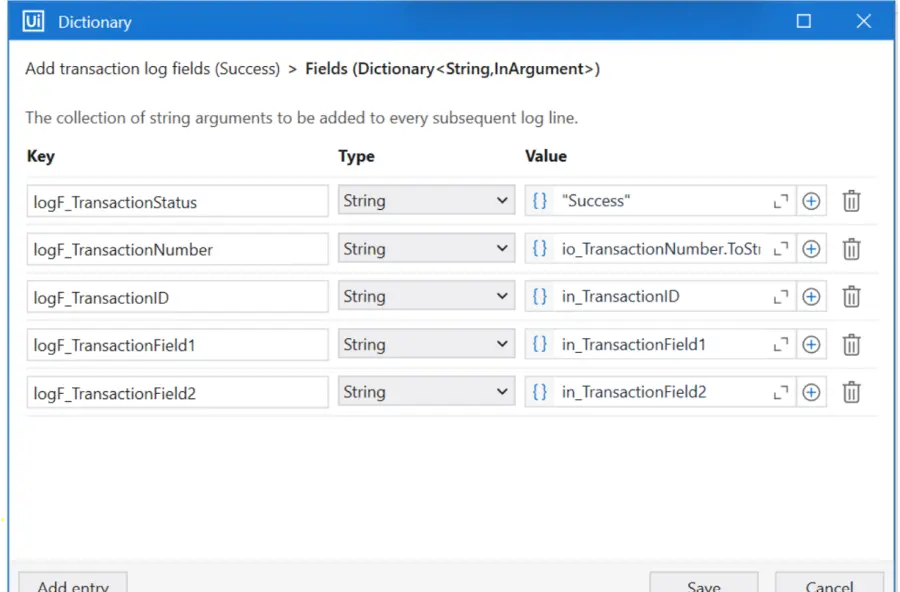
The developer runs the process and notices the argument values for the first transaction are:

in_TransactionID = "07/18/2023 10:27:29"

io_TransactionNumber = 1

in_TransactionField1 = "UI235-80"

in_TransactionField2 = "Update Request"

Which of the following Log Message Details will be displayed when executing the activity Log Message Completed for the first transaction, considering it is successful?

Correct Answer: D. {'message': 'Transaction Completed','level': 'Information','logType': 'User','timeStamp': '10:30:19','fileName': 'SetTransactionStatus','processVersion': '1.0.0','jobId': 'f8a36a46-8ebc-40df-8f71-26b39087ebee','robotName': 'test.robot','machineId': 0,'logF_BusinessProcessName': 'Framework'}
Explanation:

In the REFramework, the Add Log Fields activity is used to append additional information to the log messages. This information is stored in the form of custom fields. In this scenario, Add Log Fields (Success) activity is adding several fields with the transaction details whenever a transaction is successful.

The Remove Log Fields activity is then used to delete these custom fields to prevent them from appearing in subsequent log messages. This is important to ensure that only relevant information is logged for each transaction and to avoid cluttering the logs with outdated information.

When the Log Message Completed activity is executed after the Remove Log Fields activity, it should log the message without the additional fields that were added by the Add Log Fields activity since they have been removed. This means that the log message should only include the standard fields like message, level, logType, timeStamp, fileName, processVersion, jobId, robotName, and machineId, without the custom fields like logF_TransactionStatus, logF_TransactionNumber, etc.

Based on the options provided and the understanding of the REFramework's logging mechanism, the correct answer should be:

D . { 'message': 'Transaction Completed', 'level': 'Information', 'logType': 'User', 'timeStamp': '10:30:19', 'fileName': 'SetTransactionStatus', 'processVersion': '1.0.0', 'jobId': 'f8a36a46-8ebc-40df-8f71-26b39087ebee', 'robotName': 'test.robot', 'machineId': 0, 'logF_BusinessProcessName': 'Framework' }

This option is correct because it shows a log message after the removal of custom fields, retaining only the logF_BusinessProcessName field, which wasn't specified to be removed according to the provided information.

Question 2

In the Robotic Enterprise (RE) Framework, at which point should a developer log a clear message with the Logging Level set to "Information," adhering to the best practices for automating a production-level process?

Correct Answer: B. Whenever data is fetched from external sources.
Explanation:

In the Robotic Enterprise Framework (REFramework), best practices for logging at the 'Information' level suggest recording entries that are informative about the progress of the automation. This would typically include:

The start and end of a transaction.

Status updates of a transaction.

The result of an operation, like a successful data retrieval or submission.

From the provided options, the one that aligns best with this approach would be:

B . Whenever data is fetched from external sources.

This action is a significant step in most automation processes because it usually represents a point where the robot interacts with systems outside of its immediate control, and it's important to have a record that this step has been completed successfully. It provides a clear and traceable log entry that helps in understanding the workflow's progress and is useful for audit trails and troubleshooting.

Logging every time an argument or value is used (C) would be excessive and not practical for production-level processes. Logging every exception (A) and error on a Queue Item (D) would typically be done at a 'Warning' or 'Error' level, not 'Information'.


Question 3

When building automation projects, which statement is true regarding Perform Remote Debugging?

Correct Answer: D. Perform Remote Debugging allows developers to debug a project on a different machine using a web-based interface.
Explanation:

Comprehensive and Detailed Remote Debugging is a feature of UiPath Studio that allows developers to run and debug automation projects on robots deployed to remote machines, including on Linux robots that can run cross-platform projects1.It enables developers to connect to the remote robot using either a remote machine connection or an unattended robot connection, and then use the Studio debugging tools to inspect the execution and troubleshoot any issues1.Remote Debugging uses a web-based interface that shows the UI elements and the data of the remote machine, as well as the breakpoints, variables, and output of the project2.

The other options are incorrect because:

Option A is incorrect because Remote Debugging is not limited by the involvement of Orchestrator queues and assets in the automation project.Remote Debugging can work with any project that can be executed by a robot on a remote machine, regardless of the Orchestrator entities used1.

Option B is incorrect because Remote Debugging does not enable developers to design new UI elements for the automation project.Remote Debugging is only used for testing and debugging existing projects, not for creating or modifying them1.

Option C is incorrect because Remote Debugging does not refer to the process of testing and debugging an automation project on the same machine where UiPath Studio is installed.That process is called Local Debugging, which is the default debugging mode in Studio3.


Studio - Remote Debugging - UiPath Documentation Portal

Remote Debugging in UiPath Studio - Video Tutorials - UiPath Community Forum

Studio - Debugging Actions - UiPath Documentation Portal

Question 4

Which activity from the Microsoft 365 package should be used to retrieve the Driveitem ID for a Sharepoint URL?

Correct Answer: B. Get File/Folder
Explanation:

The Get File/Folder activity from the Microsoft 365 package should be used to retrieve the Driveitem ID for a Sharepoint URL. This activity allows you to get information about a specific file or folder from OneDrive or SharePoint, such as the name, size, ID, URL, etc.You can specify the file or folder to be retrieved by browsing, entering the ID, or entering the URL1.

To get the Driveitem ID for a Sharepoint URL, you need to do the following steps:

Use the Get File/Folder activity and select the Enter Url option in the File or folder to get property.

Enter the Sharepoint URL of the file or folder in the File or folder Url property. For example,5.

Create a variable of type Microsoft.Graph.DriveItem in the Output property. For example, driveItem.

Use an Assign activity to get the Driveitem ID from the output variable. For example, driveItemId = driveItem.Id.

The other options are not activities that can be used to retrieve the Driveitem ID for a Sharepoint URL, because they either do not have an output property that returns the Driveitem ID, or they do not have an input property that accepts the Sharepoint URL. For example:

The Get Group activity gets information about a specific group from Microsoft 365, such as the name, ID, description, etc.It does not have an output property that returns the Driveitem ID, nor an input property that accepts the Sharepoint URL2.

The Share File/Folder activity shares a file or folder with the specified recipients.It does not have an output property that returns the Driveitem ID, but only the sharing link and the expiration date3.

The Download File activity downloads a file from OneDrive or SharePoint to a local folder.It does not have an output property that returns the Driveitem ID, but only the local path of the downloaded file4.


1:Get File/Folder - UiPath Activities2:Get Group - UiPath Activities3:Share File/Folder - UiPath Activities4:Download File - UiPath Activities

Question 5

You are tasked with automating a process that requires secure, persisted, and accessible data storage across multiple systems. What is the most suitable benefit of UiPath Data Service for this scenario?

Correct Answer: C. It provides secured, persisted storage in a central location accessible to all UiPath products.
Explanation:

UiPath Data Service offers a centralized, secure, and persistent data storage solution, natively integrated across UiPath products like Studio and Orchestrator. It enables developers to define and manage entities and relationships, and use them across processes --- ideal for workflows requiring data consistency and accessibility across multiple systems.


Question 6

In a UiPath State Machine workflow, which section of State activity is used to specify conditional/triggers logic and multiple outgoing transitions in a state machine?

Correct Answer: B. Transitions
Explanation:

In a UiPath State Machine workflow, the Transitions section of the State activity is used to specify conditional/triggers logic and multiple outgoing transitions in a state machine. Transitions are expanded when you double-click them, just like the State activity. They contain three sections: Trigger, Condition and Action, that enable you to add a trigger for the next state, or add a condition under which an activity or sequence is to be executed. Transitions are represented by arrows or branches between states. They define the flow of the state machine and the rules for moving from one state to another. You can add multiple transitions from a state, but only one transition can be taken at a time, based on the trigger or condition that is met first


Question 7

How does UiPath Integration Service benefit automation developers?

Correct Answer: B. By standardizing authorization and authentication, managing API connections, and enabling faster integration into SaaS platforms.
Explanation:

UiPath Integration Service is a feature of UiPath Automation Cloud that allows you to connect to various external applications and systems using predefined connectors. A connector is a component that provides the logic and interface for interacting with a specific application or system. A connection is an instance of a connector that is configured with the credentials and parameters required to access the application or system.

UiPath Integration Service benefits automation developers by standardizing authorization and authentication, managing API connections, and enabling faster integration into SaaS platforms. By using UiPath Integration Service, automation developers can:

Use a consistent and secure way of authenticating and authorizing access to different applications and systems, such as OAuth 2.0, API keys, or basic authentication.

Manage and reuse connections across multiple automation projects, and share them with other developers using UiPath Orchestrator folders and permissions.

Integrate with popular SaaS platforms, such as Microsoft Outlook 365, Salesforce, Google Sheets, and more, using the built-in connectors and activities that are available in UiPath Studio and other products.

Trigger automations based on events or actions that occur in the external applications or systems, such as receiving an email, creating a record, or updating a spreadsheet.

Build custom connectors for any system integration using the Connector Builder, which allows you to create and publish connectors based on third-party APIs.

The correct answer is B. By standardizing authorization and authentication, managing API connections, and enabling faster integration into SaaS platforms. This statement accurately describes how UiPath Integration Service benefits automation developers.

The other options are not correct statements. Option A is incorrect, because UiPath Integration Service does not substitute the requirement for API automation with UI automation capabilities, but rather combines them and allows both capabilities to be centrally accessed within the same integration design environment. Option C is incorrect, because UiPath Integration Service does not offer a comprehensive, unified platform dedicated solely to UI automation, but rather a component of the UiPath Platform that makes the automation of third-party applications easier by using both UI and API automation. Option D is incorrect, because UiPath Integration Service does not enable developers to create custom UI elements for applications without using APIs, but rather to create custom connectors for applications using APIs.


Question 8

How can a process be converted from a toreground process to a background process?

Correct Answer: D. A process may be turned into a Background Process as long as it does not contain activities with Ul interaction You need to go to the Project Settings window and set the Starts in Background toggle to Yes.
Explanation:

Converting a process into a background process in UiPath is accomplished by ensuring the process does not contain UI interaction and setting the 'Starts in Background' toggle to Yes in the Project Settings. This is crucial for processes meant to run without user interface interaction.


Question 9

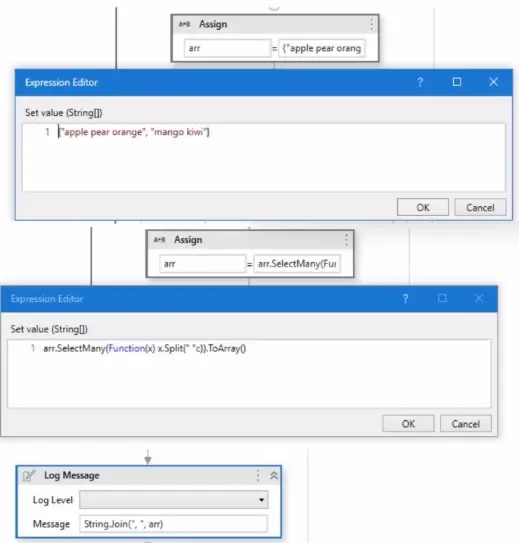
Given the following workflow:

What will be the output of the Log Message activity?

Correct Answer: B. apple, pear, orange, mango, kiwi

Question 10

An error occurs during the Initialization state within the 'FrameworkMnitAIISettings.xaml'' file for a process using REFramework which is executed on Orchestrator. The project contains default values for the settings specified in "Config.xlsx".

What is the current state of the job in Orchestrator?

Correct Answer: B. Faulted
Explanation:

The current state of the job in Orchestrator is Faulted, because an error occurred during the Initialization state of the process using REFramework.The REFramework is a template for creating robust and scalable automation projects that uses the State Machine workflow type1.The Initialization state is the first state in the REFramework, which is responsible for initializing the application, reading the configuration file, and setting the log level2.If an error occurs during the Initialization state, the process will go to the End Process state, which will perform the final actions and close the application2.The End Process state will also mark the job as Faulted in Orchestrator, if the value of the ShouldMarkJobAsFaulted argument is True2.The default value of this argument in the REFramework is True, unless it is changed in the Config.xlsx file or in the Orchestrator assets3.

Option A is incorrect, because the job is not Successful, as an error occurred during the Initialization state. Option C is incorrect, because the job is not Suspended, as the process did not pause or wait for any user input. Option D is incorrect, because the job is not Stopped, as the process did not encounter any user intervention or manual termination.


Question 11

A developer Intends to incorporate a Flow Switch activity within a Flowchart. What Is a characteristic of this activity?

Correct Answer: C. The default TypeArgument property for the Flow Switch activity is set lo Int32.
Explanation:

In UiPath, the Flow Switch activity is commonly used within flowcharts. Its default TypeArgument property is set to Int32, which means it is primarily used to handle integer-based decision branching.


Question 12

When developing a new project using REf ramework. logging in to multiple applications Is required. What is the recommended location to accomplish this task?

Correct Answer: A. InitAIIApplicatlons.xaml
Explanation:

In the REFramework (Robotic Enterprise Framework), the initialization of all required applications should ideally be done in the 'InitAllApplications.xaml' file. This helps in keeping the project organized and maintains a standard structure.


Question 13

What method can be used to change the index of an existing column in a datatable?

Correct Answer: B. SetOrdinal
Explanation:

In a UiPath REFramework project, the primary purpose of using Custom Log Fields is to add specific contextual information to log messages that are relevant to the automation process. Custom Log Fields are created using the Add Log Fields activity, which adds custom log fields to the Robot Execution Logs. The new log fields created via this activity are added for every Log Message execution throughout the entire workflow, unless a Remove Log Fields activity is used. Custom Log Fields can help you to maintain contextual insights within log messages, such as the business process name, the transaction data, the transaction status, or any other information that can help you to monitor, analyze, or debug the automation process. Custom Log Fields can also enhance the readability and consistency of log messages, as well as facilitate log filtering and reporting.


Question 14

How are custom log fields used in the REFramework?

Correct Answer: D. Customlog fieldsareincluded in log messages and used to add more data about each transaction for reporting and troubleshooting purposes.
Explanation:

Custom log fields are additional fields that can be added to the Robot Execution Logs using the Add Log Fields activity1.The REFramework is a template for creating robust and scalable automation projects that uses the State Machine workflow type2. The REFramework leverages the custom log fields feature to include more information about each transaction in the log messages, such as the transaction number, the transaction item, the business process name, etc.This helps to improve the reporting and troubleshooting capabilities of the automation project, as the custom log fields can be easily viewed and filtered in the Output panel, the Orchestrator Logs page, or any external logging tool3.

Option A is incorrect, because custom log fields are not used to automatically retry failed transactions, but rather to provide more details about them.The REFramework uses the Retry Scope activity and the Set Transaction Status activity to handle the retry mechanism for failed transactions4. Option B is incorrect, because custom log fields are not used to store sensitive information, but rather to enhance the log messages. Storing sensitive information like credentials and personal data of users in the log fields is not recommended, as it may pose a security risk. Option C is incorrect, because custom log fields are not used to define the variable types for transactions, but rather to add more data about them. The REFramework uses the TransactionItem argument to store the transaction data, which can be of any type, such as QueueItem, DataRow, String, etc.


Question 15

Under what conditions will a trigger be automatically disabled upon failure in Integration Service?

Correct Answer: A. When the job is not able to start after 3 attempts for a single event or the job does not start for the last 25 events.
Explanation:

In UiPath Integration Service, a trigger will be automatically disabled upon failure under specific conditions to prevent continuous failure and unnecessary resource consumption. This typically happens when the job associated with the trigger fails to start after a predefined number of attempts for a single event, or when it consistently fails to start across a series of events. The condition of failing to start after 3 attempts for a single event or not starting for the last 25 events is designed to safeguard against persistent issues that could disrupt the automation flow or lead to resource wastage.Reference:

UiPath Integration Service Documentation: Triggers and Events