
Question 1
What is a requirement to access Automation Cloud?
What is a requirement to access Automation Cloud?
What is the man purpose of UiPath Apps?
What is the main purpose of Workflow Analyzer in UiPath Studio?
The main purpose of Workflow Analyzer in UiPath Studio is to evaluate the usage of best practices within the development process, identify design errors, and pinpoint areas for improvement. Workflow Analyzer is a static code analysis tool that scans automation projects for potential issues, inefficiencies, and deviations from best practices. It provides developers with actionable feedback and recommendations, helping to improve the quality, maintainability, and performance of the workflows. This tool is instrumental in ensuring that automations are built to the highest standards, aligning with organizational guidelines and industry best practices.
UiPath Studio Guide: Workflow Analyzer
UiPath Best Practices: Workflow Design
A user is designing a solution lot a business process that uses the following Personal Identifiable Information (Pll):
Employee Name and Employee Date of Birth
Taking into consideration that PH should not be accessible to Database Administrators how should the details be stored in UiPath Orchestrator Queues?
Which of the following is true about long-running workflow?
What is the correct description of how Machine Learning works?
Machine Learning (ML) is a subset of artificial intelligence that enables systems to learn from data, identify patterns, and make decisions with minimal human intervention. Unlike traditional programming, where a developer writes the instructions to solve a problem, ML algorithms learn from the data. They improve their performance as the amount of data increases. This learning process involves training an ML model on a dataset, allowing it to learn from the examples provided. Once the model is trained, it can make predictions or decisions based on new, unseen data. This approach is powerful in handling complex tasks where defining explicit rules is challenging.
UiPath AI Center Guide: Introduction to Machine Learning
UiPath AI Fabric: Machine Learning Models
Which of the following describes the function of Clustering in ensuring high availability for UiPath Orchestrator?
Clustering in UiPath Orchestrator is designed to ensure high availability by providing redundancy and fault tolerance. If one Orchestrator node in the cluster fails, other nodes can continue to handle the workload, ensuring that the system remains operational with minimal disruption.
In Document Classification tasks, what is the primary role of the user?
In Document Classification tasks within UiPath, the primary role of the user is to review the classifications made by the automation (Robot) and make any necessary corrections or approvals. This step is crucial in ensuring the accuracy of the document processing workflow, especially in scenarios where the classification might not be entirely clear-cut or when the document falls into ambiguous categories. The user's input helps in training the model better, improving the automation's accuracy over time. This human-in-the-loop approach ensures that even as the automation handles the bulk of the work, the final say in nuanced or critical classifications comes from a human, maintaining quality and reliability.
UiPath Document Understanding Guide: Document Classification
UiPath Academy: Document Understanding Course
What is a key difference between Attended and Unattended Automations in UiPath?
The key difference between Attended and Unattended Automations in UiPath is the level of human involvement and interaction required for the automation to run. Attended Automations are designed to assist human users with their tasks, such as filling forms, validating data, or providing guidance. They are triggered by the user and run on the user's machine, usually in the foreground. They are best suited for smaller, fragmented tasks that need human input or decision making. Unattended Automations are designed to perform complex and repetitive tasks without human intervention, such as processing invoices, generating reports, or updating databases. They are triggered by a schedule, an event, or an API call and run on dedicated machines, usually in the background. They are best suited for large-scale, batch-mode tasks that need high reliability and scalability.
Overview - Attended Vs. Unattended Automation
A medium-sized insurance company is struggling with the repetitive, time-consuming task of processing insurance claims. The company management is looking for a low-cost innovative solution to streamline and Automate the claims processing workflow to increase efficiency and save time.
Which of the following approaches would you recommend?
Consider the following business scenario which has to be automated:
Invoices arrive in various mailboxes and their information must be extracted and entered into SAP
Which architectural approach is best for this?
Given the blowing diagram how on the process be optimized from the steps perspective?
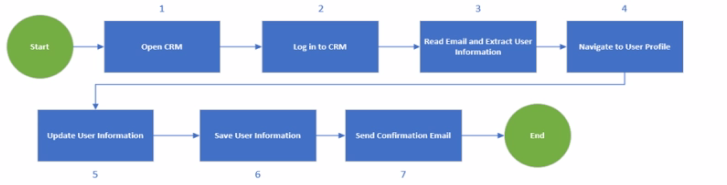
The process shown in the diagram can be optimized by reading the email as the first step and opening CRM and logging in only if there's an email. This way, the process can avoid unnecessary steps and save time and resources. If there is no email, the process can end without opening CRM. If there is an email, the process can extract the user information from the email and use it to log in to CRM and navigate to the user profile. This can also reduce the risk of errors and exceptions due to invalid or missing user information. Reading the email as the first step can also help the process to prioritize the emails based on their importance or urgency and handle them accordingly.Reference:
UiPath Process Mining: Use process monitoring and optimization to propel RPA
Optimizing Processes with UiPath Process Mining
Optimization maximum utilisation - UiPath Community Forum
Which are the deployment options available for UiPath Orchestrator Standalone?
UiPath Orchestrator offers several deployment options to cater to different organizational needs for scalability, reliability, and disaster recovery. These options include single-node deployments for smaller or less critical environments, multi-node deployments for increased throughput and redundancy, and High Availability (HA) deployments that ensure the Orchestrator remains operational even in the event of failures. For organizations requiring robust disaster recovery solutions, UiPath provides options for High Availability with Disaster Recovery in both Active/Passive configurations, where one data center is on standby, and Two Active Data Centers, where both data centers are operational, providing seamless failover capabilities.
UiPath Orchestrator Guide: About Deployment Options
UiPath Orchestrator Guide: High Availability and Disaster Recovery
Which UiPath Task Mining integrator allows for documented tasks to be exported as automaton ideas?
What argument types can be used for a workflow that is invoked with the Isolated" option?