A company's infrastructure includes a Fibre Channel SAN where the VMware VMs are located. The administrator wants to create a backup that minimizes the impact on the production environment. What proxy transport mode should be used?
Correct Answer:C. Direct storage access
Explanation:
For a VMware environment on a Fibre Channel SAN, the most efficient proxy transport mode to minimize impact on the production environment is Direct Storage Access. This mode allows the backup proxy to directly interact with the SAN, bypassing the production network and reducing load on the ESXi hosts.
Reference: Veeam Backup & Replication Best Practices, Veeam VMware Backup Proxy Guide
Question 2
What type of backup can Veeam Plug-ins for Enterprise Applications provide?
Correct Answer:B. A transactionally consistent backup of the database and its database logs
Explanation:
Veeam Plug-ins for Enterprise Applications provide a transactionally consistent backup of databases and their database logs. This ensures that the backup is not only complete but also consistent at a transactional level, capturing all transactions up to the point of the backup. This is crucial for databases to ensure data integrity and consistency when restored.
Reference: Veeam Plug-ins for Enterprise Applications Guide, Veeam Database Backup Best Practices
Question 3
What can Veeam Service Providers deploy in the Veeam Service Provider Console v7.0?
Correct Answer:C. Veeam Backup for Microsoft 365
Explanation:
In the Veeam Service Provider Console v7.0, Veeam Service Providers can deploy C: Veeam Backup for Microsoft 365. This deployment option is designed to extend the capabilities of Veeam Service Providers, allowing them to offer managed backup services for Microsoft 365 environments, including Exchange Online, SharePoint Online, OneDrive for Business, and Microsoft Teams. Veeam Backup for Microsoft 365 is a comprehensive solution that provides secure backup of Microsoft 365 data, ensuring its availability and recoverability in the event of accidental deletion, security threats, or retention policy gaps. By integrating this solution into the Veeam Service Provider Console, service providers can manage and monitor Microsoft 365 backups across multiple tenants, enhancing their service offerings and providing added value to their customers.
Question 4
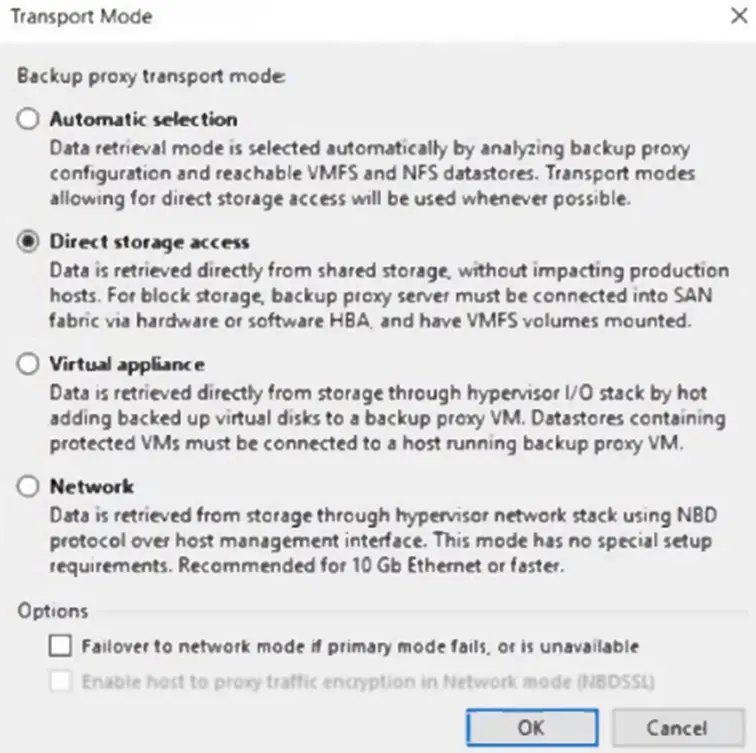
A Veeam proxy server is configured as follows. No modifications are allowed to the transport mode.
When performing a restore of a VMware virtual disk using this proxy server, the restore fails. What is a possible cause?
Correct Answer:C. The virtual disk is thin-provisioned.
Explanation:
Given the provided transport modes and the fact that no modifications are allowed to these settings, a possible cause for the restore of a VMware virtual disk to fail using this proxy server is C: The virtual disk is thin-provisioned. In the transport modes shown, the Direct storage access and Virtual appliance options would require the VM disk files to be accessible in a certain way that might not be compatible with thin-provisioned disks depending on the storage configuration and the current state of the VM. If the storage integration specifics or the snapshot handling do not support the thin-provisioned format, the restore operation could fail. It's important to ensure that the transport mode selected is compatible with the type of virtual disk being restored to prevent such issues.
Question 5
The administrator of a VMware environment backed up by Veeam Backup & Replication has a critical server with corruption on one of its three data drives. What is the fastest way to bring this drive back online with the least disruption to business?
Correct Answer:A. Instant Disk Recovery
Explanation:
The fastest way to bring a corrupted data drive back online with the least disruption in a VMware environment is through Instant Disk Recovery. This feature allows the administrator to quickly restore the specific affected disk from a backup, minimizing downtime and impact on business operations.
Reference: Veeam Backup & Replication User Guide, Veeam Instant Disk Recovery Guide
Question 6
Why is it recommended to install Veeam ONE before Veeam Backup & Replication?
Correct Answer:D. Veeam ONE can potentially identify infrastructure issues prior to performing a backup.
Explanation:
It is recommended to install Veeam ONE before Veeam Backup & Replication because Veeam ONE can potentially identify infrastructure issues that might affect backup operations before they are performed. This proactive approach ensures that the environment is optimized for successful backup and replication tasks.
Reference: Veeam Installation and Configuration Guide, Veeam ONE Deployment Best Practices
Question 7
A company has an application on a VMware VM that stores customer photos. Customers may request their photos be removed at any time. The server needs to be restored from last week's backup. What Veeam restore process allows for custom scripting to be run to automatically remove any required photos before the server is returned to production?
Correct Answer:C. Staged Restore
Explanation:
The Veeam restore process that allows for custom scripting to be run before returning a server to production is Staged Restore. This feature enables administrators to perform necessary operations, like running a script to remove customer photos, during the restore process before the VM is brought back online.
Reference: Veeam Backup & Replication User Guide, Veeam Staged Restore Guide
Question 8
It is required that some replicated VMs start on a time delay during a failover. How can this be accomplished?
Correct Answer:A. Create a failover plan.
Explanation:
A failover plan in Veeam Backup & Replication allows you to define the order in which VMs are started during a failover operation. It can include startup delays for certain VMs, ensuring that some VMs can be configured to start after a defined time delay. This meets the requirement of having some replicated VMs start on a time delay.
Reference:
Veeam Backup & Replication User Guide: Failover Plans
Veeam Help Center: Creating Failover Plans
Question 9
A customer wants to set up a Scale-Out Backup Repository. Due to malware concerns, immutability is recommended. An on-premises server can be used to hold primary backups, but it can only hold about 21 days of backups. A copy of the backups should be stored in AWS. The retention for all backups is 60 days.
Which configuration of a Scale-out Backup repository meets these requirements?
Correct Answer:D. Copy and move mode
Performance Tier: Linux Hardened Repository, XFS, immutability set for 11 days
Capacity Tier: Amazon S3, immutability set for 60 days
Explanation:
To meet the requirements of setting up a Scale-Out Backup Repository (SOBR) with immutability for malware protection and specific retention policies, the most fitting configuration is D: Copy and move mode with a Performance Tier configured on a Linux Hardened Repository using the XFS file system and immutability set for 21 days, and a Capacity Tier on Amazon S3 with immutability set for 60 days. This setup utilizes the copy and move mode to ensure that backups are first stored on the on-premises Linux Hardened Repository with an immutability setting that prevents modifications to backups, providing protection against malware for the most recent 21 days of backups. As this on-premises server has limited capacity, older backups beyond 21 days are moved to the Capacity Tier in Amazon S3, where they are also protected with immutability for the entire 60-day retention period. This configuration leverages the strengths of both on-premises and cloud storage while ensuring that all backups are protected from modification or deletion by immutability, aligning with the customer's malware protection concerns and retention requirements.
Question 10
The compliance team is requesting a Veeam engineer complete the following tasks on the backup environment:
1. All image-level backups are to be tested and validated
2. Recovery verification with a well-known malware scan
3. Send an email to the Veeam engineer with test results
What is the recovery verification function to meet this requirement?
Correct Answer:B. SureBackup
Explanation:
SureBackup is the Veeam technology that allows you to verify the recoverability of backups. It can automatically verify the integrity of the backup, test it for malware (with the aid of third-party antivirus software), and send email notifications upon the completion of the job. This is accomplished by running the backups in an isolated environment called a Virtual Lab, without making any changes to the actual production environment. By using SureBackup, Veeam engineers can ensure that image-level backups are recoverable, can be verified against malware, and can report the results via email, thus meeting the compliance team's requests.