Limited-Time Offer: Enjoy 50% Savings! Ends in 00h 00m 00s Coupon code: 50OFF
Skip to content

Free WGU Web Development Applications (KVO1) Web-Development-Applications Exam Questions

Page: 1 / 14 Total 136 questions

Want more questions? Get Premium Access.

Question 1

Given the following markup and no style sheet:

Which control does the input element render?

Correct Answer: A. Slider
Explanation:

The type='range' attribute in an <input> element renders a slider control.

HTML Input Type range:

Purpose: The range type is used for input fields that should contain a value from a range of numbers.

Example:

Given the HTML:

<input id='range' name='range' type='range'>

This will render as a slider that the user can move to select a value within a range.


MDN Web Docs - <input type='range'>

W3Schools - HTML Input Range

Question 2

Given the following code:

Which type of user input does the developer request by specifying the pattern attribute?

Correct Answer: D. Latitude/longitude
Explanation:

The pattern attribute in the <input> element is used to specify a regular expression that the input's value must match for it to be considered valid. The given pattern -?\d{1,3}\.\d+ matches strings that represent decimal numbers with an optional negative sign, typically used for latitude and longitude values.

Pattern

-? allows for an optional negative sign.

\d{1,3} matches one to three digits.

\. matches a literal dot.

\d+ matches one or more digits.

Usage Example:

<input type='text' pattern='-?\d{1,3}\.\d+' placeholder='Enter latitude or longitude'>

This pattern ensures the input matches the format of latitude/longitude values.


MDN Web Docs on <input> pattern attribute

Regular Expressions Documentation

Question 3

Which code snippet defines a list of choices that automatically alphabetize themselves?

Correct Answer: D. ```html <input list='titles' name='title'> <datalist id='titles'> <option value='Ms.'> <option value='Mrs.'> <option value='Mr.'> </datalist> ```
Explanation:

> ''The correct structure for binding suggestions to an `<input>` element is to use a `<datalist>` with `<option>` children. This enables the browser to suggest predefined values to the user.''

>

> Although `<datalist>` does not alphabetize values automatically, among the options, only Option D uses valid HTML for `datalist`, making it the correct snippet syntactically.


* MDN Web Docs: <datalist> and <option>

* HTML Specification: datalist behavior

---

Let me know if you have more to process or need a compiled version of all questions.

Here are the verified and correctly formatted answers for Questions 58 through 62 using your requested format:

---

Question 4

Which structure tag should a developer use for blogs, images, and social media posts?

Correct Answer: A
Explanation:

The

element represents a self-contained composition in a document that is intended to be independently distributable or reusable. It is ideal for blog entries, news stories, forum posts, and similar content.

'The

element is used for content that forms an independent part of a document or site such as blog entries, news items, or user comments.'

'It is suitable for self-contained content that could stand on its own if distributed separately.'


HTML5 Specification (Sectioning Content) -- W3C

HTML Reference Guides -- MDN

Question 5

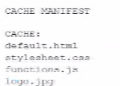
A file named application, Appchache contains the following content:

Which attribute should a developer set to application. Appchache so the four files will be cached?

Correct Answer: C. The manifest attribute of the <html> element
Explanation:

To specify a cache manifest file for an HTML document, the manifest attribute must be set in the <html> element. This attribute tells the browser to cache the files listed in the manifest for offline use.

Cache Manifest:

Purpose: Specifies resources that should be cached by the browser.

Attribute: manifest is used in the <html> tag to link the cache manifest file.

Example:

Given the manifest file application.appcache:

CACHE MANIFEST

CACHE:

default.html

stylesheet.css

functions.js

logo.jpg

HTML with the manifest attribute:

<html manifest='application.appcache'>

...

</html>


MDN Web Docs - Offline Web applications

W3C HTML5 Specification - manifest attribute

Question 6

What is a characteristic of JavaScript code?

Correct Answer: A. It runs inside a web browser
Explanation:

JavaScript is a scripting language primarily used for creating and controlling dynamic website content. Here are some characteristics:

Runs Inside a Web Browser: JavaScript code is executed in the web browser, making it possible to create interactive and dynamic web pages.

Cross-Browser Compatibility: JavaScript is designed to be compatible across different web browsers.

Interpreted Language: JavaScript is interpreted, meaning it does not need to be compiled before execution.

Accessible to Users: JavaScript code is not hidden from the user; it can be viewed in the browser's developer tools.


MDN Web Docs on JavaScript

W3C JavaScript Introduction

Question 7

Which layout design is easiest to manage on a variety of devices?

Correct Answer: C. Grid
Explanation:

A grid layout is easiest to manage across a variety of devices due to its flexibility and ability to create responsive designs that adapt to different screen sizes.

Grid Layout:

Responsive Design: Grid layouts can be easily adjusted using media queries to provide a consistent user experience across devices.

CSS Grid Example:

.container {

display: grid;

grid-template-columns: repeat(auto-fill, minmax(200px, 1fr));

}

Other Options:

A . Flow: Often used for text, not layout.

B . Table: Outdated and not responsive.

D . Border: Not commonly used for complex layouts.


MDN Web Docs - CSS Grid Layout

W3Schools - CSS Grid Layout

Question 8

Which global attribute prepares an element for input when a page loads?

Correct Answer: D. autofocus
Explanation:

> ''The `autofocus` global attribute specifies that the element should automatically get focus when the page loads.''

>

> This is commonly used on input elements to direct the user's cursor to a particular field immediately.

Example:

```html

<input type='text' autofocus>

```


* MDN Web Docs: autofocus attribute

* HTML Living Standard: Global attributes

---

Question 9

Given the following markup:

Where does the image align in relation to the text?

Correct Answer: C. The bottom of the Image aligns to the bottom of Hello World
Explanation:

The CSS property vertical-align: baseline aligns the baseline of the element with the baseline of its parent. For inline elements like images, the baseline alignment means that the bottom of the image aligns with the bottom of the text.

CSS vertical-align Property:

Baseline Alignment: Aligns the baseline of the element with the baseline of its parent.

Example:

Hello World

Analysis:

The element with vertical-align: baseline will align its bottom with the bottom of the surrounding text 'Hello World'.


MDN Web Docs - vertical-align

W3C CSS Inline Layout Module Level 3

Question 10

A web designer writes the following CSS3 style:

```css

@keyframes image {

from { opacity: 0.0; }

to { opacity: 1.0; }

}

img {

animation-name: image;

animation-duration: 5s;

}

```

How do images on the page appear after the page loads?

Correct Answer: D. Invisible, and then they gradually appear over a five-second interval
Explanation:

> ''The `@keyframes` rule defines the animation. The `from` block sets the starting state and the `to` block sets the end state. In this case, `from { opacity: 0.0; } to { opacity: 1.0; }` causes the element to gradually increase in opacity from fully transparent to fully visible.''

>

> ''The `animation-duration: 5s;` applies the animation over a span of five seconds.''

Therefore, images begin as invisible and gradually become visible over five seconds.


* MDN Web Docs: CSS animations -- @keyframes

* CSS Animations Module Level 1

---